Cirkit Designer Logo
Cirkit Designer
Your all-in-one circuit design IDE
Home / 
Component Documentation

How to Use X MIND TECH: Examples, Pinouts, and Specs
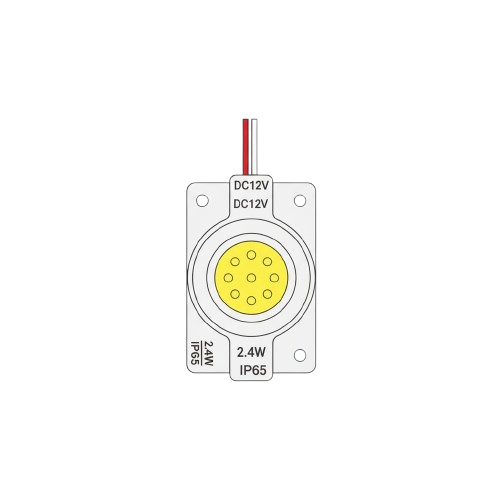

Image of X MIND TECH
Cirkit Designer LogoDesign with X MIND TECH in Cirkit Designer

Introduction

The X MIND TECH 12V Light, manufactured by Arduino, is a versatile and efficient lighting component designed for a wide range of applications. This component is ideal for projects requiring reliable illumination, such as robotics, home automation, and industrial systems. Its compact design and compatibility with standard 12V power supplies make it a popular choice for both hobbyists and professionals.

Explore Projects Built with X MIND TECH

Use Cirkit Designer to design, explore, and prototype these projects online. Some projects support real-time simulation. Click "Open Project" to start designing instantly!
Solar-Powered GSM/GPRS+GPS Tracker with Seeeduino XIAO
Image of SOS System : A project utilizing X MIND TECH in a practical application
This circuit features an Ai Thinker A9G development board for GSM/GPRS and GPS/BDS connectivity, interfaced with a Seeeduino XIAO microcontroller for control and data processing. A solar cell, coupled with a TP4056 charging module, charges a 3.3V battery, which powers the system through a 3.3V regulator ensuring stable operation. The circuit likely serves for remote data communication and location tracking, with the capability to be powered by renewable energy and interfaced with additional sensors or input devices via the Seeeduino XIAO.
Cirkit Designer LogoOpen Project in Cirkit Designer
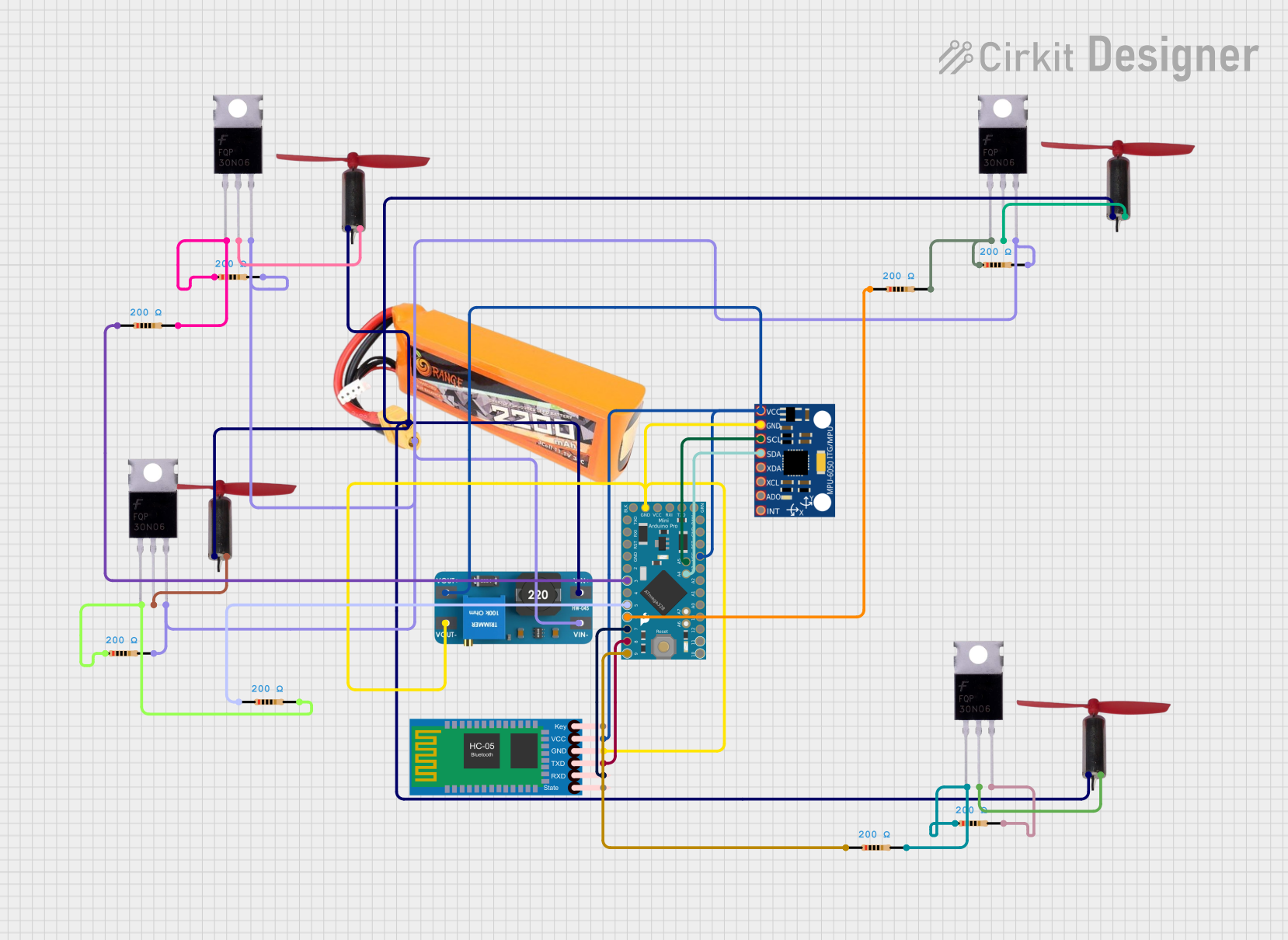
Arduino Pro Mini and HC-05 Bluetooth Controlled Coreless Motor Clock with MPU-6050 Feedback
Image of drone: A project utilizing X MIND TECH in a practical application
This is a motion-controlled device with wireless capabilities, powered by a LiPo battery with voltage regulation. It uses an Arduino Pro Mini to process MPU-6050 sensor data and control coreless motors via MOSFETs, interfacing with an external device through an HC-05 Bluetooth module.
Cirkit Designer LogoOpen Project in Cirkit Designer
Beelink Mini S12 N95 and Arduino UNO Based Fingerprint Authentication System with ESP32 CAM
Image of design 3: A project utilizing X MIND TECH in a practical application
This circuit features a Beelink MINI S12 N95 computer connected to a 7-inch display via HDMI for video output and two USB connections for power and touch screen functionality. An Arduino UNO is interfaced with a fingerprint scanner for biometric input. The Beelink MINI S12 N95 is powered by a PC power supply, which in turn is connected to a 240V power source. Additionally, an ESP32 CAM module is powered and programmed via a USB plug and an FTDI programmer, respectively, for wireless camera capabilities.
Cirkit Designer LogoOpen Project in Cirkit Designer
Interactive Touch and Motion Sensor System with Bela Board and OLED Display
Image of GIZMO Teaset: A project utilizing X MIND TECH in a practical application
This circuit integrates a Bela Board with various sensors and actuators, including a TRILL CRAFT touch sensor, an ADXXL335 accelerometer, a vibration motor, and a loudspeaker. The Bela Board processes input from the touch sensor and accelerometer, and controls the vibration motor and loudspeaker, while an OLED display provides visual feedback.
Cirkit Designer LogoOpen Project in Cirkit Designer

Explore Projects Built with X MIND TECH

Use Cirkit Designer to design, explore, and prototype these projects online. Some projects support real-time simulation. Click "Open Project" to start designing instantly!
Image of SOS System : A project utilizing X MIND TECH in a practical application
Solar-Powered GSM/GPRS+GPS Tracker with Seeeduino XIAO
This circuit features an Ai Thinker A9G development board for GSM/GPRS and GPS/BDS connectivity, interfaced with a Seeeduino XIAO microcontroller for control and data processing. A solar cell, coupled with a TP4056 charging module, charges a 3.3V battery, which powers the system through a 3.3V regulator ensuring stable operation. The circuit likely serves for remote data communication and location tracking, with the capability to be powered by renewable energy and interfaced with additional sensors or input devices via the Seeeduino XIAO.
Cirkit Designer LogoOpen Project in Cirkit Designer
Image of drone: A project utilizing X MIND TECH in a practical application
Arduino Pro Mini and HC-05 Bluetooth Controlled Coreless Motor Clock with MPU-6050 Feedback
This is a motion-controlled device with wireless capabilities, powered by a LiPo battery with voltage regulation. It uses an Arduino Pro Mini to process MPU-6050 sensor data and control coreless motors via MOSFETs, interfacing with an external device through an HC-05 Bluetooth module.
Cirkit Designer LogoOpen Project in Cirkit Designer
Image of design 3: A project utilizing X MIND TECH in a practical application
Beelink Mini S12 N95 and Arduino UNO Based Fingerprint Authentication System with ESP32 CAM
This circuit features a Beelink MINI S12 N95 computer connected to a 7-inch display via HDMI for video output and two USB connections for power and touch screen functionality. An Arduino UNO is interfaced with a fingerprint scanner for biometric input. The Beelink MINI S12 N95 is powered by a PC power supply, which in turn is connected to a 240V power source. Additionally, an ESP32 CAM module is powered and programmed via a USB plug and an FTDI programmer, respectively, for wireless camera capabilities.
Cirkit Designer LogoOpen Project in Cirkit Designer
Image of GIZMO Teaset: A project utilizing X MIND TECH in a practical application
Interactive Touch and Motion Sensor System with Bela Board and OLED Display
This circuit integrates a Bela Board with various sensors and actuators, including a TRILL CRAFT touch sensor, an ADXXL335 accelerometer, a vibration motor, and a loudspeaker. The Bela Board processes input from the touch sensor and accelerometer, and controls the vibration motor and loudspeaker, while an OLED display provides visual feedback.
Cirkit Designer LogoOpen Project in Cirkit Designer

Common Applications and Use Cases

  • Robotics: Used as indicator lights or for vision systems in robotic platforms.
  • Home Automation: Provides lighting for smart home systems.
  • Industrial Systems: Serves as a status indicator or task light in machinery.
  • DIY Projects: Perfect for custom lighting setups in hobbyist projects.

Technical Specifications

The following table outlines the key technical details of the X MIND TECH 12V Light:

Parameter Value
Operating Voltage 12V DC
Current Consumption 20mA
Power Rating 0.24W
Light Color White (Cool White, 6000K)
Luminous Intensity 100 lumens
Dimensions 20mm x 10mm x 5mm
Operating Temperature -20°C to 60°C
Lifespan 50,000 hours

Pin Configuration and Descriptions

The X MIND TECH 12V Light has two pins for easy integration into circuits:

Pin Name Description
1 VCC Connect to the positive terminal of a 12V DC power supply.
2 GND Connect to the ground terminal of the power supply.

Usage Instructions

How to Use the Component in a Circuit

  1. Power Supply: Ensure you have a stable 12V DC power source.
  2. Connections:
    • Connect the VCC pin of the light to the positive terminal of the power supply.
    • Connect the GND pin to the ground terminal of the power supply.
  3. Testing: Once connected, the light should illuminate immediately if the power supply is functioning correctly.

Important Considerations and Best Practices

  • Polarity: Ensure correct polarity when connecting the pins. Reversing the connections may damage the component.
  • Current Limiting: Although the light is designed for 12V operation, consider using a current-limiting resistor if your power source is unregulated.
  • Heat Management: Avoid operating the light in environments exceeding the specified temperature range (-20°C to 60°C).
  • Mounting: Secure the light in place using non-conductive materials to prevent short circuits.

Example: Connecting to an Arduino UNO

The X MIND TECH 12V Light can be controlled using an Arduino UNO with the help of a transistor. Below is an example circuit and code:

Circuit Setup

  1. Connect the VCC pin of the light to the collector of an NPN transistor (e.g., 2N2222).
  2. Connect the GND pin of the light to the ground of the power supply.
  3. Connect the emitter of the transistor to the ground of the Arduino.
  4. Connect a 1kΩ resistor between the base of the transistor and a digital pin (e.g., pin 9) on the Arduino.
  5. Connect the positive terminal of a 12V power supply to the light's VCC pin.

Arduino Code

// Define the pin connected to the transistor base
const int lightPin = 9;

void setup() {
  // Set the pin as an output
  pinMode(lightPin, OUTPUT);
}

void loop() {
  // Turn the light ON
  digitalWrite(lightPin, HIGH);
  delay(1000); // Keep the light ON for 1 second

  // Turn the light OFF
  digitalWrite(lightPin, LOW);
  delay(1000); // Keep the light OFF for 1 second
}

Troubleshooting and FAQs

Common Issues and Solutions

  1. The light does not turn on:

    • Verify the power supply voltage is 12V DC.
    • Check the polarity of the connections.
    • Ensure the light is not damaged by testing it with a different power source.
  2. The light flickers:

    • Check for loose connections in the circuit.
    • Ensure the power supply is stable and not fluctuating.
  3. The light overheats:

    • Confirm the operating environment is within the specified temperature range.
    • Ensure the light is not being overdriven by an unregulated power source.

FAQs

Q: Can I use the X MIND TECH 12V Light with a 9V battery?
A: No, the light is designed for 12V operation. Using a lower voltage may result in dim or no illumination.

Q: Is the light waterproof?
A: No, the X MIND TECH 12V Light is not waterproof. Use it in dry environments or enclose it in a waterproof housing for outdoor applications.

Q: Can I dim the light?
A: Yes, you can dim the light by using a PWM (Pulse Width Modulation) signal from a microcontroller like the Arduino UNO.

This concludes the documentation for the X MIND TECH 12V Light. For further assistance, refer to the manufacturer's support resources.