
How to Use conactor: Examples, Pinouts, and Specs
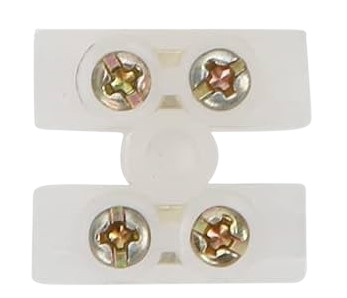
 Design with conactor in Cirkit Designer
Introduction
A contactor is an electromechanical switch in electrical engineering, used primarily for switching an electrical power circuit. Similar to a relay, a contactor is controlled by a circuit which has a much lower power level than the switched circuit. Contactors come into play in various applications such as motor starter systems, lighting control, and heating, where they handle high currents and voltages.
Explore Projects Built with conactor
 Open Project in Cirkit Designer
 Open Project in Cirkit Designer
 Open Project in Cirkit Designer
 Open Project in Cirkit Designer
Explore Projects Built with conactor
Open Project in Cirkit DesignerOpen Project in Cirkit DesignerOpen Project in Cirkit DesignerOpen Project in Cirkit DesignerTechnical Specifications
Key Technical Details
- Rated Voltage: The maximum voltage the contactor can handle.
- Rated Current: The maximum current that can flow through the contactor.
- Power Ratings: The maximum power the contactor can switch.
- Control Voltage: The voltage required to activate the coil of the contactor.
- Number of Poles: The number of separate circuits the contactor can control.
- Contact Material: The type of material used for the contacts, affecting durability and conductivity.
Pin Configuration and Descriptions
| Pin Number | Description | Notes |
|---|---|---|
| A1 | Coil Input (+) | Connect to control voltage (+) |
| A2 | Coil Input (-) | Connect to control voltage (-) |
| 1, 3, 5 | Power Circuit Input | Connect to the power source |
| 2, 4, 6 | Power Circuit Output | Connect to the load |
| NC | Normally Closed | Closed when contactor is off |
| NO | Normally Open | Closed when contactor is on |
Usage Instructions
How to Use the Contactor in a Circuit
Power Circuit Connection:
- Connect the power source to the input terminals (1, 3, 5).
- Connect the load you wish to control to the output terminals (2, 4, 6).
Control Circuit Connection:
- Apply the control voltage to the coil terminals (A1 and A2). Ensure that the control voltage matches the contactor's specifications.
Activation:
- When the control voltage is applied, the contactor's coil gets energized, pulling the contacts together and allowing current to flow through the power circuit.
Important Considerations and Best Practices
- Overload Protection: Always use an overload relay or similar protection device in conjunction with the contactor to protect against overcurrent conditions.
- Correct Rating: Ensure the contactor's voltage and current ratings match the requirements of the application.
- Mounting: Secure the contactor firmly to a stable surface to prevent movement and vibration.
- Wiring: Use appropriately rated cables and secure connections to prevent overheating and ensure reliable operation.
Troubleshooting and FAQs
Common Issues
- Contactor Does Not Activate: Check the control voltage and connections to the coil. Ensure the coil is not damaged.
- Intermittent Operation: Inspect for loose connections, damaged contacts, or a faulty coil.
- Overheating: Verify that the current through the contactor does not exceed its rated capacity.
Solutions and Tips
- Regular Maintenance: Clean and inspect the contactor regularly to ensure reliable operation.
- Replacement Parts: Use manufacturer-recommended parts for any replacements to maintain performance and safety standards.
FAQs
Q: Can a contactor be used for both AC and DC applications? A: Contactors are typically designed for specific types of current. Always use a contactor that matches the type of current in your application.
Q: How do I know if my contactor is failing? A: Signs of a failing contactor include unusual noises, visible damage, or a burnt smell. If the contactor fails to operate or operates erratically, it may need to be replaced.
Q: Can I manually operate the contactor? A: Some contactors come with a manual operation feature, but it is primarily designed for automatic operation via the control circuit.
Q: What is the difference between a contactor and a relay? A: Contactors are typically used for higher power applications, while relays are used for lower power signals. Contactors also usually have higher current and voltage ratings compared to relays.
Note: If you are using a contactor with an Arduino UNO or similar microcontroller for control purposes, ensure that you use an appropriate driver circuit or relay module to handle the control voltage and protect the microcontroller from high voltage and current.
// Example Arduino code to control a contactor
// Ensure you have an appropriate interface between the Arduino and the contactor

const int contactorPin = 7; // The digital pin connected to the contactor control circuit

void setup() {
  pinMode(contactorPin, OUTPUT); // Set the contactor pin as an output
}

void loop() {
  digitalWrite(contactorPin, HIGH); // Energize the contactor coil
  delay(5000);                      // Keep the contactor on for 5 seconds
  digitalWrite(contactorPin, LOW);  // De-energize the contactor coil
  delay(5000);                      // Keep the contactor off for 5 seconds
}
Code Comments:
- The
contactorPinis defined as the pin connected to the control circuit of the contactor. - In
setup(), the pin mode is set toOUTPUT. - The
loop()function turns the contactor on and off in 5-second intervals. - Ensure that the control voltage from the Arduino to the contactor is isolated and properly rated to prevent damage to the microcontroller.