
How to Use G3MB-202P: Examples, Pinouts, and Specs
 Design with G3MB-202P in Cirkit Designer
Introduction
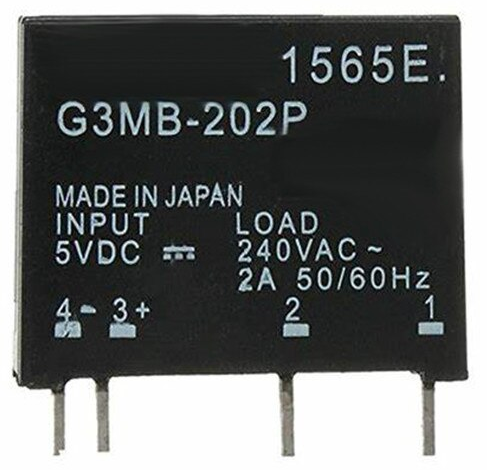
The G3MB-202P is a compact and reliable solid-state relay (SSR) designed for controlling high voltage and current loads using a low voltage control signal. It features an opto-isolated input for enhanced safety and electrical isolation, making it ideal for applications where electrical noise or interference is a concern. The G3MB-202P can switch AC loads up to 2A at 240VAC, making it suitable for a wide range of automation and control systems.
Explore Projects Built with G3MB-202P
 Open Project in Cirkit Designer
 Open Project in Cirkit Designer
 Open Project in Cirkit Designer
 Open Project in Cirkit Designer
Explore Projects Built with G3MB-202P
Open Project in Cirkit DesignerOpen Project in Cirkit DesignerOpen Project in Cirkit DesignerOpen Project in Cirkit DesignerCommon Applications and Use Cases
- Home automation systems (e.g., controlling lights, fans, or appliances)
- Industrial control systems
- Microcontroller-based projects (e.g., Arduino, Raspberry Pi)
- HVAC systems
- Motor control and switching
- Noise-sensitive environments requiring electrical isolation
Technical Specifications
Below are the key technical details of the G3MB-202P solid-state relay:
| Parameter | Value |
|---|---|
| Input Control Voltage | 5V DC |
| Input Current | 7.5mA (typical) |
| Output Voltage Range | 75VAC to 264VAC |
| Maximum Output Current | 2A |
| Isolation Voltage | 2500V RMS |
| Switching Type | Zero-cross switching |
| Operating Temperature | -30°C to 80°C |
| Dimensions | 25mm x 25mm x 8mm |
Pin Configuration and Descriptions
The G3MB-202P has four pins, as described in the table below:
| Pin | Name | Description |
|---|---|---|
| 1 | Input (+) | Positive terminal for the control signal (typically 5V DC). |
| 2 | Input (-) | Negative terminal for the control signal (ground). |
| 3 | Output (AC1) | One terminal of the AC load to be controlled. |
| 4 | Output (AC2) | The other terminal of the AC load to be controlled. |
Usage Instructions
How to Use the G3MB-202P in a Circuit
Connect the Control Signal:
- Connect the positive control signal (e.g., from a microcontroller like Arduino) to the
Input (+)pin. - Connect the ground of the control signal to the
Input (-)pin.
- Connect the positive control signal (e.g., from a microcontroller like Arduino) to the
Connect the AC Load:
- Connect one terminal of the AC load to the
Output (AC1)pin. - Connect the other terminal of the AC load to the
Output (AC2)pin.
- Connect one terminal of the AC load to the
Power the Control Circuit:
- Ensure the control signal voltage is within the specified range (5V DC).
Switching the Load:
- When the control signal is applied, the relay will switch the AC load on or off.
Important Considerations and Best Practices
- Electrical Isolation: The opto-isolated input ensures safety, but always double-check connections to avoid short circuits.
- Load Ratings: Do not exceed the maximum output current of 2A or the voltage range of 75VAC to 264VAC.
- Heat Dissipation: Ensure proper ventilation or heat sinking if the relay is used near its maximum current rating.
- Zero-Cross Switching: The relay uses zero-cross switching to minimize electrical noise and prolong the life of the load.
Example: Using the G3MB-202P with an Arduino UNO
Below is an example of how to control an AC load using the G3MB-202P and an Arduino UNO:
// Example: Controlling an AC load with G3MB-202P and Arduino UNO

const int relayPin = 7; // Pin connected to the G3MB-202P Input (+)

void setup() {
  pinMode(relayPin, OUTPUT); // Set the relay pin as an output
  digitalWrite(relayPin, LOW); // Ensure the relay is off at startup
}

void loop() {
  digitalWrite(relayPin, HIGH); // Turn the relay on (AC load ON)
  delay(5000); // Keep the load on for 5 seconds
  digitalWrite(relayPin, LOW); // Turn the relay off (AC load OFF)
  delay(5000); // Keep the load off for 5 seconds
}
Note: Always ensure proper safety precautions when working with high voltage AC loads. Disconnect power before making any changes to the circuit.
Troubleshooting and FAQs
Common Issues and Solutions
The relay does not switch the load:
- Verify that the control signal voltage is within the specified range (5V DC).
- Check the wiring of the control signal and AC load.
- Ensure the AC load is within the relay's rated voltage and current.
The relay gets too hot:
- Ensure the load current does not exceed 2A.
- Provide adequate ventilation or use a heat sink if necessary.
Electrical noise or interference:
- Use proper grounding and shielding techniques in your circuit.
- Ensure the relay is not placed near high-frequency noise sources.
The relay switches erratically:
- Check for stable and noise-free control signals.
- Verify that the power supply to the control circuit is sufficient.
FAQs
Q: Can the G3MB-202P be used with a 3.3V control signal?
A: No, the G3MB-202P requires a 5V DC control signal for proper operation.
Q: Is the relay suitable for DC loads?
A: No, the G3MB-202P is designed for AC loads only and cannot switch DC loads.
Q: Can I use the relay to control inductive loads like motors?
A: Yes, but ensure the load is within the relay's rated current and voltage. For inductive loads, consider using a snubber circuit to protect the relay.
Q: Does the relay provide electrical isolation?
A: Yes, the opto-isolated input provides electrical isolation between the control and load circuits.