
How to Use Shell EM: Examples, Pinouts, and Specs
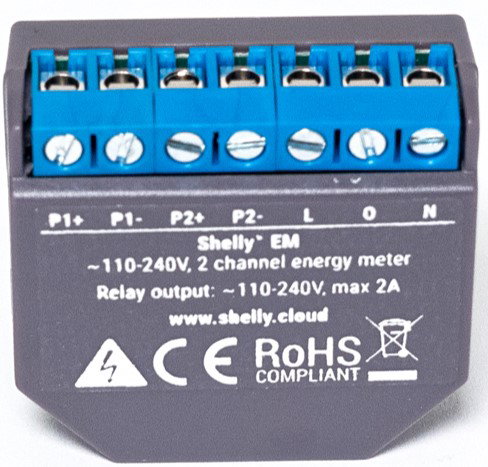
 Design with Shell EM in Cirkit Designer
Introduction
The Shell EM, manufactured by Shelly, is an advanced electromagnetic shielding component designed to protect electronic circuits from external electromagnetic interference (EMI). EMI can cause significant disruptions in electronic devices, leading to malfunctions or degraded performance. The Shell EM provides a robust solution to mitigate these issues, ensuring the reliability and stability of sensitive electronic systems.
Explore Projects Built with Shell EM
 Open Project in Cirkit Designer
 Open Project in Cirkit Designer
 Open Project in Cirkit Designer
 Open Project in Cirkit Designer
Explore Projects Built with Shell EM
Open Project in Cirkit DesignerOpen Project in Cirkit DesignerOpen Project in Cirkit DesignerOpen Project in Cirkit DesignerCommon Applications and Use Cases
- Consumer Electronics: Protects devices like smartphones, tablets, and laptops from EMI.
- Medical Equipment: Ensures the proper functioning of sensitive medical instruments.
- Automotive Electronics: Shields automotive control units and infotainment systems.
- Industrial Control Systems: Protects PLCs and other control systems in industrial environments.
- Communication Devices: Ensures clear signal transmission in radios, routers, and other communication equipment.
Technical Specifications
The following table outlines the key technical specifications of the Shell EM:
| Parameter | Value |
|---|---|
| Manufacturer | Shelly |
| Part ID | EM |
| Material | Conductive Metal Alloy |
| Shielding Effectiveness | 60-90 dB (depending on frequency) |
| Operating Temperature | -40°C to +85°C |
| Dimensions | Customizable |
| Weight | Varies based on dimensions |
| Compliance | RoHS, REACH |
Pin Configuration and Descriptions
The Shell EM does not have a traditional pin configuration as it is a shielding component. However, it is important to understand its physical installation and connection points within a circuit. The following table provides a general overview:
| Connection Point | Description |
|---|---|
| Ground Connection | Connects to the circuit's ground to ensure proper shielding. |
| Enclosure Contact | Ensures the Shell EM is in contact with the device's enclosure for optimal EMI protection. |
| Mounting Points | Used to secure the Shell EM in place within the device. |
Usage Instructions
How to Use the Shell EM in a Circuit
- Identify EMI Sources: Determine the potential sources of EMI in your circuit or device.
- Select Appropriate Shell EM Size: Choose a Shell EM size that fits your device's dimensions and provides adequate coverage.
- Ground Connection: Ensure the Shell EM is properly connected to the circuit's ground. This is crucial for effective EMI shielding.
- Enclosure Contact: Make sure the Shell EM is in contact with the device's enclosure. This helps in creating a Faraday cage effect, enhancing EMI protection.
- Secure Mounting: Use the provided mounting points to securely attach the Shell EM within the device.
Important Considerations and Best Practices
- Proper Grounding: Always ensure the Shell EM is properly grounded. Poor grounding can reduce the effectiveness of the shielding.
- Avoid Gaps: Ensure there are no gaps between the Shell EM and the device's enclosure. Gaps can allow EMI to penetrate.
- Regular Inspection: Periodically inspect the Shell EM for any signs of wear or damage. Replace if necessary to maintain optimal performance.
- Compatibility: Verify that the Shell EM is compatible with the materials and design of your device to avoid any adverse reactions.
Troubleshooting and FAQs
Common Issues Users Might Face
Reduced Shielding Effectiveness:
- Cause: Poor grounding or gaps in the shielding.
- Solution: Check and improve the grounding connection. Ensure there are no gaps between the Shell EM and the enclosure.
Physical Damage:
- Cause: Wear and tear over time or improper handling.
- Solution: Inspect the Shell EM regularly and replace it if any damage is found.
Interference Not Fully Mitigated:
- Cause: Inadequate coverage or incorrect installation.
- Solution: Ensure the Shell EM covers all critical areas and is installed correctly.
Solutions and Tips for Troubleshooting
- Use a Multimeter: Check the continuity of the ground connection using a multimeter to ensure proper grounding.
- Visual Inspection: Regularly inspect the Shell EM for any physical damage or wear.
- Consult Manufacturer Guidelines: Refer to Shelly's guidelines for specific installation and maintenance instructions.
FAQs
Q1: Can the Shell EM be used in high-temperature environments?
- A1: Yes, the Shell EM is designed to operate in temperatures ranging from -40°C to +85°C.
Q2: How do I know if the Shell EM is compatible with my device?
- A2: Check the dimensions and material compatibility with your device. Consult Shelly's technical support if needed.
Q3: Can the Shell EM be customized for specific applications?
- A3: Yes, the Shell EM can be customized in terms of dimensions to fit specific applications.
Q4: How often should I inspect the Shell EM?
- A4: It is recommended to inspect the Shell EM periodically, especially in high-stress environments, to ensure it remains effective.
By following this documentation, users can effectively utilize the Shell EM to protect their electronic circuits from EMI, ensuring reliable and stable performance.