
How to Use 20V 2Ahr Battery: Examples, Pinouts, and Specs
 Design with 20V 2Ahr Battery in Cirkit Designer
Introduction
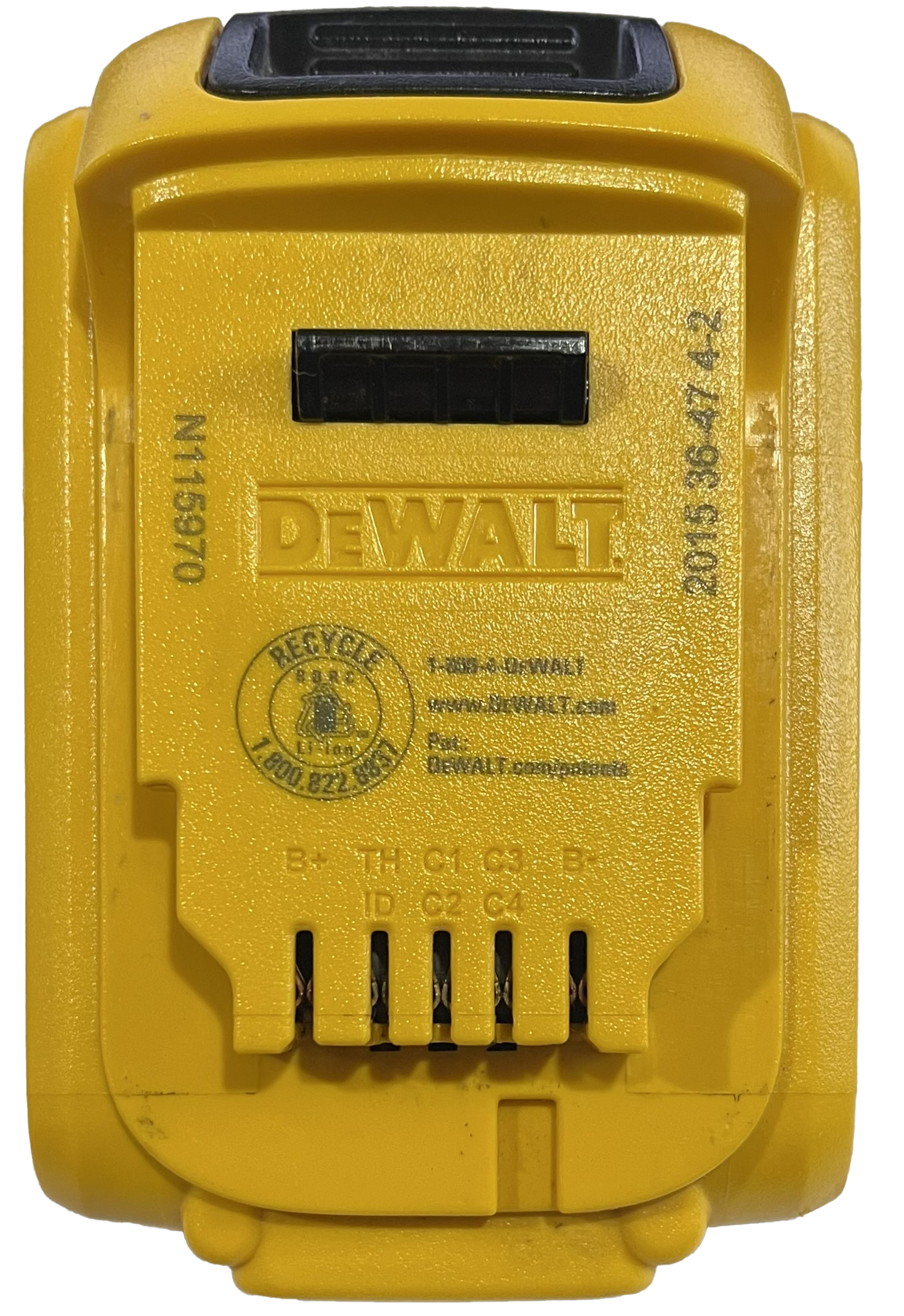
The DeWalt DCB203 is a rechargeable lithium-ion battery designed to deliver a nominal voltage of 20 volts and a capacity of 2 ampere-hours (Ahr). This compact and lightweight battery is ideal for powering a wide range of electronic devices, tools, and circuits. Its high energy density and reliable performance make it a popular choice for both professional and hobbyist applications.
Explore Projects Built with 20V 2Ahr Battery
 Open Project in Cirkit Designer
 Open Project in Cirkit Designer
 Open Project in Cirkit Designer
 Open Project in Cirkit Designer
Explore Projects Built with 20V 2Ahr Battery
Open Project in Cirkit DesignerOpen Project in Cirkit DesignerOpen Project in Cirkit DesignerOpen Project in Cirkit DesignerCommon Applications and Use Cases
- Powering cordless power tools such as drills, saws, and impact drivers
- Supplying energy to portable electronic devices and DIY projects
- Serving as a backup power source for small-scale systems
- Integration into robotics and automation projects
- Use in prototyping and testing circuits requiring a stable 20V power supply
Technical Specifications
The following table outlines the key technical details of the DeWalt DCB203 battery:
| Parameter | Specification |
|---|---|
| Nominal Voltage | 20V |
| Capacity | 2 Ahr |
| Chemistry | Lithium-Ion (Li-Ion) |
| Maximum Output Current | 10A (peak) |
| Dimensions | 4.5 x 3.0 x 2.0 inches |
| Weight | 1.0 lbs (approx.) |
| Operating Temperature | 32°F to 104°F (0°C to 40°C) |
| Storage Temperature | -4°F to 113°F (-20°C to 45°C) |
| Charging Voltage | 20V (via compatible charger) |
| Manufacturer Part ID | DCB203 |
Pin Configuration and Descriptions
The DeWalt DCB203 battery features a connector with multiple terminals. The table below describes the pin configuration:
| Pin | Label | Description |
|---|---|---|
| 1 | +V | Positive terminal (20V output) |
| 2 | -V | Negative terminal (ground) |
| 3 | T | Temperature sensor pin for monitoring battery temp. |
| 4 | ID | Identification pin for charger compatibility |
Usage Instructions
How to Use the Component in a Circuit
Connecting the Battery:
- Use the
+Vand-Vterminals to connect the battery to your circuit. Ensure proper polarity to avoid damage. - For temperature monitoring, connect the
Tpin to a compatible temperature sensing circuit. - The
IDpin is typically used by DeWalt chargers and may not be required for custom circuits.
- Use the
Charging the Battery:
- Use a DeWalt-compatible charger to safely recharge the battery. Avoid using unapproved chargers to prevent overcharging or damage.
Powering Devices:
- Ensure the connected device or circuit does not exceed the battery's maximum output current (10A peak).
- Use a voltage regulator if your circuit requires a voltage lower than 20V.
Important Considerations and Best Practices
- Avoid Deep Discharge: Do not allow the battery to discharge below its safe voltage threshold (typically 15V for Li-Ion batteries).
- Temperature Management: Operate the battery within the specified temperature range to ensure safety and longevity.
- Storage: Store the battery in a cool, dry place when not in use. Avoid prolonged exposure to extreme temperatures.
- Protection Circuitry: Consider adding overcurrent, overvoltage, and thermal protection circuits when integrating the battery into custom designs.
Example: Using the Battery with an Arduino UNO
To use the DeWalt DCB203 battery with an Arduino UNO, you can connect the battery to a voltage regulator (e.g., LM7805) to step down the voltage to 5V. Below is an example circuit and code:
Circuit Connections
- Connect the
+Vterminal of the battery to the input of the LM7805 regulator. - Connect the
-Vterminal of the battery to the ground of the regulator and Arduino. - Connect the output of the LM7805 to the Arduino's 5V pin.
Arduino Code
// Simple Arduino code to blink an LED using power from the DeWalt DCB203 battery
// Ensure the battery is connected to a voltage regulator to provide 5V to the Arduino

const int ledPin = 13; // Pin connected to the onboard LED

void setup() {
  pinMode(ledPin, OUTPUT); // Set the LED pin as an output
}

void loop() {
  digitalWrite(ledPin, HIGH); // Turn the LED on
  delay(1000);                // Wait for 1 second
  digitalWrite(ledPin, LOW);  // Turn the LED off
  delay(1000);                // Wait for 1 second
}
Troubleshooting and FAQs
Common Issues Users Might Face
Battery Not Charging:
- Ensure the battery is connected to a compatible DeWalt charger.
- Check for dirt or debris on the battery terminals and clean them if necessary.
- Verify that the charger is functioning properly.
Battery Drains Quickly:
- Check if the connected device is drawing excessive current.
- Ensure the battery is fully charged before use.
- Replace the battery if it shows signs of wear or reduced capacity.
Overheating During Use:
- Ensure the battery is not being used in a high-temperature environment.
- Verify that the connected device is not exceeding the battery's maximum current rating.
Solutions and Tips for Troubleshooting
- Check Connections: Ensure all connections are secure and free of corrosion.
- Use a Multimeter: Measure the battery's voltage to confirm it is within the expected range.
- Inspect the Charger: Test the charger with another battery to rule out charger issues.
- Replace if Necessary: If the battery shows signs of physical damage or reduced performance, consider replacing it.
By following these guidelines, you can maximize the performance and lifespan of your DeWalt DCB203 battery.