
How to Use Step Down Converter USB (12-24V): Examples, Pinouts, and Specs
 Design with Step Down Converter USB (12-24V) in Cirkit Designer
Introduction
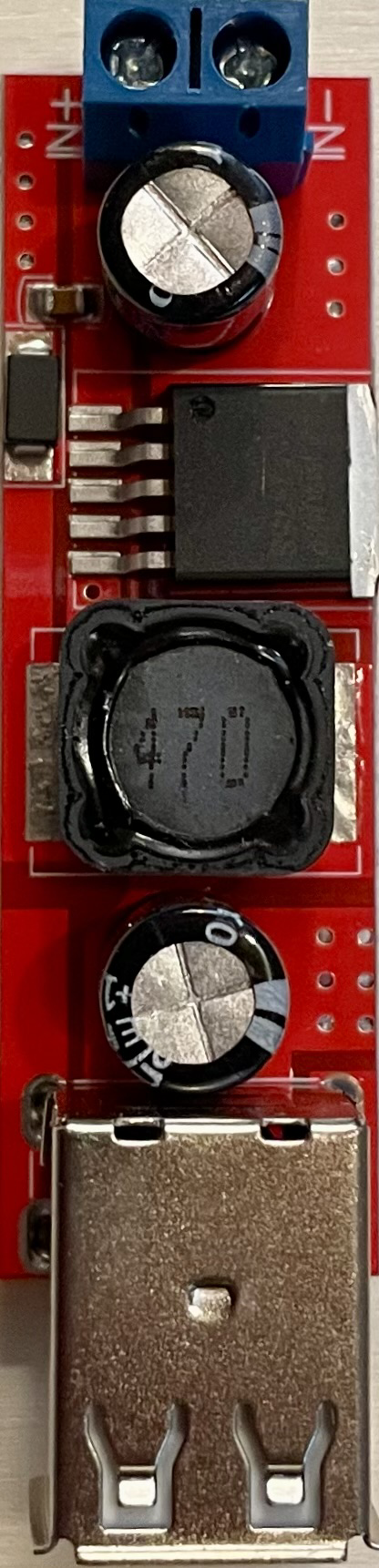
The Step Down Converter USB module is an electronic device designed to convert higher DC input voltages, typically in the range of 12-24V, to a lower, stable DC output voltage suitable for charging USB devices. This module is commonly used in automotive applications, where the electrical system provides a nominal 12V or 24V, which needs to be stepped down to the 5V required by USB-powered devices such as smartphones, tablets, and GPS units.
Explore Projects Built with Step Down Converter USB (12-24V)
 Open Project in Cirkit Designer
 Open Project in Cirkit Designer
 Open Project in Cirkit Designer
 Open Project in Cirkit Designer
Explore Projects Built with Step Down Converter USB (12-24V)
Open Project in Cirkit DesignerOpen Project in Cirkit DesignerOpen Project in Cirkit DesignerOpen Project in Cirkit DesignerCommon Applications and Use Cases
- Charging USB devices in vehicles
- Powering USB devices from a higher voltage battery bank
- DIY electronics projects requiring USB power from a higher voltage source
Technical Specifications
Key Technical Details
- Input Voltage: 12-24V DC
- Output Voltage: 5V DC
- Output Current: Up to 3A (depending on model)
- Conversion Efficiency: Up to 95%
- Operating Temperature: -40°C to +85°C
Pin Configuration and Descriptions
| Pin Number | Description | Notes |
|---|---|---|
| 1 | Input Voltage (VIN) | Connect to 12-24V power source |
| 2 | Ground (GND) | Common ground for input/output |
| 3 | USB Output (+5V) | Connect to USB device VCC |
| 4 | USB Output (GND) | Connect to USB device GND |
Usage Instructions
How to Use the Component in a Circuit
- Power Source Connection: Connect the positive terminal of your 12-24V power source to the VIN pin, and the negative terminal to the GND pin.
- Device Connection: Plug your USB device into the USB port of the module.
- Mounting: Secure the module to your project or vehicle, ensuring it is properly insulated from any conductive surfaces.
Important Considerations and Best Practices
- Voltage Range: Do not exceed the specified input voltage range to avoid damage.
- Heat Dissipation: Ensure adequate ventilation around the module, as it may generate heat during operation.
- Load Capacity: Do not exceed the maximum output current rating.
- Short Circuit Protection: Always check for short circuits in your wiring before powering the module.
Troubleshooting and FAQs
Common Issues
- USB Device Not Charging: Ensure the input voltage is within the specified range and connections are secure.
- Module Overheating: Check if the module is overloaded or lacks proper ventilation.
- Intermittent Power: Inspect for loose connections or intermittent contact in the wiring.
Solutions and Tips for Troubleshooting
- Input Voltage Check: Use a multimeter to verify the input voltage is within the 12-24V range.
- Connection Inspection: Recheck all connections for proper contact and secure them with appropriate connectors.
- Load Reduction: If overheating, reduce the load on the module or improve cooling.
FAQs
Q: Can I use this module to power non-USB devices? A: Yes, as long as the device operates at 5V and does not draw more current than the module's rating.
Q: Is the output voltage adjustable? A: No, this module provides a fixed 5V output suitable for USB devices.
Q: Does this module offer protection against reverse polarity? A: This varies by model. Check the specific model's datasheet for protection features.
Example Arduino UNO Connection
// No specific code is required for the Step Down Converter USB module
// as it is a power supply component. However, you can monitor the
// output voltage using an Arduino UNO by connecting an analog pin
// to the USB output and reading the voltage.

const int analogPin = A0; // Connect to the USB output (+5V) through a voltage divider

void setup() {
  Serial.begin(9600);
}

void loop() {
  int sensorValue = analogRead(analogPin);
  float voltage = sensorValue * (5.0 / 1023.0); // Convert the reading to voltage
  Serial.print("USB Output Voltage: ");
  Serial.println(voltage);
  delay(1000); // Wait for a second between readings
}
Note: When connecting the USB output to an analog pin, ensure you use a voltage divider to bring the voltage within the safe range for the Arduino analog input (0-5V).