
How to Use A4950: Examples, Pinouts, and Specs
 Design with A4950 in Cirkit Designer
Introduction
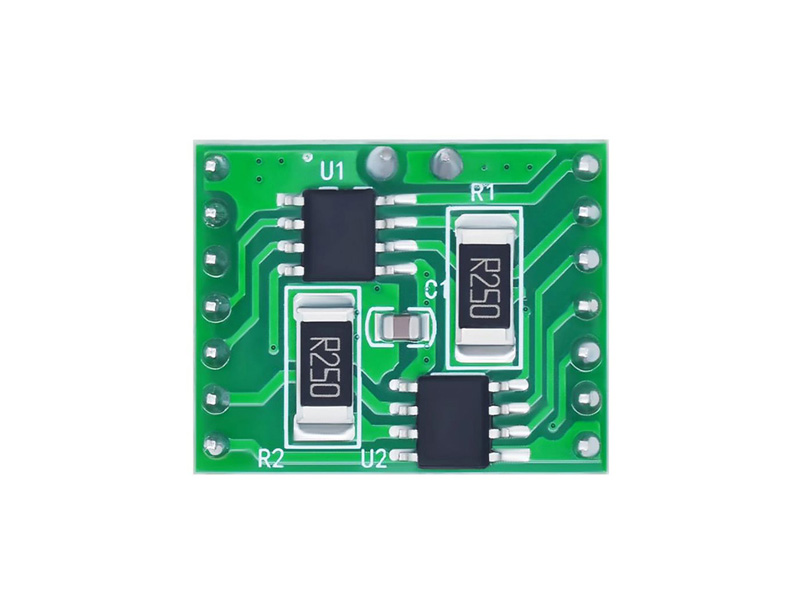
The A4950 is a dual H-bridge motor driver IC designed for driving bipolar stepper motors and DC motors. It integrates features such as built-in PWM control, current sensing, and thermal shutdown protection, making it a versatile and reliable choice for motor control applications. The A4950 is commonly used in robotics, industrial automation, and consumer electronics where precise motor control is required.
Explore Projects Built with A4950
 Open Project in Cirkit Designer
 Open Project in Cirkit Designer
 Open Project in Cirkit Designer
 Open Project in Cirkit Designer
Explore Projects Built with A4950
Open Project in Cirkit DesignerOpen Project in Cirkit DesignerOpen Project in Cirkit DesignerOpen Project in Cirkit DesignerCommon Applications
- Driving bipolar stepper motors in 3D printers and CNC machines
- Controlling DC motors in robotics and small vehicles
- Motorized actuators in industrial automation systems
- Consumer electronics requiring motorized components (e.g., camera gimbals)
Technical Specifications
Key Technical Details
| Parameter | Value |
|---|---|
| Supply Voltage (VBB) | 8 V to 40 V |
| Output Current (per H-bridge) | Up to 2 A continuous |
| Logic Input Voltage Range | 0 V to 5.5 V |
| PWM Frequency | Up to 50 kHz |
| Thermal Shutdown Protection | Yes |
| Overcurrent Protection | Yes |
| Package Type | SOIC-8 with exposed thermal pad |
Pin Configuration and Descriptions
The A4950 is available in an 8-pin SOIC package. Below is the pinout and description:
| Pin Number | Pin Name | Description |
|---|---|---|
| 1 | IN1 | Logic input to control H-bridge 1 (PWM or logic) |
| 2 | IN2 | Logic input to control H-bridge 2 (PWM or logic) |
| 3 | VBB | Motor supply voltage (8 V to 40 V) |
| 4 | OUT1 | Output terminal for H-bridge 1 |
| 5 | OUT2 | Output terminal for H-bridge 2 |
| 6 | GND | Ground connection |
| 7 | SENSE | Current sense pin for monitoring motor current |
| 8 | VREF | Reference voltage input for current regulation |
Usage Instructions
Using the A4950 in a Circuit
- Power Supply: Connect the motor supply voltage (8 V to 40 V) to the
VBBpin. Ensure the power supply can handle the current requirements of your motor. - Logic Inputs: Use the
IN1andIN2pins to control the H-bridge. These pins accept logic-level signals (0 V to 5.5 V). For PWM control, apply a PWM signal to these pins. - Motor Connections: Connect the motor terminals to
OUT1andOUT2. For a bipolar stepper motor, connect one coil to each H-bridge. - Current Sensing: Use the
SENSEpin to monitor the motor current. A resistor can be placed betweenSENSEandGNDto set the current limit. - Reference Voltage: Apply a reference voltage to the
VREFpin to set the current regulation threshold.
Important Considerations
- Thermal Management: The A4950 includes thermal shutdown protection, but proper heat dissipation is essential. Use a PCB with a thermal pad for optimal performance.
- Decoupling Capacitors: Place a decoupling capacitor (e.g., 100 µF) close to the
VBBpin to stabilize the supply voltage. - PWM Frequency: Ensure the PWM frequency does not exceed 50 kHz for proper operation.
- Current Sensing Resistor: Choose a low-value resistor for the
SENSEpin to avoid excessive voltage drops.
Example: Controlling a DC Motor with Arduino UNO
Below is an example of how to control a DC motor using the A4950 and an Arduino UNO:
// Define pin connections
const int IN1 = 9;  // Connect to A4950 IN1 pin
const int IN2 = 10; // Connect to A4950 IN2 pin

void setup() {
  // Set motor control pins as outputs
  pinMode(IN1, OUTPUT);
  pinMode(IN2, OUTPUT);
}

void loop() {
  // Rotate motor forward
  analogWrite(IN1, 128); // 50% duty cycle PWM signal
  digitalWrite(IN2, LOW);
  delay(2000); // Run motor for 2 seconds

  // Rotate motor backward
  digitalWrite(IN1, LOW);
  analogWrite(IN2, 128); // 50% duty cycle PWM signal
  delay(2000); // Run motor for 2 seconds

  // Stop motor
  digitalWrite(IN1, LOW);
  digitalWrite(IN2, LOW);
  delay(2000); // Wait for 2 seconds
}
Troubleshooting and FAQs
Common Issues and Solutions
Motor Does Not Spin
- Cause: Incorrect wiring or insufficient power supply.
- Solution: Double-check all connections and ensure the power supply meets the voltage and current requirements.
Motor Spins Erratically
- Cause: Noise in the PWM signal or unstable power supply.
- Solution: Use a decoupling capacitor near the
VBBpin and ensure the PWM signal is clean.
Overheating
- Cause: Excessive current draw or poor thermal dissipation.
- Solution: Verify the motor's current requirements and improve heat dissipation with a proper PCB design.
No Current Sensing Output
- Cause: Incorrect or missing sense resistor.
- Solution: Ensure a low-value resistor is connected between
SENSEandGND.
FAQs
Can the A4950 drive two DC motors? Yes, the A4950 has two H-bridges, allowing it to drive two DC motors independently.
What is the maximum PWM frequency supported? The A4950 supports PWM frequencies up to 50 kHz.
Is the A4950 suitable for battery-powered applications? Yes, as long as the battery voltage is within the 8 V to 40 V range and can supply sufficient current.
Does the A4950 support bidirectional motor control? Yes, the H-bridge configuration allows for forward, reverse, and braking operations.
This concludes the documentation for the A4950 motor driver IC.