
How to Use CD4518: Examples, Pinouts, and Specs
 Design with CD4518 in Cirkit Designer
Introduction
The CD4518 is a dual 4-bit binary-coded decimal (BCD) up counter manufactured by Motorola. It is designed to count in binary up to 15 (1111 in binary) and features a reset function for clearing the count. The CD4518 is highly versatile and can be cascaded with other counters to extend its counting range. It operates over a wide voltage range, making it suitable for a variety of digital applications.
Explore Projects Built with CD4518
 Open Project in Cirkit Designer
 Open Project in Cirkit Designer
 Open Project in Cirkit Designer
 Open Project in Cirkit Designer
Explore Projects Built with CD4518
Open Project in Cirkit DesignerOpen Project in Cirkit DesignerOpen Project in Cirkit DesignerOpen Project in Cirkit DesignerCommon Applications and Use Cases
- Digital clocks and timers
- Frequency division and counting
- Event counting in digital systems
- Sequential logic circuits
- Cascaded counting for extended range applications
Technical Specifications
The following are the key technical details of the CD4518:
| Parameter | Value |
|---|---|
| Supply Voltage (VDD) | 3V to 15V |
| Input Voltage Range | 0V to VDD |
| Maximum Clock Frequency | 6 MHz (at 10V supply) |
| Output Voltage (High) | VDD - 0.05V (typical) |
| Output Voltage (Low) | 0.05V (typical) |
| Propagation Delay | 200 ns (at 10V supply) |
| Power Dissipation | 500 mW |
| Operating Temperature Range | -55°C to +125°C |
Pin Configuration and Descriptions
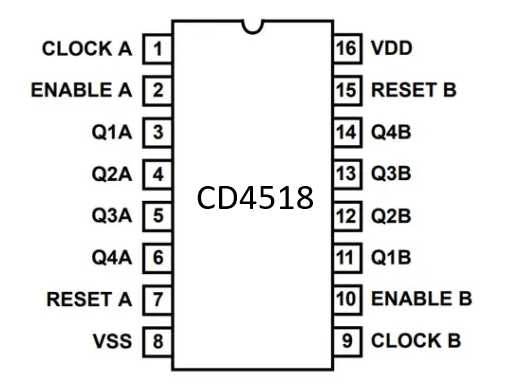
The CD4518 is a 16-pin dual in-line package (DIP). Below is the pinout and description:
| Pin Number | Pin Name | Description |
|---|---|---|
| 1 | MR1 | Master Reset for Counter 1 (Active High) |
| 2 | CP1 | Clock Input for Counter 1 |
| 3 | Q1A | Counter 1 Output A (Least Significant Bit) |
| 4 | Q1B | Counter 1 Output B |
| 5 | Q1C | Counter 1 Output C |
| 6 | Q1D | Counter 1 Output D (Most Significant Bit) |
| 7 | VSS | Ground (0V) |
| 8 | Q2D | Counter 2 Output D (Most Significant Bit) |
| 9 | Q2C | Counter 2 Output C |
| 10 | Q2B | Counter 2 Output B |
| 11 | Q2A | Counter 2 Output A (Least Significant Bit) |
| 12 | CP2 | Clock Input for Counter 2 |
| 13 | MR2 | Master Reset for Counter 2 (Active High) |
| 14 | VDD | Positive Supply Voltage |
| 15 | NC | No Connection |
| 16 | NC | No Connection |
Usage Instructions
How to Use the CD4518 in a Circuit
- Power Supply: Connect the VDD pin (Pin 14) to a positive voltage source (3V to 15V) and the VSS pin (Pin 7) to ground.
- Clock Input: Provide a clock signal to the CP1 (Pin 2) and/or CP2 (Pin 12) pins. Each clock pulse increments the respective counter.
- Reset Function: To reset a counter, apply a HIGH signal to the MR1 (Pin 1) or MR2 (Pin 13) pins. This clears the count to 0000.
- Outputs: The outputs (QxA, QxB, QxC, QxD) represent the binary count. Connect these pins to other digital components as needed.
- Cascading Counters: To extend the counting range, connect the most significant bit (MSB) output of one counter to the clock input of another CD4518.
Important Considerations and Best Practices
- Debounce the Clock Signal: If using a mechanical switch for the clock input, ensure the signal is debounced to avoid erratic counting.
- Avoid Floating Inputs: Unused inputs should be tied to a defined logic level (HIGH or LOW) to prevent unpredictable behavior.
- Voltage Compatibility: Ensure that the input and output voltage levels are compatible with other components in the circuit.
- Bypass Capacitor: Place a 0.1 µF ceramic capacitor close to the VDD pin to reduce noise and improve stability.
Example: Using CD4518 with Arduino UNO
The following example demonstrates how to use the CD4518 with an Arduino UNO to count clock pulses and display the count on the serial monitor.
// CD4518 Example with Arduino UNO
// Connect CP1 (Pin 2) to Arduino Pin 3 for clock signal
// Connect Q1A, Q1B, Q1C, Q1D (Pins 3, 4, 5, 6) to Arduino Pins 8, 9, 10, 11

const int clockPin = 3; // Arduino pin connected to CP1
const int outputPins[] = {8, 9, 10, 11}; // Q1A, Q1B, Q1C, Q1D

void setup() {
  pinMode(clockPin, OUTPUT); // Set clock pin as output
  for (int i = 0; i < 4; i++) {
    pinMode(outputPins[i], INPUT); // Set output pins as input
  }
  Serial.begin(9600); // Initialize serial communication
}

void loop() {
  // Generate a clock pulse
  digitalWrite(clockPin, HIGH);
  delay(100); // 100 ms HIGH pulse
  digitalWrite(clockPin, LOW);
  delay(100); // 100 ms LOW pulse

  // Read the counter outputs
  int count = 0;
  for (int i = 0; i < 4; i++) {
    count |= digitalRead(outputPins[i]) << i; // Combine bits into a single number
  }

  // Print the count to the serial monitor
  Serial.print("Count: ");
  Serial.println(count);
}
Troubleshooting and FAQs
Common Issues and Solutions
Counter Not Incrementing:
- Ensure the clock signal is properly connected and toggling between HIGH and LOW.
- Verify that the MR1 or MR2 pins are not held HIGH, as this will continuously reset the counter.
Erratic Counting:
- Check for noise or bouncing on the clock signal. Use a debounce circuit or software debounce if necessary.
- Ensure all unused inputs are tied to a defined logic level.
Incorrect Output:
- Verify the connections to the output pins (QxA, QxB, QxC, QxD).
- Ensure the supply voltage is within the specified range.
FAQs
Q: Can I use the CD4518 with a 5V power supply?
A: Yes, the CD4518 operates within a wide voltage range of 3V to 15V, so it is compatible with a 5V supply.
Q: How do I cascade multiple CD4518 counters?
A: Connect the MSB output (QxD) of one counter to the clock input (CPx) of the next counter. This allows the second counter to increment after the first counter completes a full cycle.
Q: What is the maximum counting range of a single CD4518?
A: Each counter in the CD4518 can count from 0 to 15 (4 bits). Since it is a dual counter, the total counting range is 0 to 15 for each counter.