
How to Use Kabel Jack DC : Examples, Pinouts, and Specs
 Design with Kabel Jack DC in Cirkit Designer
Introduction
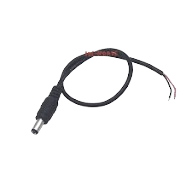
The Kabel Jack DC is a widely used connector designed for transferring direct current (DC) electricity between a power supply and an electronic device. It typically consists of a cylindrical plug and socket, ensuring a secure and reliable connection. This component is commonly found in applications such as powering Arduino boards, LED strips, routers, and other low-voltage electronic devices.
Explore Projects Built with Kabel Jack DC
 Open Project in Cirkit Designer
 Open Project in Cirkit Designer
 Open Project in Cirkit Designer
 Open Project in Cirkit Designer
Explore Projects Built with Kabel Jack DC
Open Project in Cirkit DesignerOpen Project in Cirkit DesignerOpen Project in Cirkit DesignerOpen Project in Cirkit DesignerCommon Applications and Use Cases
- Powering microcontroller boards (e.g., Arduino, Raspberry Pi with adapters)
- Supplying power to LED lighting systems
- Connecting DC power supplies to small appliances
- Prototyping and DIY electronics projects
Technical Specifications
The Kabel Jack DC is available in various sizes, with the most common being 5.5mm outer diameter and 2.1mm inner diameter. Below are the general specifications:
| Parameter | Value |
|---|---|
| Outer Diameter | 5.5mm |
| Inner Diameter | 2.1mm |
| Voltage Rating | Typically 12V to 24V DC |
| Current Rating | Up to 5A (depending on the model) |
| Connector Type | Male and Female |
| Cable Length (if wired) | Varies (commonly 20cm to 1m) |
| Polarity | Center positive (in most cases) |
Pin Configuration and Descriptions
The Kabel Jack DC typically has two connections:
| Pin | Description |
|---|---|
| Center Pin | Positive terminal (V+) |
| Outer Sleeve | Negative terminal (GND) |
Note: Always verify the polarity of your DC jack to avoid damaging your device.
Usage Instructions
How to Use the Kabel Jack DC in a Circuit
- Identify Polarity: Check the polarity of the DC jack. Most jacks are center-positive, meaning the center pin is the positive terminal, and the outer sleeve is the ground.
- Connect to Power Supply: Plug the male DC jack into the female socket of your power supply or device.
- Soldering (if required): If using a bare cable, solder the positive wire to the center pin and the negative wire to the outer sleeve.
- Verify Connections: Use a multimeter to confirm the voltage and polarity before connecting to your circuit.
Important Considerations and Best Practices
- Voltage Compatibility: Ensure the voltage of the power supply matches the requirements of your device.
- Current Rating: Verify that the current rating of the DC jack is sufficient for your application.
- Polarity Check: Incorrect polarity can damage sensitive electronics. Double-check before powering on.
- Secure Connections: If soldering, ensure strong and clean solder joints to prevent loose connections.
Example: Using Kabel Jack DC with Arduino UNO
The Kabel Jack DC is commonly used to power an Arduino UNO. Below is an example of how to connect and use it:
- Connect a 9V or 12V DC power supply to the male DC jack.
- Plug the male DC jack into the Arduino UNO's power input port.
- Optionally, you can use the following Arduino code to test the setup by blinking an LED:
// Simple LED blink example for Arduino UNO
// Ensure the Arduino is powered via the DC jack

const int ledPin = 13; // Built-in LED pin on Arduino UNO

void setup() {
  pinMode(ledPin, OUTPUT); // Set the LED pin as an output
}

void loop() {
  digitalWrite(ledPin, HIGH); // Turn the LED on
  delay(1000);                // Wait for 1 second
  digitalWrite(ledPin, LOW);  // Turn the LED off
  delay(1000);                // Wait for 1 second
}
Troubleshooting and FAQs
Common Issues and Solutions
No Power to Device
- Cause: Incorrect polarity or loose connection.
- Solution: Verify the polarity with a multimeter and ensure the jack is securely connected.
Overheating of DC Jack
- Cause: Exceeding the current rating of the jack.
- Solution: Use a DC jack with a higher current rating or reduce the load on the circuit.
Intermittent Power
- Cause: Poor soldering or damaged cable.
- Solution: Inspect the solder joints and cable for damage. Re-solder or replace if necessary.
Device Not Turning On
- Cause: Incorrect voltage from the power supply.
- Solution: Check the power supply's output voltage and ensure it matches the device's requirements.
FAQs
Q: Can I use a Kabel Jack DC for AC power?
A: No, the Kabel Jack DC is designed specifically for direct current (DC) applications.Q: How do I determine the polarity of my DC jack?
A: Use a multimeter to measure the voltage. The positive probe should touch the center pin, and the negative probe should touch the outer sleeve.Q: What is the maximum cable length I can use?
A: The maximum length depends on the current and voltage of your application. Longer cables may result in voltage drops, so use thicker wires for longer distances.
By following this documentation, you can effectively use the Kabel Jack DC in your electronic projects while avoiding common pitfalls.