
How to Use POWER SUPPLY 24V: Examples, Pinouts, and Specs
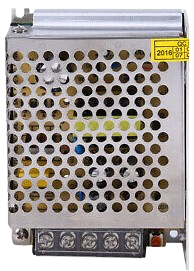
 Design with POWER SUPPLY 24V in Cirkit Designer
Introduction
The POWER SUPPLY 24V is a device that converts electrical energy from a source into a stable 24V output, suitable for powering electronic circuits and devices. It ensures a consistent voltage and current, making it ideal for applications requiring reliable power delivery. This component is commonly used in industrial automation, robotics, LED lighting systems, and laboratory equipment.
Explore Projects Built with POWER SUPPLY 24V
 Open Project in Cirkit Designer
 Open Project in Cirkit Designer
 Open Project in Cirkit Designer
 Open Project in Cirkit Designer
Explore Projects Built with POWER SUPPLY 24V
Open Project in Cirkit DesignerOpen Project in Cirkit DesignerOpen Project in Cirkit DesignerOpen Project in Cirkit DesignerTechnical Specifications
The following table outlines the key technical details of the POWER SUPPLY 24V:
| Parameter | Value |
|---|---|
| Input Voltage Range | 100-240V AC (50/60Hz) |
| Output Voltage | 24V DC |
| Output Current | 2A (typical), 5A (maximum, model-dependent) |
| Power Rating | 48W (typical), up to 120W |
| Efficiency | ≥85% |
| Ripple and Noise | ≤120mV |
| Operating Temperature | -10°C to +50°C |
| Protection Features | Overvoltage, Overcurrent, Short Circuit |
Pin Configuration and Descriptions
The POWER SUPPLY 24V typically has the following input and output terminals:
| Pin/Terminal | Description |
|---|---|
| L (Line) | AC live input (100-240V AC) |
| N (Neutral) | AC neutral input |
| GND (Ground) | Earth ground connection |
| V+ | Positive 24V DC output |
| V- | Negative (ground) 24V DC output |
Usage Instructions
How to Use the POWER SUPPLY 24V in a Circuit
Input Connection:
- Connect the AC input terminals (L and N) to a suitable power source (100-240V AC).
- Ensure the ground terminal (GND) is properly connected to earth ground for safety.
Output Connection:
- Connect the V+ terminal to the positive input of your load or circuit.
- Connect the V- terminal to the ground of your load or circuit.
Power On:
- After verifying all connections, switch on the AC power source.
- The POWER SUPPLY 24V will provide a stable 24V DC output.
Important Considerations and Best Practices
- Load Compatibility: Ensure the connected load does not exceed the maximum current rating of the power supply.
- Ventilation: Place the power supply in a well-ventilated area to prevent overheating.
- Polarity: Double-check the polarity of the output connections to avoid damaging your circuit.
- Safety: Always disconnect the power supply from the AC source before making any wiring changes.
Example: Using with an Arduino UNO
The POWER SUPPLY 24V can be used to power devices like an Arduino UNO through a voltage regulator (e.g., LM7805) to step down the voltage to 5V. Below is an example circuit and code:
Circuit Setup
- Connect the V+ terminal of the power supply to the input pin of the LM7805 regulator.
- Connect the V- terminal of the power supply to the ground pin of the LM7805.
- Connect the output pin of the LM7805 to the 5V pin of the Arduino UNO.
- Connect the ground pin of the LM7805 to the GND pin of the Arduino UNO.
Example Code
// Example code to blink an LED using Arduino UNO powered by a 24V power supply
// through an LM7805 voltage regulator

const int ledPin = 13; // Pin connected to the onboard LED

void setup() {
  pinMode(ledPin, OUTPUT); // Set the LED pin as an output
}

void loop() {
  digitalWrite(ledPin, HIGH); // Turn the LED on
  delay(1000);               // Wait for 1 second
  digitalWrite(ledPin, LOW);  // Turn the LED off
  delay(1000);               // Wait for 1 second
}
Troubleshooting and FAQs
Common Issues and Solutions
No Output Voltage:
- Cause: Incorrect input wiring or no AC power.
- Solution: Verify the AC input connections and ensure the power source is active.
Overheating:
- Cause: Insufficient ventilation or excessive load.
- Solution: Ensure proper airflow around the power supply and reduce the load if necessary.
Output Voltage Fluctuations:
- Cause: Load exceeding the power supply's capacity or unstable input voltage.
- Solution: Use a load within the rated capacity and ensure a stable AC input.
Short Circuit Protection Triggered:
- Cause: Output terminals are shorted.
- Solution: Disconnect the power supply, check the wiring, and remove the short circuit.
FAQs
Q: Can I use the POWER SUPPLY 24V to directly power a 5V device?
A: No, you need a voltage regulator or DC-DC converter to step down the voltage to 5V.Q: Is the power supply suitable for outdoor use?
A: Only if it is housed in a weatherproof enclosure, as most models are not designed for outdoor environments.Q: How do I know if the power supply is overloaded?
A: Many models include an LED indicator or will shut down automatically when overloaded.
By following this documentation, you can safely and effectively use the POWER SUPPLY 24V in your projects.