
How to Use 3 Cell Holder: Examples, Pinouts, and Specs
 Design with 3 Cell Holder in Cirkit Designer
3 Cell Holder Documentation
Manufacturer: Cat
Part ID: Lithium
1. Introduction
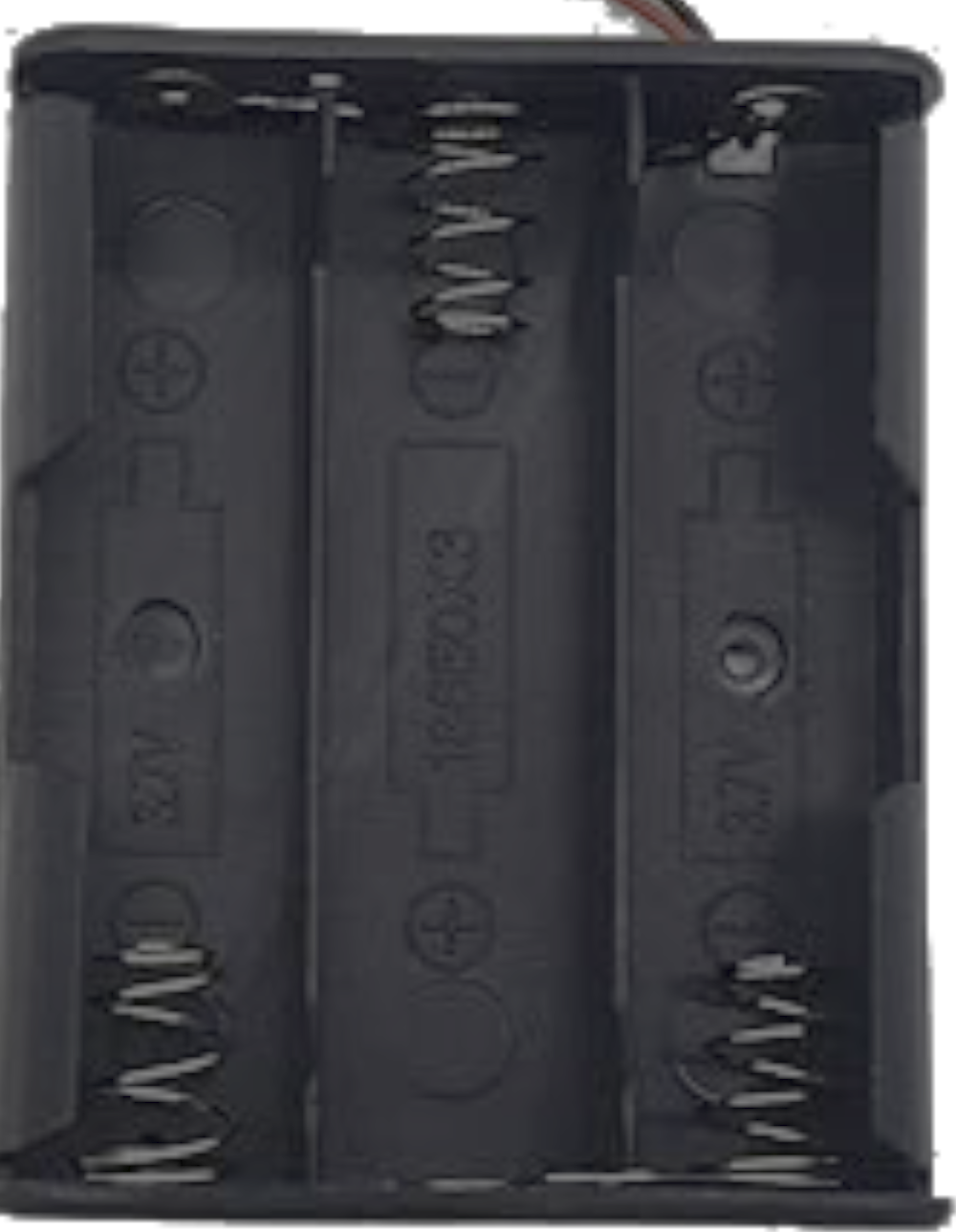
The 3 Cell Holder is a compact and durable device designed to securely hold and connect three batteries in series or parallel configurations. It ensures proper alignment and electrical contact, making it an essential component for powering a wide range of electronic devices. This holder is compatible with standard cylindrical batteries, such as AA, AAA, or 18650 cells, depending on the specific model.
Common Applications:
- Powering portable electronic devices (e.g., flashlights, toys, and remote controls).
- Supplying power to microcontroller-based projects (e.g., Arduino, Raspberry Pi).
- DIY electronics and prototyping.
- Robotics and small motorized systems.
2. Technical Specifications
The following table outlines the key technical details of the 3 Cell Holder:
| Parameter | Specification |
|---|---|
| Battery Configuration | 3 cells in series or parallel (depending on wiring). |
| Supported Battery Types | AA, AAA, or 18650 (model-specific). |
| Output Voltage | 4.5V (3 x 1.5V cells in series) or 3.7V (3 x 18650 cells in parallel). |
| Material | High-quality ABS plastic with metal spring or flat contacts. |
| Dimensions | Varies by model (e.g., 18650 holder: ~80mm x 60mm x 20mm). |
| Current Rating | Up to 5A (depending on battery type and holder design). |
| Operating Temperature | -20°C to 60°C. |
| Weight | ~20g (without batteries). |
Pin Configuration and Descriptions
The 3 Cell Holder typically has two output terminals:
| Pin | Label | Description |
|---|---|---|
| 1 | Positive (+) | The positive terminal of the battery pack. Connect to the positive side of the circuit. |
| 2 | Negative (-) | The negative terminal of the battery pack. Connect to the ground of the circuit. |
3. Usage Instructions
How to Use the 3 Cell Holder in a Circuit:
Insert Batteries:
- Place three batteries into the holder, ensuring correct polarity (match the "+" and "-" markings).
- For series configuration, the holder will automatically connect the batteries in sequence to provide a higher voltage.
Connect to Circuit:
- Use the positive (+) and negative (-) terminals to connect the holder to your circuit.
- Ensure proper wiring to avoid short circuits or reverse polarity.
Secure the Holder:
- Mount the holder securely in your project using screws, adhesive, or a mounting bracket.
Important Considerations and Best Practices:
- Battery Type: Use batteries of the same type, capacity, and charge level to ensure consistent performance.
- Polarity Check: Double-check the polarity of the batteries before powering the circuit.
- Avoid Overloading: Do not exceed the current rating of the holder or the batteries.
- Heat Management: Avoid prolonged use in high-temperature environments to prevent damage.
- Storage: Remove batteries when not in use to prevent leakage or corrosion.
4. Example Application with Arduino UNO
The 3 Cell Holder can be used to power an Arduino UNO via its VIN pin. Below is an example of how to connect the holder and a simple Arduino sketch to blink an LED.
Circuit Diagram:
- Connect the positive (+) terminal of the holder to the VIN pin of the Arduino UNO.
- Connect the negative (-) terminal of the holder to the GND pin of the Arduino UNO.
- Connect an LED to pin 13 of the Arduino UNO with a 220-ohm resistor in series.
Arduino Code:
// Simple LED Blink Example
// This code blinks an LED connected to pin 13 of the Arduino UNO.
// Ensure the 3 Cell Holder is connected to the VIN and GND pins of the Arduino.

void setup() {
  pinMode(13, OUTPUT); // Set pin 13 as an output pin
}

void loop() {
  digitalWrite(13, HIGH); // Turn the LED on
  delay(1000);            // Wait for 1 second
  digitalWrite(13, LOW);  // Turn the LED off
  delay(1000);            // Wait for 1 second
}
5. Troubleshooting and FAQs
Common Issues and Solutions:
| Issue | Possible Cause | Solution |
|---|---|---|
| Batteries not powering the circuit | Incorrect polarity or loose connections. | Check battery orientation and ensure secure connections. |
| Overheating of the holder | Excessive current draw or short circuit. | Verify the circuit design and ensure current is within the holder's rating. |
| Corrosion on terminals | Battery leakage or prolonged storage. | Clean terminals with isopropyl alcohol and use fresh batteries. |
| Low output voltage | Batteries are discharged or mismatched. | Replace with fully charged or new batteries of the same type and capacity. |
Frequently Asked Questions:
Can I use rechargeable batteries with the 3 Cell Holder?
Yes, the holder is compatible with rechargeable batteries such as NiMH or Li-ion cells.What is the maximum current the holder can handle?
The holder can handle up to 5A, but this depends on the battery type and wiring.Can I connect multiple holders in parallel?
Yes, you can connect multiple holders in parallel to increase the current capacity, but ensure proper wiring and battery matching.Is the holder waterproof?
No, the holder is not waterproof. Avoid exposing it to moisture or water.
6. Conclusion
The Cat Lithium 3 Cell Holder is a versatile and reliable component for securely holding and connecting three batteries in a circuit. Its robust design and compatibility with various battery types make it ideal for powering a wide range of electronic devices and projects. By following the usage instructions and best practices outlined in this documentation, users can ensure safe and efficient operation of the holder in their applications.
For further assistance, please contact the manufacturer or refer to the product datasheet.
Explore Projects Built with 3 Cell Holder
 Open Project in Cirkit Designer
 Open Project in Cirkit Designer
 Open Project in Cirkit Designer
 Open Project in Cirkit Designer
Explore Projects Built with 3 Cell Holder
Open Project in Cirkit DesignerOpen Project in Cirkit DesignerOpen Project in Cirkit DesignerOpen Project in Cirkit Designer