
How to Use ADAFRUIT TMP235: Examples, Pinouts, and Specs
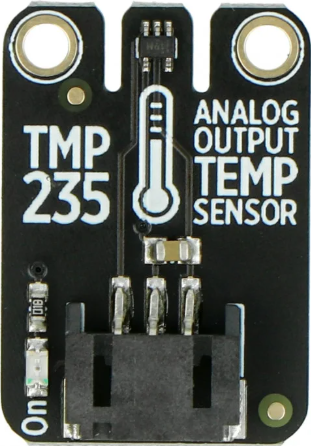
 Design with ADAFRUIT TMP235 in Cirkit Designer
Introduction
The ADAFRUIT TMP235 is a precision temperature sensor designed to provide accurate and reliable temperature readings in a compact and easy-to-use package. Manufactured by Adafruit Industries LLC, this sensor is ideal for applications requiring precise temperature monitoring. It features an analog voltage output proportional to the temperature, making it simple to interface with microcontrollers, ADCs (Analog-to-Digital Converters), and other analog input systems.
Explore Projects Built with ADAFRUIT TMP235
 Open Project in Cirkit Designer
 Open Project in Cirkit Designer
 Open Project in Cirkit Designer
 Open Project in Cirkit Designer
Explore Projects Built with ADAFRUIT TMP235
Open Project in Cirkit DesignerOpen Project in Cirkit DesignerOpen Project in Cirkit DesignerOpen Project in Cirkit DesignerCommon Applications and Use Cases
- Environmental monitoring systems
- Industrial temperature control
- Consumer electronics
- IoT (Internet of Things) devices
- HVAC (Heating, Ventilation, and Air Conditioning) systems
- Medical devices requiring temperature sensing
Technical Specifications
Below are the key technical details of the ADAFRUIT TMP235:
| Parameter | Value |
|---|---|
| Manufacturer | Adafruit Industries LLC |
| Manufacturer Part ID | 1528-4686-ND |
| Supply Voltage (Vcc) | 2.3V to 5.5V |
| Output Voltage Range | 0.1V to 2.0V (proportional to temperature) |
| Temperature Range | -40°C to +125°C |
| Accuracy | ±0.5°C (typical) |
| Output Type | Analog voltage |
| Response Time | 1 ms (typical) |
| Package Type | TO-92 |
| Power Consumption | Low power (typical < 50 µA) |
Pin Configuration and Descriptions
The ADAFRUIT TMP235 comes in a 3-pin TO-92 package. Below is the pinout and description:
| Pin | Name | Description |
|---|---|---|
| 1 | Vcc | Power supply input (2.3V to 5.5V) |
| 2 | Vout | Analog output voltage proportional to temperature |
| 3 | GND | Ground connection |
Usage Instructions
How to Use the ADAFRUIT TMP235 in a Circuit
- Power Supply: Connect the Vcc pin to a stable power source within the range of 2.3V to 5.5V. Ensure proper decoupling with a capacitor (e.g., 0.1 µF) between Vcc and GND to reduce noise.
- Output Connection: Connect the Vout pin to an ADC input of a microcontroller or an analog input device. The output voltage is directly proportional to the temperature.
- Ground: Connect the GND pin to the ground of your circuit.
The output voltage can be converted to temperature using the formula:
Temperature (°C) = (Vout - 0.5) * 100
Where Vout is the voltage measured at the output pin.
Important Considerations and Best Practices
- Placement: Place the sensor away from heat-generating components to avoid inaccurate readings.
- Decoupling: Use a 0.1 µF capacitor close to the Vcc pin to minimize power supply noise.
- Calibration: While the TMP235 is factory-calibrated, you may perform additional calibration for critical applications.
- Interfacing: Ensure the ADC resolution of your microcontroller is sufficient to capture the small changes in the output voltage.
Example: Connecting to an Arduino UNO
Below is an example of how to connect and read data from the TMP235 using an Arduino UNO:
Circuit Diagram
- Connect the TMP235's Vcc pin to the Arduino's 5V pin.
- Connect the TMP235's GND pin to the Arduino's GND pin.
- Connect the TMP235's Vout pin to the Arduino's A0 pin.
Arduino Code
// TMP235 Temperature Sensor Example
// Reads the analog output of the TMP235 and converts it to temperature in °C.

const int TMP235_PIN = A0; // TMP235 output connected to Arduino A0 pin

void setup() {
  Serial.begin(9600); // Initialize serial communication at 9600 baud
}

void loop() {
  int analogValue = analogRead(TMP235_PIN); // Read the analog value from TMP235
  float voltage = analogValue * (5.0 / 1023.0); // Convert ADC value to voltage
  float temperatureC = (voltage - 0.5) * 100.0; // Convert voltage to temperature

  // Print the temperature to the Serial Monitor
  Serial.print("Temperature: ");
  Serial.print(temperatureC);
  Serial.println(" °C");

  delay(1000); // Wait for 1 second before the next reading
}
Troubleshooting and FAQs
Common Issues and Solutions
No Output Voltage:
- Cause: Incorrect wiring or insufficient power supply.
- Solution: Verify all connections and ensure the power supply is within the specified range (2.3V to 5.5V).
Inaccurate Temperature Readings:
- Cause: Electrical noise or improper placement of the sensor.
- Solution: Add a decoupling capacitor (0.1 µF) near the Vcc pin and place the sensor away from heat sources.
Fluctuating Output:
- Cause: Unstable power supply or interference.
- Solution: Use a regulated power supply and ensure proper grounding.
FAQs
Q1: Can the TMP235 measure negative temperatures?
Yes, the TMP235 can measure temperatures as low as -40°C. The output voltage will reflect this range.
Q2: What is the resolution of the TMP235?
The resolution depends on the ADC used to read the output voltage. For example, with a 10-bit ADC and a 5V reference, the resolution is approximately 0.49°C per step.
Q3: Can I use the TMP235 with a 3.3V system?
Yes, the TMP235 operates with supply voltages as low as 2.3V, making it compatible with 3.3V systems.
Q4: Is the TMP235 waterproof?
No, the TMP235 is not waterproof. For outdoor or wet environments, consider using a waterproof enclosure.
Q5: How fast does the TMP235 respond to temperature changes?
The TMP235 has a typical response time of 1 ms, making it suitable for applications requiring fast temperature updates.