
How to Use MAX30102: Examples, Pinouts, and Specs
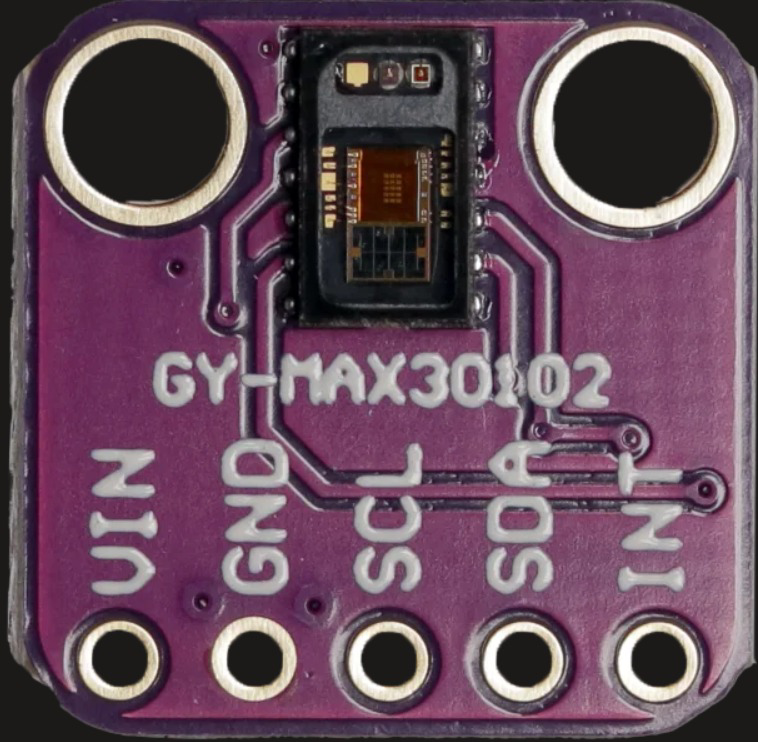
 Design with MAX30102 in Cirkit Designer
Introduction
The MAX30102 is a pulse oximeter and heart-rate sensor module designed for non-invasive health monitoring applications. It utilizes photoplethysmography (PPG) technology to measure blood oxygen saturation (SpO2) and heart rate. The module integrates red and infrared LEDs, a photodetector, optical elements, and low-noise electronics in a compact package, making it ideal for wearable devices, fitness trackers, and medical monitoring systems.
Explore Projects Built with MAX30102
 Open Project in Cirkit Designer
 Open Project in Cirkit Designer
 Open Project in Cirkit Designer
 Open Project in Cirkit Designer
Explore Projects Built with MAX30102
Open Project in Cirkit DesignerOpen Project in Cirkit DesignerOpen Project in Cirkit DesignerOpen Project in Cirkit DesignerCommon Applications
- Wearable health monitoring devices
- Fitness trackers
- Medical-grade pulse oximeters
- Heart rate monitoring systems
- IoT-based health monitoring solutions
Technical Specifications
Key Technical Details
| Parameter | Value |
|---|---|
| Supply Voltage | 1.8V (core) and 3.3V (LED driver) |
| Operating Current | 600 µA (typical) |
| Standby Current | 0.7 µA |
| Measurement Method | Photoplethysmography (PPG) |
| LED Wavelengths | Red: 660 nm, Infrared: 880 nm |
| Communication Interface | I2C |
| Operating Temperature Range | -40°C to +85°C |
| Dimensions | 5.6 mm x 3.3 mm x 1.55 mm |
Pin Configuration and Descriptions
The MAX30102 module typically comes with the following pinout:
| Pin Name | Pin Number | Description |
|---|---|---|
| VIN | 1 | Power supply input (3.3V recommended) |
| GND | 2 | Ground |
| SDA | 3 | I2C data line |
| SCL | 4 | I2C clock line |
| INT | 5 | Interrupt output (active low) |
Usage Instructions
How to Use the MAX30102 in a Circuit
- Power Supply: Connect the VIN pin to a 3.3V power source and the GND pin to ground.
- I2C Communication: Connect the SDA and SCL pins to the corresponding I2C pins on your microcontroller (e.g., Arduino UNO).
- Interrupt Pin: Optionally, connect the INT pin to a GPIO pin on your microcontroller to handle interrupts.
- Pull-Up Resistors: Use 4.7kΩ pull-up resistors on the SDA and SCL lines if not already present on the module.
- Placement: Ensure the sensor is placed close to the skin for accurate readings, with minimal ambient light interference.
Important Considerations
- Avoid exposing the sensor to direct sunlight or strong ambient light, as this can affect accuracy.
- Ensure proper alignment of the sensor with the skin for consistent readings.
- Use a low-noise power supply to minimize interference.
Example Code for Arduino UNO
Below is an example of how to interface the MAX30102 with an Arduino UNO using the Adafruit MAX30102 library:
#include <Wire.h>
#include "Adafruit_MAX30102.h"

// Create an instance of the MAX30102 sensor
Adafruit_MAX30102 max30102;

void setup() {
  Serial.begin(9600); // Initialize serial communication
  while (!Serial);    // Wait for the serial monitor to open

  // Initialize the I2C communication
  if (!max30102.begin()) {
    Serial.println("MAX30102 not detected. Check connections.");
    while (1); // Halt execution if the sensor is not found
  }

  Serial.println("MAX30102 initialized successfully.");
}

void loop() {
  // Variables to store sensor readings
  int redValue, irValue;

  // Read data from the sensor
  if (max30102.check() == true) {
    redValue = max30102.getRed(); // Get red LED value
    irValue = max30102.getIR();  // Get infrared LED value

    // Print the readings to the serial monitor
    Serial.print("Red: ");
    Serial.print(redValue);
    Serial.print(" | IR: ");
    Serial.println(irValue);
  } else {
    Serial.println("No data available.");
  }

  delay(100); // Delay for stability
}
Notes on the Code
- Install the Adafruit MAX30102 library via the Arduino Library Manager before running the code.
- Ensure the I2C address of the MAX30102 matches the library's default (0x57). If not, modify the library or use a different address.
Troubleshooting and FAQs
Common Issues and Solutions
Sensor Not Detected:
- Ensure proper wiring of the SDA and SCL pins.
- Verify that pull-up resistors are present on the I2C lines.
- Check the power supply voltage (3.3V recommended).
Inaccurate Readings:
- Ensure the sensor is in contact with the skin and properly aligned.
- Avoid strong ambient light or reflective surfaces near the sensor.
- Use a low-noise power source to reduce interference.
No Data Available:
- Verify that the sensor is initialized correctly in the code.
- Check the interrupt pin connection if using interrupts.
FAQs
Q: Can the MAX30102 be powered with 5V?
A: No, the MAX30102 requires a 3.3V power supply. Using 5V can damage the module.
Q: What is the maximum I2C clock speed supported?
A: The MAX30102 supports I2C clock speeds up to 400 kHz.
Q: Can the MAX30102 measure SpO2 and heart rate simultaneously?
A: Yes, the MAX30102 can measure both parameters simultaneously using its red and infrared LEDs.
Q: How do I improve measurement accuracy?
A: Ensure proper sensor placement, minimize ambient light interference, and use a stable power supply.
This concludes the documentation for the MAX30102. For further assistance, refer to the official datasheet or community forums.