
How to Use W25Q: Examples, Pinouts, and Specs
 Design with W25Q in Cirkit Designer
Introduction
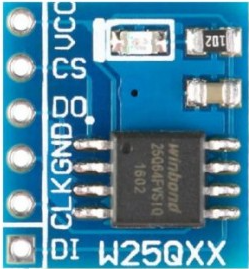
The W25Q is a series of SPI (Serial Peripheral Interface) Flash memory chips manufactured by Winbond. These chips are designed for high-speed performance and low power consumption, making them ideal for a wide range of applications. The W25Q series is commonly used in embedded systems for data storage, firmware updates, and code execution. With capacities ranging from 512 Kbit to 256 Mbit, the W25Q series offers flexibility for various storage needs.
Explore Projects Built with W25Q
 Open Project in Cirkit Designer
 Open Project in Cirkit Designer
 Open Project in Cirkit Designer
 Open Project in Cirkit Designer
Explore Projects Built with W25Q
Open Project in Cirkit DesignerOpen Project in Cirkit DesignerOpen Project in Cirkit DesignerOpen Project in Cirkit DesignerCommon Applications and Use Cases
- Embedded Systems: Storing firmware, configuration data, and logs.
- Consumer Electronics: Used in devices like smart TVs, routers, and IoT devices.
- Code Execution: Supports Execute-In-Place (XIP) for running code directly from the flash memory.
- Data Logging: Ideal for applications requiring non-volatile storage of sensor data.
- Firmware Updates: Enables over-the-air (OTA) updates in embedded systems.
Technical Specifications
The W25Q series includes a variety of models with different storage capacities. Below are the general technical specifications for the series:
| Parameter | Specification |
|---|---|
| Interface | SPI (Serial Peripheral Interface) |
| Operating Voltage | 2.7V to 3.6V |
| Memory Capacity | 512 Kbit to 256 Mbit |
| Clock Frequency | Up to 133 MHz |
| Page Size | 256 bytes |
| Sector Size | 4 KB |
| Block Size | 32 KB or 64 KB |
| Write/Erase Cycles | 100,000 cycles (typical) |
| Data Retention | 20 years |
| Operating Temperature | -40°C to +85°C |
| Package Types | SOP-8, WSON-8, USON-8, and others |
Pin Configuration and Descriptions
The W25Q series typically comes in an 8-pin package. Below is the pin configuration for the SOP-8 package:
| Pin Number | Pin Name | Description |
|---|---|---|
| 1 | CS# | Chip Select (active low) |
| 2 | DO (MISO) | Data Output (Master In, Slave Out) |
| 3 | WP# | Write Protect (active low) |
| 4 | GND | Ground |
| 5 | DI (MOSI) | Data Input (Master Out, Slave In) |
| 6 | CLK | Serial Clock Input |
| 7 | HOLD# | Hold (active low) |
| 8 | VCC | Power Supply (2.7V to 3.6V) |
Usage Instructions
How to Use the W25Q in a Circuit
- Power Supply: Connect the VCC pin to a 3.3V power source and the GND pin to ground.
- SPI Interface: Connect the SPI pins (CS#, CLK, DI, DO) to the corresponding SPI pins on your microcontroller.
- Write Protect and Hold: If not used, connect WP# and HOLD# to VCC through pull-up resistors.
- Chip Select: Use the CS# pin to enable or disable communication with the chip. Pull it low to select the chip.
- Data Transfer: Use SPI commands to read, write, or erase data. Refer to the W25Q datasheet for detailed command instructions.
Important Considerations and Best Practices
- Voltage Levels: Ensure the operating voltage is within the specified range (2.7V to 3.6V).
- Decoupling Capacitor: Place a 0.1 µF decoupling capacitor close to the VCC pin to stabilize the power supply.
- Erase Before Write: Flash memory requires erasing a sector or block before writing new data.
- SPI Clock Speed: Configure the SPI clock speed to match the chip's maximum supported frequency (up to 133 MHz).
- Protecting Data: Use the WP# pin or software protection features to prevent accidental writes or erases.
Example Code for Arduino UNO
Below is an example of how to interface the W25Q chip with an Arduino UNO using the SPI library:
#include <SPI.h>

// Define SPI pins for the W25Q chip
const int CS_PIN = 10; // Chip Select pin

void setup() {
  // Initialize Serial Monitor
  Serial.begin(9600);

  // Initialize SPI
  SPI.begin();
  pinMode(CS_PIN, OUTPUT);
  digitalWrite(CS_PIN, HIGH); // Deselect the chip

  Serial.println("W25Q SPI Flash Initialized");
}

void loop() {
  // Example: Read Manufacturer ID
  digitalWrite(CS_PIN, LOW); // Select the chip
  SPI.transfer(0x90);        // Command to read Manufacturer ID
  SPI.transfer(0x00);        // Dummy byte 1
  SPI.transfer(0x00);        // Dummy byte 2
  SPI.transfer(0x00);        // Dummy byte 3
  byte manufacturerID = SPI.transfer(0x00); // Read Manufacturer ID
  digitalWrite(CS_PIN, HIGH); // Deselect the chip

  // Print Manufacturer ID
  Serial.print("Manufacturer ID: 0x");
  Serial.println(manufacturerID, HEX);

  delay(1000); // Wait for 1 second
}
Notes on the Code
- The
CS_PINis set to pin 10 on the Arduino UNO, which is the default SPI chip select pin. - The
SPI.transfer()function is used to send and receive data over the SPI bus. - Replace the command
0x90with other commands as needed to perform different operations (e.g., read, write, erase).
Troubleshooting and FAQs
Common Issues and Solutions
No Communication with the Chip
- Ensure the CS# pin is pulled low during SPI communication.
- Verify the SPI clock speed is within the chip's supported range.
- Check the wiring for loose or incorrect connections.
Data Corruption
- Ensure sectors or blocks are erased before writing new data.
- Use proper decoupling capacitors to stabilize the power supply.
Write Protection Issues
- Verify the WP# pin is correctly configured (pull it high if not used).
- Check the status register for software write protection settings.
Incorrect Data Read
- Ensure the SPI mode (Mode 0 or Mode 3) is correctly configured in your microcontroller.
- Verify the timing and sequence of SPI commands.
FAQs
Q: Can I use the W25Q with a 5V microcontroller?
A: The W25Q operates at 3.3V. If using a 5V microcontroller, level shifters or voltage dividers are required to avoid damaging the chip.
Q: How do I erase data on the W25Q?
A: Use the sector erase (4 KB), block erase (32 KB or 64 KB), or chip erase commands. Refer to the datasheet for the specific command codes.
Q: What is the maximum clock speed for SPI communication?
A: The W25Q supports SPI clock speeds up to 133 MHz, depending on the specific model.
Q: How do I protect data from accidental writes?
A: Use the WP# pin or enable software-based write protection by configuring the status register.
By following this documentation, users can effectively integrate and utilize the W25Q SPI Flash memory chip in their projects.