
How to Use Adafruit ENS161 MOX Gas Sensor: Examples, Pinouts, and Specs
 Design with Adafruit ENS161 MOX Gas Sensor in Cirkit Designer
Introduction
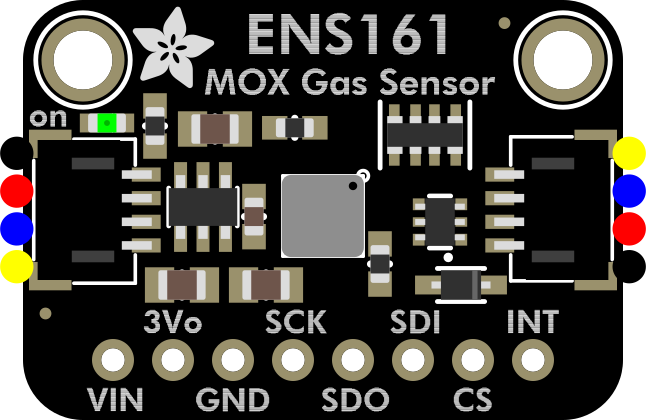
The Adafruit ENS161 MOX Gas Sensor (Part ID: 6431) is a versatile gas sensor designed to detect a variety of gases, including volatile organic compounds (VOCs) and other air quality indicators. It utilizes a metal oxide (MOX) sensing element to measure gas concentrations and provides both analog and digital outputs for seamless integration into a wide range of applications.
This sensor is ideal for air quality monitoring, environmental sensing, and IoT projects. Its compact design and compatibility with microcontrollers like Arduino make it a popular choice for hobbyists and professionals alike.
Explore Projects Built with Adafruit ENS161 MOX Gas Sensor
 Open Project in Cirkit Designer
 Open Project in Cirkit Designer
 Open Project in Cirkit Designer
 Open Project in Cirkit Designer
Explore Projects Built with Adafruit ENS161 MOX Gas Sensor
Open Project in Cirkit DesignerOpen Project in Cirkit DesignerOpen Project in Cirkit DesignerOpen Project in Cirkit DesignerCommon Applications
- Indoor air quality monitoring
- Smart home automation systems
- Environmental sensing and research
- Industrial safety and gas detection
- IoT-based air quality projects
Technical Specifications
Key Technical Details
| Parameter | Value |
|---|---|
| Manufacturer | Adafruit |
| Part ID | 6431 |
| Sensing Element | Metal Oxide (MOX) |
| Detected Gases | VOCs, ethanol, hydrogen, and other gases |
| Operating Voltage | 3.3V to 5V |
| Output Type | Analog and I²C digital output |
| Operating Temperature | -40°C to 85°C |
| Power Consumption | Low power mode available |
| Communication Protocol | I²C (7-bit address: 0x53) |
Pin Configuration and Descriptions
| Pin Name | Pin Type | Description |
|---|---|---|
| VIN | Power Input | Connect to 3.3V or 5V power supply. |
| GND | Ground | Connect to the ground of the circuit. |
| SDA | Data Line | I²C data line for communication. |
| SCL | Clock Line | I²C clock line for communication. |
| AOUT | Analog Output | Provides analog voltage proportional to |
| gas concentration. |
Usage Instructions
How to Use the ENS161 in a Circuit
- Power the Sensor: Connect the VIN pin to a 3.3V or 5V power source and the GND pin to the ground.
- I²C Communication: Connect the SDA and SCL pins to the corresponding I²C pins on your microcontroller (e.g., Arduino UNO: A4 for SDA, A5 for SCL).
- Analog Output: Optionally, connect the AOUT pin to an analog input pin on your microcontroller to read gas concentration as a voltage.
- Install Libraries: If using Arduino, install the Adafruit ENS161 library via the Arduino Library Manager.
- Write Code: Use the provided library functions to initialize the sensor, read gas concentration, and interpret the data.
Important Considerations
- Preheating: Allow the sensor to preheat for a few minutes after powering it on for accurate readings.
- Ventilation: Ensure proper airflow around the sensor for reliable gas detection.
- Calibration: For precise measurements, calibrate the sensor in a controlled environment.
- Power Supply: Use a stable power source to avoid fluctuations in readings.
Example Arduino Code
#include <Wire.h>
#include <Adafruit_ENS161.h>

// Create an instance of the ENS161 sensor
Adafruit_ENS161 ens161;

void setup() {
  Serial.begin(9600);
  while (!Serial) {
    delay(10); // Wait for Serial Monitor to open
  }

  Serial.println("Adafruit ENS161 Gas Sensor Test");

  // Initialize the sensor
  if (!ens161.begin()) {
    Serial.println("Failed to find ENS161 sensor! Check wiring.");
    while (1) {
      delay(10); // Stay in loop if sensor initialization fails
    }
  }
  Serial.println("ENS161 sensor initialized successfully!");
}

void loop() {
  // Read gas concentration values
  float tvoc = ens161.getTVOC(); // Total Volatile Organic Compounds
  float eco2 = ens161.geteCO2(); // Equivalent CO2 concentration

  // Print the readings to the Serial Monitor
  Serial.print("TVOC: ");
  Serial.print(tvoc);
  Serial.print(" ppb, eCO2: ");
  Serial.print(eco2);
  Serial.println(" ppm");

  delay(1000); // Wait 1 second before the next reading
}
Troubleshooting and FAQs
Common Issues and Solutions
Sensor Not Detected
- Cause: Incorrect wiring or I²C address mismatch.
- Solution: Verify the connections to the SDA and SCL pins. Ensure the I²C address (0x53) matches the one in your code.
Inaccurate Readings
- Cause: Insufficient preheating or poor ventilation.
- Solution: Allow the sensor to preheat for at least 5 minutes. Ensure proper airflow around the sensor.
Fluctuating Output
- Cause: Unstable power supply.
- Solution: Use a regulated power source to power the sensor.
Library Not Found
- Cause: Adafruit ENS161 library not installed.
- Solution: Install the library via the Arduino Library Manager or download it from the Adafruit GitHub repository.
FAQs
Q: Can the ENS161 detect specific gases like carbon monoxide?
A: The ENS161 is designed to detect a range of gases, including VOCs and equivalent CO2 levels. However, it is not specifically calibrated for carbon monoxide detection.
Q: How long does the sensor last?
A: The sensor has a long operational life when used within its specified conditions. Regular calibration and proper usage can extend its lifespan.
Q: Can I use the sensor with a 3.3V microcontroller?
A: Yes, the ENS161 is compatible with both 3.3V and 5V systems.
Q: Is the analog output accurate enough for precise measurements?
A: The analog output provides a general indication of gas concentration. For precise measurements, use the I²C digital output.
This concludes the documentation for the Adafruit ENS161 MOX Gas Sensor. For further assistance, refer to the Adafruit support resources or community forums.