
How to Use FAN: Examples, Pinouts, and Specs
 Design with FAN in Cirkit Designer
Introduction
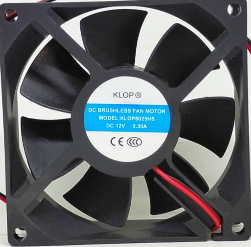
The FAN 12V, manufactured by Arduino, is an electromechanical device designed to create airflow for cooling or ventilation purposes. It is commonly used in electronic equipment to dissipate heat generated by components such as processors, power supplies, and other heat-sensitive devices. By maintaining optimal operating temperatures, the FAN 12V ensures the longevity and reliability of electronic systems.
Explore Projects Built with FAN
 Open Project in Cirkit Designer
 Open Project in Cirkit Designer
 Open Project in Cirkit Designer
 Open Project in Cirkit Designer
Explore Projects Built with FAN
Open Project in Cirkit DesignerOpen Project in Cirkit DesignerOpen Project in Cirkit DesignerOpen Project in Cirkit DesignerCommon Applications and Use Cases
- Cooling microcontrollers, processors, and power supplies in electronic circuits.
- Ventilation in enclosures or cabinets housing electronic equipment.
- Heat dissipation in 3D printers, robotics, and industrial control systems.
- General-purpose cooling for small-scale projects and DIY applications.
Technical Specifications
The following table outlines the key technical details of the FAN 12V:
| Parameter | Specification |
|---|---|
| Operating Voltage | 12V DC |
| Operating Current | 0.15A (typical) |
| Power Consumption | 1.8W |
| Airflow | 25 CFM (Cubic Feet/Minute) |
| Fan Speed | 3000 RPM |
| Noise Level | 25 dBA |
| Dimensions | 40mm x 40mm x 10mm |
| Connector Type | 2-pin JST or bare wires |
| Bearing Type | Sleeve Bearing |
| Operating Temperature | -10°C to 70°C |
| Weight | 15g |
Pin Configuration and Descriptions
The FAN 12V typically comes with a 2-pin connector or bare wires for easy integration into circuits. The pin configuration is as follows:
| Pin/Wire | Color | Description |
|---|---|---|
| Pin 1 | Red | Positive terminal (+12V DC) |
| Pin 2 | Black | Ground (GND) |
Usage Instructions
How to Use the FAN 12V in a Circuit
- Power Supply: Ensure that the power supply provides a stable 12V DC output. The FAN 12V requires a current of approximately 0.15A.
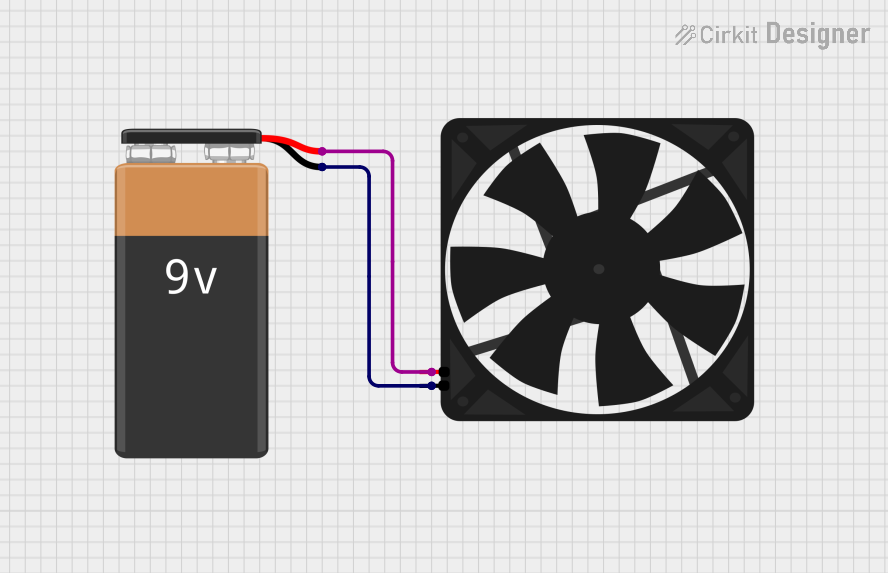
- Connection: Connect the red wire (positive terminal) to the 12V DC power source and the black wire (ground) to the GND of the power source or circuit.
- Mounting: Secure the fan in place using screws or adhesive mounts. Ensure that the airflow direction aligns with the cooling requirements of your application.
- Control (Optional): For variable speed control, you can use a PWM (Pulse Width Modulation) signal from a microcontroller like the Arduino UNO. A transistor or MOSFET may be required to handle the fan's current.
Important Considerations and Best Practices
- Voltage Tolerance: Do not exceed the rated 12V DC input to avoid damaging the fan.
- Airflow Direction: Check the markings on the fan housing to determine the airflow direction and ensure proper installation.
- Noise Reduction: Use rubber mounts or grommets to minimize vibration and noise.
- Dust Accumulation: Periodically clean the fan blades to prevent dust buildup, which can reduce efficiency.
- PWM Control: If using PWM for speed control, ensure the frequency is compatible with the fan's motor (typically 25kHz or higher).
Example: Controlling the FAN 12V with Arduino UNO
Below is an example of how to control the FAN 12V using an Arduino UNO and a transistor for PWM speed control:
// Define the PWM pin connected to the transistor's base
const int fanPin = 9; // Pin 9 supports PWM output

void setup() {
  pinMode(fanPin, OUTPUT); // Set the fan pin as an output
}

void loop() {
  // Gradually increase fan speed
  for (int speed = 0; speed <= 255; speed += 5) {
    analogWrite(fanPin, speed); // Write PWM signal to control fan speed
    delay(50); // Wait for 50ms before increasing speed
  }

  // Gradually decrease fan speed
  for (int speed = 255; speed >= 0; speed -= 5) {
    analogWrite(fanPin, speed); // Write PWM signal to control fan speed
    delay(50); // Wait for 50ms before decreasing speed
  }
}
Note: Use a suitable NPN transistor (e.g., 2N2222) or MOSFET (e.g., IRF540N) to handle the fan's current. Connect the fan's positive terminal to 12V and its negative terminal to the transistor's collector (or drain). The emitter (or source) should be connected to GND.
Troubleshooting and FAQs
Common Issues and Solutions
Fan Does Not Spin
- Cause: Insufficient voltage or incorrect wiring.
- Solution: Verify that the power supply provides 12V DC and check the wiring connections.
Fan Spins Slowly
- Cause: Insufficient current or excessive load on the power supply.
- Solution: Ensure the power supply can deliver at least 0.15A. Check for obstructions or excessive dust on the fan blades.
Excessive Noise
- Cause: Vibration or worn-out bearings.
- Solution: Use rubber mounts to reduce vibration. If the noise persists, consider replacing the fan.
Fan Overheats
- Cause: Prolonged operation in high-temperature environments.
- Solution: Ensure the ambient temperature does not exceed 70°C. Improve ventilation around the fan.
FAQs
Q1: Can I use the FAN 12V with a 5V power supply?
A1: No, the FAN 12V requires a 12V DC power supply for proper operation. Using a lower voltage will result in reduced performance or failure to spin.
Q2: Can I reverse the polarity of the wires?
A2: No, reversing the polarity can damage the fan's motor. Always connect the red wire to the positive terminal and the black wire to ground.
Q3: Is the FAN 12V waterproof?
A3: No, the FAN 12V is not waterproof. Avoid exposing it to water or high humidity environments.
Q4: Can I control the fan speed without a microcontroller?
A4: Yes, you can use a variable resistor (potentiometer) or a dedicated fan speed controller circuit to adjust the speed manually.
By following this documentation, you can effectively integrate and operate the Arduino FAN 12V in your projects.