
How to Use Engine with gearbox 6 VDC 200rpm up: Examples, Pinouts, and Specs
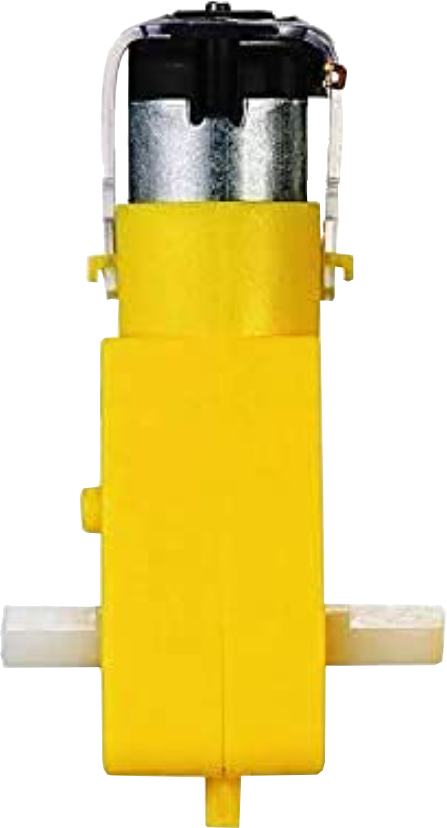
 Design with Engine with gearbox 6 VDC 200rpm up in Cirkit Designer
Introduction
The Engine with Gearbox 6 VDC 200rpm is a DC motor with an integrated gearbox designed to operate at 6 volts. It provides a rotational speed of 200 revolutions per minute (rpm), making it suitable for applications requiring moderate torque and speed control. The gearbox reduces the motor's speed while increasing its torque, making it ideal for robotics, small machinery, and hobbyist projects.
Explore Projects Built with Engine with gearbox 6 VDC 200rpm up
 Open Project in Cirkit Designer
 Open Project in Cirkit Designer
 Open Project in Cirkit Designer
 Open Project in Cirkit Designer
Explore Projects Built with Engine with gearbox 6 VDC 200rpm up
Open Project in Cirkit DesignerOpen Project in Cirkit DesignerOpen Project in Cirkit DesignerOpen Project in Cirkit DesignerCommon Applications and Use Cases
- Robotics: Driving wheels or actuators in small robots.
- Conveyor belts: Powering lightweight conveyor systems.
- DIY projects: Used in hobbyist creations like RC cars or automated systems.
- Educational purposes: Demonstrating motor and gearbox functionality in classrooms.
Technical Specifications
Below are the key technical details of the Engine with Gearbox 6 VDC 200rpm:
| Parameter | Value |
|---|---|
| Operating Voltage | 6 V DC |
| No-Load Speed | 200 rpm |
| Gearbox Ratio | Typically 1:30 (varies by model) |
| Stall Torque | ~1.5 kg·cm (approximate) |
| No-Load Current | ~150 mA |
| Stall Current | ~1.2 A |
| Shaft Diameter | 6 mm |
| Shaft Length | 15 mm |
| Motor Dimensions | 37 mm (diameter) x 70 mm (length) |
| Weight | ~150 g |
Pin Configuration and Descriptions
The motor typically has two terminals for electrical connections:
| Pin | Description |
|---|---|
| + | Positive terminal for power input. |
| - | Negative terminal for power input. |
Note: Reversing the polarity of the terminals will reverse the motor's rotation direction.
Usage Instructions
How to Use the Component in a Circuit
- Power Supply: Connect the motor to a 6 V DC power source. Ensure the power supply can provide sufficient current (at least 1.2 A for stall conditions).
- Polarity Control: To control the direction of rotation, reverse the polarity of the connections to the motor terminals.
- Speed Control: Use a Pulse Width Modulation (PWM) signal to control the motor's speed. This can be achieved using a motor driver or an Arduino.
- Motor Driver: For better control, use an H-bridge motor driver (e.g., L298N or L293D) to manage speed and direction.
Important Considerations and Best Practices
- Avoid Overloading: Do not exceed the motor's torque rating to prevent damage to the gearbox.
- Heat Management: Prolonged operation at high currents may cause the motor to overheat. Allow cooling periods during extended use.
- Power Supply: Use a regulated power supply to avoid voltage spikes that could damage the motor.
- Mounting: Secure the motor properly to prevent vibrations or misalignment, which could damage the shaft or gearbox.
Example: Connecting to an Arduino UNO
Below is an example of how to control the motor using an Arduino UNO and an L298N motor driver:
// Define motor control pins
const int ENA = 9;  // PWM pin for speed control
const int IN1 = 8;  // Direction control pin 1
const int IN2 = 7;  // Direction control pin 2

void setup() {
  // Set motor control pins as outputs
  pinMode(ENA, OUTPUT);
  pinMode(IN1, OUTPUT);
  pinMode(IN2, OUTPUT);
}

void loop() {
  // Rotate motor forward at 75% speed
  analogWrite(ENA, 191); // 75% of 255 (PWM duty cycle)
  digitalWrite(IN1, HIGH);
  digitalWrite(IN2, LOW);
  delay(3000); // Run for 3 seconds

  // Stop the motor
  analogWrite(ENA, 0);
  delay(1000); // Pause for 1 second

  // Rotate motor backward at 50% speed
  analogWrite(ENA, 127); // 50% of 255 (PWM duty cycle)
  digitalWrite(IN1, LOW);
  digitalWrite(IN2, HIGH);
  delay(3000); // Run for 3 seconds

  // Stop the motor
  analogWrite(ENA, 0);
  delay(1000); // Pause for 1 second
}
Note: Ensure the motor driver is connected to the Arduino and motor correctly. The ENA pin controls speed via PWM, while IN1 and IN2 control the direction.
Troubleshooting and FAQs
Common Issues and Solutions
Motor Does Not Spin
- Cause: Insufficient power supply or loose connections.
- Solution: Check the power supply voltage and current rating. Ensure all connections are secure.
Motor Spins in the Wrong Direction
- Cause: Incorrect polarity of the motor terminals.
- Solution: Reverse the connections to the motor terminals or adjust the direction control pins in your circuit.
Motor Overheats
- Cause: Prolonged operation at high current or excessive load.
- Solution: Reduce the load on the motor or allow cooling periods during operation.
Noisy Operation
- Cause: Loose mounting or worn-out gearbox.
- Solution: Secure the motor properly and inspect the gearbox for wear.
FAQs
Can I use a higher voltage than 6 V?
- It is not recommended, as higher voltages can damage the motor or gearbox. Use a regulated 6 V power supply.
How do I increase the torque?
- The torque is determined by the motor and gearbox design. To increase torque, consider using a motor with a higher gear reduction ratio.
Can I control this motor without a motor driver?
- Yes, but a motor driver is recommended for precise speed and direction control. Without a driver, you can only control the motor's on/off state and direction by manually switching the polarity.
This documentation provides all the necessary details to effectively use and troubleshoot the Engine with Gearbox 6 VDC 200rpm.