
How to Use interrupteur inverseur: Examples, Pinouts, and Specs
 Design with interrupteur inverseur in Cirkit Designer
Introduction
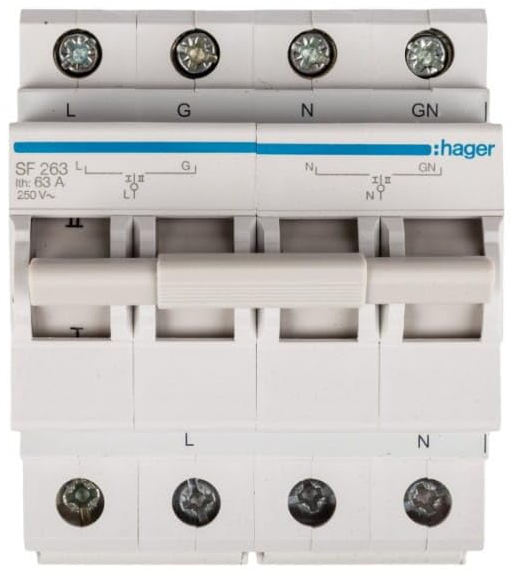
The Hager SF263 is a high-quality interrupteur inverseur (toggle switch) designed to connect or disconnect two different circuits, enabling users to switch between them seamlessly. This versatile component is widely used in residential, commercial, and industrial applications where circuit control is required. Its robust design ensures reliable operation and long-term durability.
Explore Projects Built with interrupteur inverseur
 Open Project in Cirkit Designer
 Open Project in Cirkit Designer
 Open Project in Cirkit Designer
 Open Project in Cirkit Designer
Explore Projects Built with interrupteur inverseur
Open Project in Cirkit DesignerOpen Project in Cirkit DesignerOpen Project in Cirkit DesignerOpen Project in Cirkit DesignerCommon Applications and Use Cases
- Lighting Control: Switching between two lighting circuits in homes or offices.
- Power Source Selection: Alternating between two power sources, such as mains and backup power.
- Motor Control: Switching between forward and reverse motor directions.
- Automation Systems: Used in control panels for switching between operational modes.
Technical Specifications
The Hager SF263 toggle switch is designed to meet the needs of various electrical systems. Below are its key technical details:
Key Technical Details
| Parameter | Specification |
|---|---|
| Manufacturer | Hager |
| Part ID | SF263 |
| Type | Toggle Switch (Interrupteur Inverseur) |
| Rated Voltage | 250V AC |
| Rated Current | 16A |
| Number of Poles | Single Pole |
| Switching Mechanism | SPDT (Single Pole Double Throw) |
| Operating Temperature | -5°C to +40°C |
| Mounting Type | Flush-mounted |
| Dimensions | 45mm x 45mm x 35mm |
| Compliance Standards | IEC 60669-1 |
Pin Configuration and Descriptions
The SF263 has three terminals for wiring, as described below:
| Terminal Label | Description |
|---|---|
| Common (COM) | The input terminal for the switch. |
| L1 | Output terminal connected to Circuit 1. |
| L2 | Output terminal connected to Circuit 2. |
Usage Instructions
The Hager SF263 toggle switch is straightforward to use and install. Follow the steps below to integrate it into your circuit:
Wiring Instructions
- Turn Off Power: Ensure the power supply to the circuit is turned off before installation.
- Identify Terminals: Locate the three terminals on the switch: COM, L1, and L2.
- Connect Wires:
- Connect the input wire (live wire) to the COM terminal.
- Connect the output wire for Circuit 1 to the L1 terminal.
- Connect the output wire for Circuit 2 to the L2 terminal.
- Secure Connections: Tighten the terminal screws to ensure secure connections.
- Mount the Switch: Install the switch into the wall box or panel using the appropriate mounting hardware.
- Restore Power: Turn the power supply back on and test the switch operation.
Important Considerations and Best Practices
- Ensure the switch is rated for the voltage and current of your application.
- Use appropriate wire gauges as per local electrical codes.
- Avoid overloading the switch beyond its rated current (16A).
- If used in a high-temperature environment, ensure adequate ventilation to prevent overheating.
- For safety, always use a multimeter to verify connections before restoring power.
Example: Using the SF263 with an Arduino UNO
The SF263 can be used as an input device for an Arduino UNO to detect the state of the switch. Below is an example code snippet:
// Example code to read the state of the Hager SF263 toggle switch
// connected to an Arduino UNO. The COM terminal is connected to GND,
// and L1 and L2 are connected to digital pins 2 and 3, respectively.

const int switchL1 = 2; // Pin connected to L1 terminal
const int switchL2 = 3; // Pin connected to L2 terminal

void setup() {
  pinMode(switchL1, INPUT_PULLUP); // Set L1 pin as input with pull-up resistor
  pinMode(switchL2, INPUT_PULLUP); // Set L2 pin as input with pull-up resistor
  Serial.begin(9600); // Initialize serial communication
}

void loop() {
  int stateL1 = digitalRead(switchL1); // Read state of L1
  int stateL2 = digitalRead(switchL2); // Read state of L2

  // Print the state of the switch to the Serial Monitor
  if (stateL1 == LOW) {
    Serial.println("Switch is in position: L1");
  } else if (stateL2 == LOW) {
    Serial.println("Switch is in position: L2");
  } else {
    Serial.println("Switch is in an undefined state.");
  }

  delay(500); // Delay for stability
}
Troubleshooting and FAQs
Common Issues and Solutions
Switch Does Not Operate Properly:
- Cause: Loose or incorrect wiring.
- Solution: Double-check all connections and ensure wires are securely fastened to the correct terminals.
Overheating of the Switch:
- Cause: Overloading beyond the rated current (16A).
- Solution: Reduce the load or use a switch with a higher current rating.
Switch Fails to Toggle Between Circuits:
- Cause: Faulty internal mechanism or damaged contacts.
- Solution: Replace the switch with a new one.
Arduino Fails to Detect Switch State:
- Cause: Incorrect wiring or missing pull-up resistors.
- Solution: Verify connections to the Arduino and ensure pull-up resistors are enabled.
FAQs
Q1: Can the SF263 be used for DC circuits?
A1: The SF263 is primarily designed for AC circuits. For DC applications, ensure the voltage and current ratings are within safe limits.
Q2: Is the SF263 waterproof?
A2: No, the SF263 is not waterproof. It should be installed in a dry environment or within a weatherproof enclosure.
Q3: Can I use the SF263 to control a motor?
A3: Yes, the SF263 can be used to control a motor, provided the motor's current does not exceed 16A.
Q4: What is the lifespan of the SF263?
A4: The SF263 is designed for long-term use and can handle thousands of switching cycles under normal operating conditions.
By following this documentation, users can effectively integrate and troubleshoot the Hager SF263 interrupteur inverseur in their projects.