
How to Use Battery Switch ON/OFF 275A: Examples, Pinouts, and Specs
 Design with Battery Switch ON/OFF 275A in Cirkit Designer
Introduction
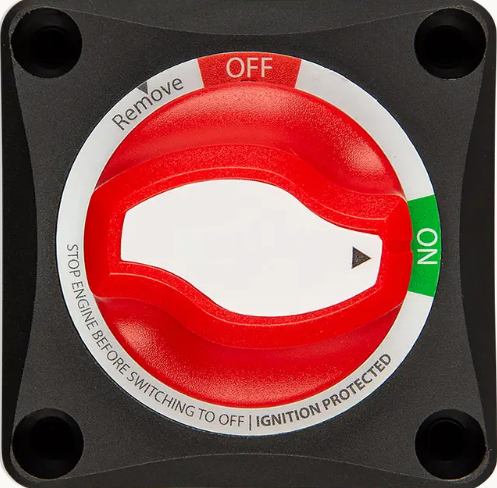
The Battery Switch ON/OFF 275A is a heavy-duty switch designed to connect or disconnect a battery from a circuit. With a current handling capacity of up to 275 amps, this switch is ideal for high-power applications. It is commonly used in automotive, marine, and industrial systems to ensure safety, prevent battery drain, and provide control over the power supply. Its robust design makes it suitable for harsh environments, offering reliable performance in demanding conditions.
Explore Projects Built with Battery Switch ON/OFF 275A
 Open Project in Cirkit Designer
 Open Project in Cirkit Designer
 Open Project in Cirkit Designer
 Open Project in Cirkit Designer
Explore Projects Built with Battery Switch ON/OFF 275A
Open Project in Cirkit DesignerOpen Project in Cirkit DesignerOpen Project in Cirkit DesignerOpen Project in Cirkit DesignerCommon Applications
- Automotive systems for isolating the battery during maintenance or storage.
- Marine applications to prevent battery drain and ensure safety.
- Industrial equipment requiring high-current power control.
- Backup power systems to manage battery connections.
Technical Specifications
The following table outlines the key technical details of the Battery Switch ON/OFF 275A:
| Parameter | Specification |
|---|---|
| Maximum Current Rating | 275A |
| Voltage Rating | 12V - 48V DC |
| Operating Temperature | -40°C to 85°C |
| Housing Material | High-strength thermoplastic |
| Mounting Type | Panel or surface mount |
| Dimensions | 69mm x 69mm x 75mm |
| Weight | 0.3 kg |
| IP Rating | IP66 (dust-tight and water-resistant) |
Pin Configuration and Descriptions
The Battery Switch ON/OFF 275A typically has two main terminals and one optional ground terminal. The table below describes the terminals:
| Terminal | Description |
|---|---|
| Terminal 1 | Connects to the positive terminal of the battery. |
| Terminal 2 | Connects to the load or circuit to be powered. |
| Ground (optional) | Used for grounding the switch housing (if required for specific installations). |
Usage Instructions
How to Use the Battery Switch ON/OFF 275A in a Circuit
- Mounting the Switch: Secure the switch to a panel or surface using the provided mounting holes. Ensure the location is accessible and protected from excessive heat or moisture.
- Connecting the Terminals:
- Connect Terminal 1 to the positive terminal of the battery using a heavy-duty cable.
- Connect Terminal 2 to the load or circuit you wish to power.
- If required, connect the optional ground terminal to the chassis or a suitable ground point.
- Operation:
- Turn the switch to the "ON" position to connect the battery to the circuit.
- Turn the switch to the "OFF" position to disconnect the battery and isolate the circuit.
Important Considerations and Best Practices
- Use cables rated for the maximum current (275A) to prevent overheating or voltage drops.
- Ensure all connections are tight and secure to avoid arcing or power loss.
- Install the switch in a location that is easily accessible but protected from direct exposure to water or extreme temperatures.
- For marine applications, ensure the switch is installed above the waterline to prevent water ingress.
Example: Connecting to an Arduino UNO
While the Battery Switch ON/OFF 275A is not directly connected to an Arduino UNO, it can be used to control the power supply to an Arduino-based system. Below is an example of how to use the switch in such a setup:
- Connect the battery's positive terminal to Terminal 1 of the switch.
- Connect Terminal 2 of the switch to the VIN pin of the Arduino UNO via a voltage regulator (if the battery voltage exceeds 12V).
- Connect the battery's negative terminal to the GND pin of the Arduino UNO.
// Example Arduino code to blink an LED when powered through the Battery Switch
// Ensure the battery switch is in the "ON" position to supply power to the Arduino.

const int ledPin = 13; // Pin connected to the onboard LED

void setup() {
  pinMode(ledPin, OUTPUT); // Set the LED pin as an output
}

void loop() {
  digitalWrite(ledPin, HIGH); // Turn the LED on
  delay(1000);                // Wait for 1 second
  digitalWrite(ledPin, LOW);  // Turn the LED off
  delay(1000);                // Wait for 1 second
}
Troubleshooting and FAQs
Common Issues and Solutions
| Issue | Possible Cause | Solution |
|---|---|---|
| Switch does not turn on the circuit. | Loose or improper connections. | Check and tighten all cable connections. |
| Overheating of the switch or cables. | Cables not rated for 275A current. | Use cables with appropriate current rating. |
| Corrosion on terminals. | Exposure to moisture or saltwater. | Clean terminals and apply a protective coating or use corrosion-resistant cables. |
| Switch is difficult to operate. | Dirt or debris in the mechanism. | Clean the switch and ensure it is free of obstructions. |
FAQs
Can this switch handle AC power?
- No, the Battery Switch ON/OFF 275A is designed for DC power systems only.
Is the switch waterproof?
- Yes, the switch has an IP66 rating, making it dust-tight and resistant to water jets. However, it should not be submerged.
Can I use this switch for a dual-battery system?
- This switch is designed for single-battery systems. For dual-battery setups, consider using a dual-battery isolator switch.
What is the maximum wire gauge supported?
- The switch supports heavy-duty cables up to 1/0 AWG (50mm²).
By following this documentation, you can safely and effectively use the Battery Switch ON/OFF 275A in your projects.