
How to Use 1379662-2 TE Connecor: Examples, Pinouts, and Specs
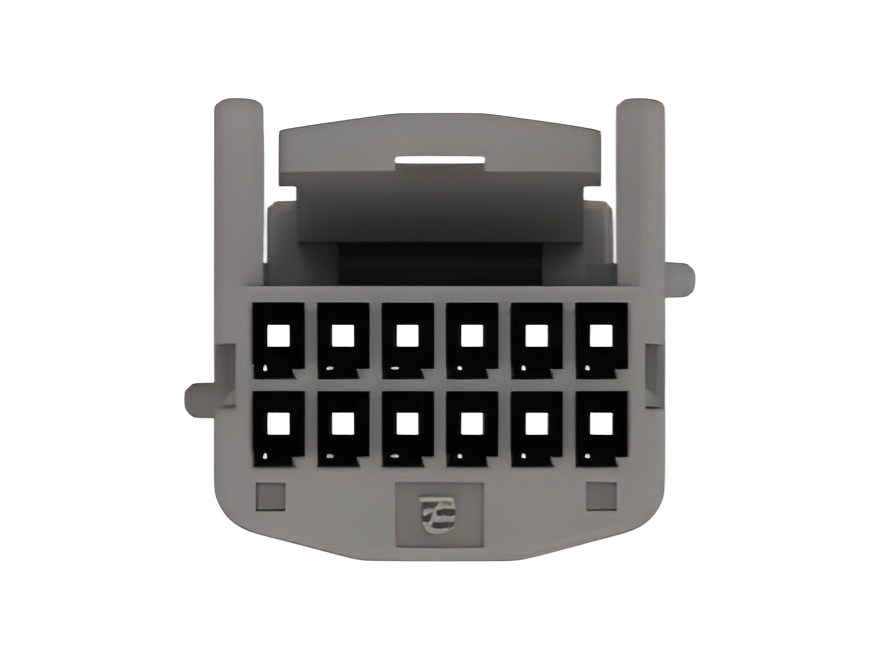
 Design with 1379662-2 TE Connecor in Cirkit Designer
Introduction
The 1379662-2 TE Connector is a high-performance electrical connector manufactured by TE Connectivity. It is designed to provide reliable and durable connections in a wide range of applications. With its robust construction and ease of use, this connector is ideal for environments requiring secure and long-lasting electrical connections.
Explore Projects Built with 1379662-2 TE Connecor
 Open Project in Cirkit Designer
 Open Project in Cirkit Designer
 Open Project in Cirkit Designer
 Open Project in Cirkit Designer
Explore Projects Built with 1379662-2 TE Connecor
Open Project in Cirkit DesignerOpen Project in Cirkit DesignerOpen Project in Cirkit DesignerOpen Project in Cirkit DesignerCommon Applications and Use Cases
- Automotive wiring systems
- Industrial machinery and equipment
- Consumer electronics
- Telecommunications and networking
- Power distribution systems
Technical Specifications
Key Technical Details
| Parameter | Specification |
|---|---|
| Manufacturer | TE Connectivity |
| Part Number | 1379662-2 |
| Connector Type | Electrical Connector |
| Number of Positions | 2 |
| Mounting Type | Free-hanging (in-line) |
| Contact Termination | Crimp |
| Operating Voltage | Up to 250V |
| Current Rating | Up to 10A |
| Operating Temperature | -40°C to +105°C |
| Material | High-quality thermoplastic housing |
| Contact Material | Tin-plated copper alloy |
Pin Configuration and Descriptions
The 1379662-2 TE Connector features a 2-position configuration. Below is the pin description:
| Pin Number | Description | Notes |
|---|---|---|
| 1 | Positive terminal | Connect to the positive voltage source |
| 2 | Negative terminal (ground) | Connect to the ground or return path |
Usage Instructions
How to Use the Component in a Circuit
- Prepare the Wires: Strip the insulation from the wires to expose approximately 5-7 mm of conductor.
- Crimp the Contacts: Use a compatible crimping tool to attach the connector contacts to the stripped wires. Ensure a secure and firm crimp for reliable connections.
- Insert Contacts into the Housing: Push the crimped contacts into the connector housing until they click into place.
- Connect the Mating Connector: Align the connector with its mating counterpart and push them together until they lock securely.
- Verify the Connection: Check the connection for stability and ensure there is no loose wiring.
Important Considerations and Best Practices
- Use the Correct Crimping Tool: Always use the recommended crimping tool for this connector to ensure proper termination.
- Avoid Overheating: Do not expose the connector to temperatures beyond its operating range (-40°C to +105°C).
- Inspect for Damage: Before use, inspect the connector for any visible damage or wear that could compromise its performance.
- Secure Connections: Ensure the connector is fully mated with its counterpart to prevent accidental disconnection.
Example: Connecting to an Arduino UNO
The 1379662-2 TE Connector can be used to connect external power or sensors to an Arduino UNO. Below is an example of how to use it for powering an Arduino UNO:
Circuit Diagram
- Pin 1 (Positive terminal) connects to the Arduino's VIN pin.
- Pin 2 (Negative terminal) connects to the Arduino's GND pin.
Sample Code
// Example code for reading a sensor connected via the 1379662-2 TE Connector
// Ensure the sensor's positive and ground wires are connected to the correct pins.

const int sensorPin = A0; // Analog pin connected to the sensor output
int sensorValue = 0;      // Variable to store the sensor reading

void setup() {
  Serial.begin(9600); // Initialize serial communication at 9600 baud
}

void loop() {
  sensorValue = analogRead(sensorPin); // Read the sensor value
  Serial.print("Sensor Value: ");
  Serial.println(sensorValue); // Print the sensor value to the Serial Monitor
  delay(1000); // Wait for 1 second before the next reading
}
Troubleshooting and FAQs
Common Issues Users Might Face
- Loose Connections: If the connector is not securely mated, it may cause intermittent connections.
- Solution: Ensure the connector is fully inserted and locked into place.
- Improper Crimping: Poorly crimped contacts can lead to unreliable connections.
- Solution: Use the recommended crimping tool and verify the quality of the crimp.
- Overheating: Operating the connector beyond its temperature or current rating can cause damage.
- Solution: Ensure the connector is used within its specified ratings.
- Corrosion on Contacts: Exposure to moisture or harsh environments may lead to contact corrosion.
- Solution: Use connectors with proper sealing or apply protective coatings if necessary.
FAQs
Q: Can this connector handle high-current applications?
A: Yes, the 1379662-2 TE Connector is rated for up to 10A, making it suitable for moderate current applications.
Q: Is this connector waterproof?
A: No, this connector is not inherently waterproof. For waterproof applications, additional sealing or a different connector model may be required.
Q: What is the recommended wire gauge for this connector?
A: The connector is compatible with wire sizes ranging from 18 AWG to 22 AWG.
Q: Can I reuse the connector contacts?
A: It is not recommended to reuse crimped contacts, as this may compromise the connection quality. Always use new contacts for reliable performance.