
How to Use cd4052 upside down: Examples, Pinouts, and Specs
 Design with cd4052 upside down in Cirkit Designer
Introduction
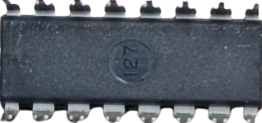
The CD4052 is a dual 4-channel analog multiplexer/demultiplexer IC. It is commonly used for routing analog or digital signals in electronic circuits. The IC features low on-resistance and high linearity, making it suitable for audio signal processing, sensor signal routing, and data acquisition systems. The "upside-down" orientation refers to the physical placement of the IC in a circuit, but the functionality remains the same.
Explore Projects Built with cd4052 upside down
 Open Project in Cirkit Designer
 Open Project in Cirkit Designer
 Open Project in Cirkit Designer
 Open Project in Cirkit Designer
Explore Projects Built with cd4052 upside down
Open Project in Cirkit DesignerOpen Project in Cirkit DesignerOpen Project in Cirkit DesignerOpen Project in Cirkit DesignerCommon Applications:
- Audio signal switching
- Sensor signal multiplexing
- Data acquisition systems
- Analog-to-digital converter (ADC) input expansion
- Communication systems
Technical Specifications
The CD4052 operates as a dual 4-channel multiplexer/demultiplexer, meaning it can route one of four inputs to a single output (or vice versa) for two independent channels. Below are the key technical details:
Key Specifications:
- Supply Voltage (VDD): 3V to 18V
- Input Voltage Range: 0V to VDD
- On-Resistance (RON): ~125Ω at VDD = 10V
- Maximum Signal Frequency: 40 MHz
- Operating Temperature Range: -55°C to +125°C
- Power Dissipation: 700 mW (maximum)
Pin Configuration and Descriptions:
The CD4052 is typically available in a 16-pin DIP, SOIC, or TSSOP package. Below is the pinout description:
| Pin Number | Pin Name | Description |
|---|---|---|
| 1 | A | Address select input A (controls channel selection) |
| 2 | EN (Inhibit) | Enable pin (active LOW; disables all channels when HIGH) |
| 3 | X0 | Channel 0 input/output for X |
| 4 | X1 | Channel 1 input/output for X |
| 5 | X2 | Channel 2 input/output for X |
| 6 | X3 | Channel 3 input/output for X |
| 7 | X (Common) | Common input/output for X channels |
| 8 | VSS | Ground (0V) |
| 9 | Y (Common) | Common input/output for Y channels |
| 10 | Y3 | Channel 3 input/output for Y |
| 11 | Y2 | Channel 2 input/output for Y |
| 12 | Y1 | Channel 1 input/output for Y |
| 13 | Y0 | Channel 0 input/output for Y |
| 14 | VDD | Positive supply voltage |
| 15 | B | Address select input B (controls channel selection) |
| 16 | NC | No connection |
Address Selection Table:
The selected channel is determined by the logic levels on the A and B address pins:
| B (Pin 15) | A (Pin 1) | Selected Channel |
|---|---|---|
| 0 | 0 | X0, Y0 |
| 0 | 1 | X1, Y1 |
| 1 | 0 | X2, Y2 |
| 1 | 1 | X3, Y3 |
Usage Instructions
How to Use the CD4052 in a Circuit:
- Power Supply: Connect the VDD pin to a positive voltage source (3V to 18V) and the VSS pin to ground.
- Channel Selection: Use the A and B address pins to select the desired channel. Apply logic HIGH (1) or LOW (0) signals to these pins as per the address selection table.
- Enable Pin: Ensure the EN (Inhibit) pin is set to LOW to enable the IC. If set to HIGH, all channels will be disabled.
- Signal Routing: Connect the input/output signals to the X or Y channels as needed. The common pins (X and Y) will route the selected channel's signal.
Important Considerations:
- Voltage Levels: Ensure that the input signal voltage does not exceed the supply voltage (VDD).
- On-Resistance: The on-resistance of the IC may affect signal quality, especially in high-precision analog applications.
- Decoupling Capacitor: Place a decoupling capacitor (e.g., 0.1 µF) near the VDD pin to stabilize the power supply.
Example: Connecting CD4052 to Arduino UNO
The CD4052 can be controlled using digital pins on an Arduino UNO. Below is an example code to select channels and read analog signals:
// Define Arduino pins connected to CD4052
const int pinA = 2; // Address pin A
const int pinB = 3; // Address pin B
const int enablePin = 4; // Enable pin (EN)
const int analogInput = A0; // Analog input connected to common pin (X or Y)

void setup() {
  // Set pin modes
  pinMode(pinA, OUTPUT);
  pinMode(pinB, OUTPUT);
  pinMode(enablePin, OUTPUT);

  // Enable the CD4052
  digitalWrite(enablePin, LOW); // Active LOW to enable the IC

  // Initialize serial communication for debugging
  Serial.begin(9600);
}

void loop() {
  for (int channel = 0; channel < 4; channel++) {
    // Set address pins to select the channel
    digitalWrite(pinA, channel & 0x01); // LSB of channel
    digitalWrite(pinB, (channel >> 1) & 0x01); // MSB of channel

    // Read the analog signal from the selected channel
    int signalValue = analogRead(analogInput);

    // Print the signal value to the Serial Monitor
    Serial.print("Channel ");
    Serial.print(channel);
    Serial.print(": ");
    Serial.println(signalValue);

    delay(500); // Wait for 500ms before switching to the next channel
  }
}
Notes:
- Connect the Arduino's 5V and GND pins to the CD4052's VDD and VSS pins, respectively.
- Ensure the input signals are within the voltage range supported by the CD4052.
Troubleshooting and FAQs
Common Issues:
No Signal Output:
- Ensure the EN (Inhibit) pin is set to LOW.
- Verify the address pins (A and B) are correctly configured.
- Check the power supply connections (VDD and VSS).
Signal Distortion:
- Verify that the input signal voltage does not exceed the supply voltage (VDD).
- Check for excessive on-resistance in the circuit, which may affect signal quality.
Incorrect Channel Selection:
- Double-check the logic levels on the A and B address pins.
- Ensure there are no loose or incorrect connections.
FAQs:
Q: Can the CD4052 handle digital signals?
A: Yes, the CD4052 can route both analog and digital signals, provided the signal voltage is within the supply voltage range.
Q: What happens if the EN pin is left floating?
A: The EN pin should not be left floating. It must be tied to either HIGH or LOW to ensure proper operation.
Q: Can I use the CD4052 with a 3.3V microcontroller?
A: Yes, the CD4052 can operate at 3.3V. Ensure that the input signals and supply voltage are compatible with this level.
Q: How do I reduce signal loss in my circuit?
A: Minimize the length of signal traces and use a higher supply voltage (within the IC's limits) to reduce on-resistance.