
How to Use Stepdown 3.3V: Examples, Pinouts, and Specs
 Design with Stepdown 3.3V in Cirkit Designer
Introduction
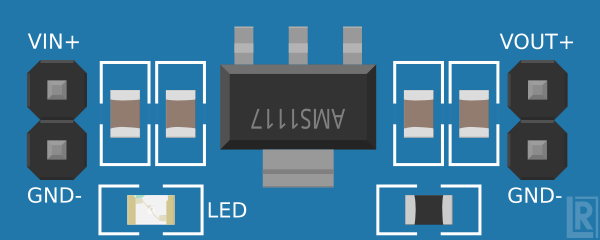
The Stepdown 3.3V is a voltage regulator designed to convert a higher input voltage (e.g., 5V, 12V) into a stable 3.3V output. This component is essential for powering low-voltage devices such as microcontrollers, sensors, and communication modules that require a consistent 3.3V supply. Its compact design and efficiency make it a popular choice in embedded systems, IoT devices, and portable electronics.
Explore Projects Built with Stepdown 3.3V
 Open Project in Cirkit Designer
 Open Project in Cirkit Designer
 Open Project in Cirkit Designer
 Open Project in Cirkit Designer
Explore Projects Built with Stepdown 3.3V
Open Project in Cirkit DesignerOpen Project in Cirkit DesignerOpen Project in Cirkit DesignerOpen Project in Cirkit DesignerCommon Applications:
- Powering 3.3V microcontrollers (e.g., ESP8266, ESP32)
- Supplying voltage to 3.3V sensors and modules (e.g., temperature sensors, RF modules)
- Voltage regulation in battery-powered devices
- General-purpose voltage conversion in embedded systems
Technical Specifications
Below are the key technical details of the Stepdown 3.3V voltage regulator:
| Parameter | Value |
|---|---|
| Input Voltage Range | 4.5V to 24V |
| Output Voltage | 3.3V ± 2% |
| Maximum Output Current | 800mA to 1.5A (depending on model) |
| Efficiency | Up to 90% |
| Operating Temperature | -40°C to +85°C |
| Package Type | TO-220, SMD, or module-based |
Pin Configuration
The pinout of the Stepdown 3.3V regulator may vary depending on the specific model. Below is a general pin configuration for a common 3-pin linear regulator (e.g., LM1117-3.3):
| Pin | Name | Description |
|---|---|---|
| 1 | Input (VIN) | Connect to the higher input voltage (e.g., 5V, 12V) |
| 2 | Ground (GND) | Connect to the circuit ground |
| 3 | Output (VOUT) | Provides the regulated 3.3V output |
For module-based stepdown converters, additional pins such as "Enable" or "Adjust" may be present. Refer to the specific datasheet for details.
Usage Instructions
How to Use the Stepdown 3.3V in a Circuit
Connect the Input Voltage (VIN):
Attach the input voltage source (e.g., 5V or 12V) to the VIN pin. Ensure the input voltage is within the specified range (4.5V to 24V).Connect the Ground (GND):
Connect the GND pin to the ground of your circuit.Connect the Output (VOUT):
Attach the VOUT pin to the device or circuit requiring a 3.3V supply.Add Capacitors (if required):
For stable operation, place a capacitor (e.g., 10µF) between the VIN and GND pins, and another capacitor (e.g., 10µF) between the VOUT and GND pins. These capacitors help reduce noise and improve stability.
Important Considerations:
- Heat Dissipation: If the input voltage is significantly higher than 3.3V and the current draw is high, the regulator may generate heat. Use a heatsink or ensure proper ventilation if necessary.
- Input Voltage Range: Do not exceed the maximum input voltage rating, as this can damage the regulator.
- Current Limitations: Ensure the connected load does not exceed the maximum output current rating of the regulator.
Example: Using Stepdown 3.3V with Arduino UNO
Although the Arduino UNO operates at 5V, you can use the Stepdown 3.3V to power 3.3V peripherals. Below is an example of connecting a 3.3V sensor to the Arduino UNO using the Stepdown 3.3V regulator.
Circuit Connections:
- Connect the Stepdown 3.3V's VIN to the Arduino's 5V pin.
- Connect the Stepdown 3.3V's GND to the Arduino's GND pin.
- Connect the Stepdown 3.3V's VOUT to the sensor's VCC pin.
- Connect the sensor's GND to the Arduino's GND.
Example Code:
// Example code for reading data from a 3.3V sensor connected to Arduino UNO

const int sensorPin = A0; // Analog pin connected to the sensor output

void setup() {
  Serial.begin(9600); // Initialize serial communication
  pinMode(sensorPin, INPUT); // Set the sensor pin as input
}

void loop() {
  int sensorValue = analogRead(sensorPin); // Read the sensor value
  float voltage = sensorValue * (5.0 / 1023.0);
  // Convert the analog reading to voltage (assuming 5V reference)

  Serial.print("Sensor Voltage: ");
  Serial.print(voltage);
  Serial.println(" V");

  delay(1000); // Wait for 1 second before the next reading
}
Troubleshooting and FAQs
Common Issues and Solutions:
No Output Voltage:
- Cause: Input voltage is too low or not connected properly.
- Solution: Verify that the input voltage is within the specified range and securely connected.
Overheating:
- Cause: Excessive current draw or high input voltage difference.
- Solution: Reduce the load current or use a heatsink to dissipate heat.
Output Voltage Fluctuations:
- Cause: Insufficient decoupling capacitors or unstable input voltage.
- Solution: Add capacitors (e.g., 10µF) between VIN and GND, and VOUT and GND.
Damaged Regulator:
- Cause: Input voltage exceeded the maximum rating or output was short-circuited.
- Solution: Replace the regulator and ensure proper voltage and current limits are observed.
FAQs:
Q1: Can I use the Stepdown 3.3V to power a 3.3V microcontroller directly?
A1: Yes, as long as the microcontroller's current requirements are within the regulator's maximum output current rating.
Q2: Do I need to use external capacitors with the Stepdown 3.3V?
A2: While some module-based regulators include built-in capacitors, it is recommended to add external capacitors for improved stability and noise reduction.
Q3: Can I use the Stepdown 3.3V with a battery?
A3: Yes, as long as the battery voltage is within the regulator's input voltage range.
Q4: What happens if I exceed the maximum input voltage?
A4: Exceeding the input voltage can permanently damage the regulator. Always ensure the input voltage is within the specified range.