The MKE-S15 DS18B20 is a waterproof digital temperature sensor designed for precise and reliable temperature measurements in a wide range of environments. Encased in a stainless steel probe, it is ideal for applications requiring durability and resistance to moisture, such as outdoor weather monitoring, liquid temperature measurement, and industrial processes.
This sensor communicates using the 1-Wire protocol, allowing multiple sensors to be connected to a single data line. Its compact design and waterproof capabilities make it a versatile choice for both hobbyist and professional projects.
Explore Projects Built with MKE-S15 DS18B20 Waterproof Temperature Sensor
Use Cirkit Designer to design, explore, and prototype these projects online. Some projects support real-time simulation. Click "Open Project" to start designing instantly!
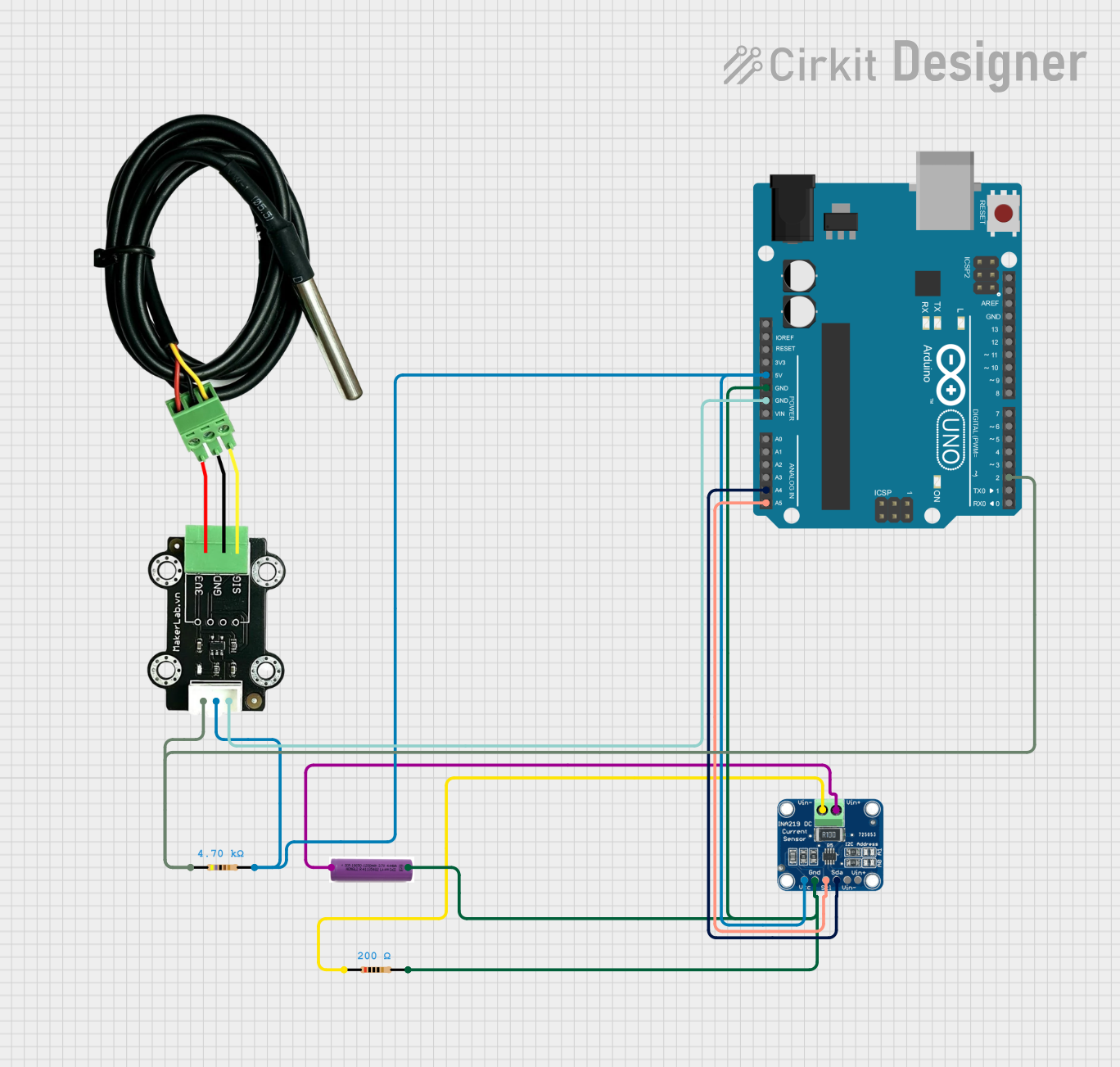
This circuit uses an Arduino UNO to read temperature data from a DS18B20 waterproof temperature sensor and monitor voltage and current using an INA219 sensor. The Arduino is powered by a 3.7V battery and communicates with the INA219 via I2C, while the DS18B20 sensor is connected to a digital pin with a pull-up resistor.
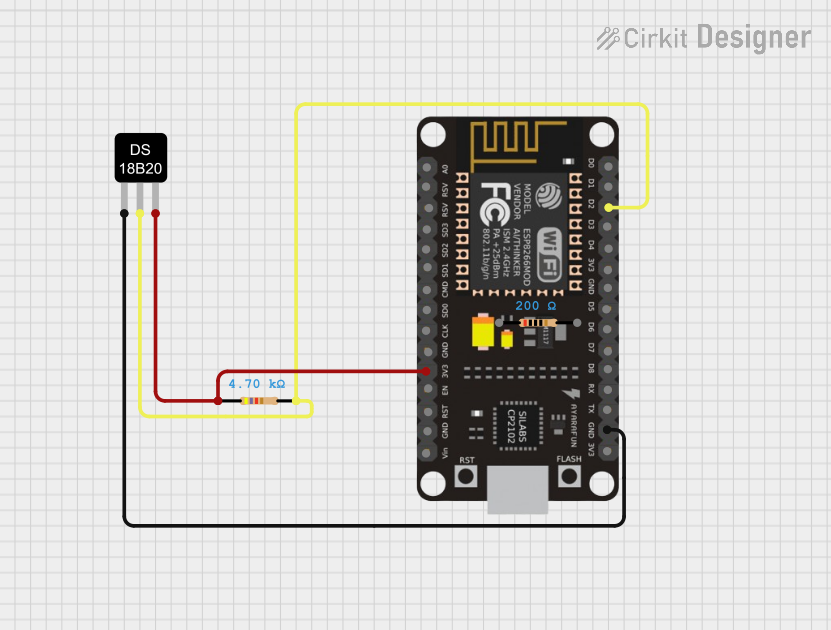
This circuit features an ESP8266 NodeMCU microcontroller connected to a DS18B20 temperature sensor. The sensor's data line (DQ) is connected to the D2 pin of the NodeMCU through a 4.7k ohm pull-up resistor, which is a common configuration for one-wire temperature sensors. The sensor is powered by the 3.3V supply from the NodeMCU, and both the sensor and the NodeMCU share a common ground.
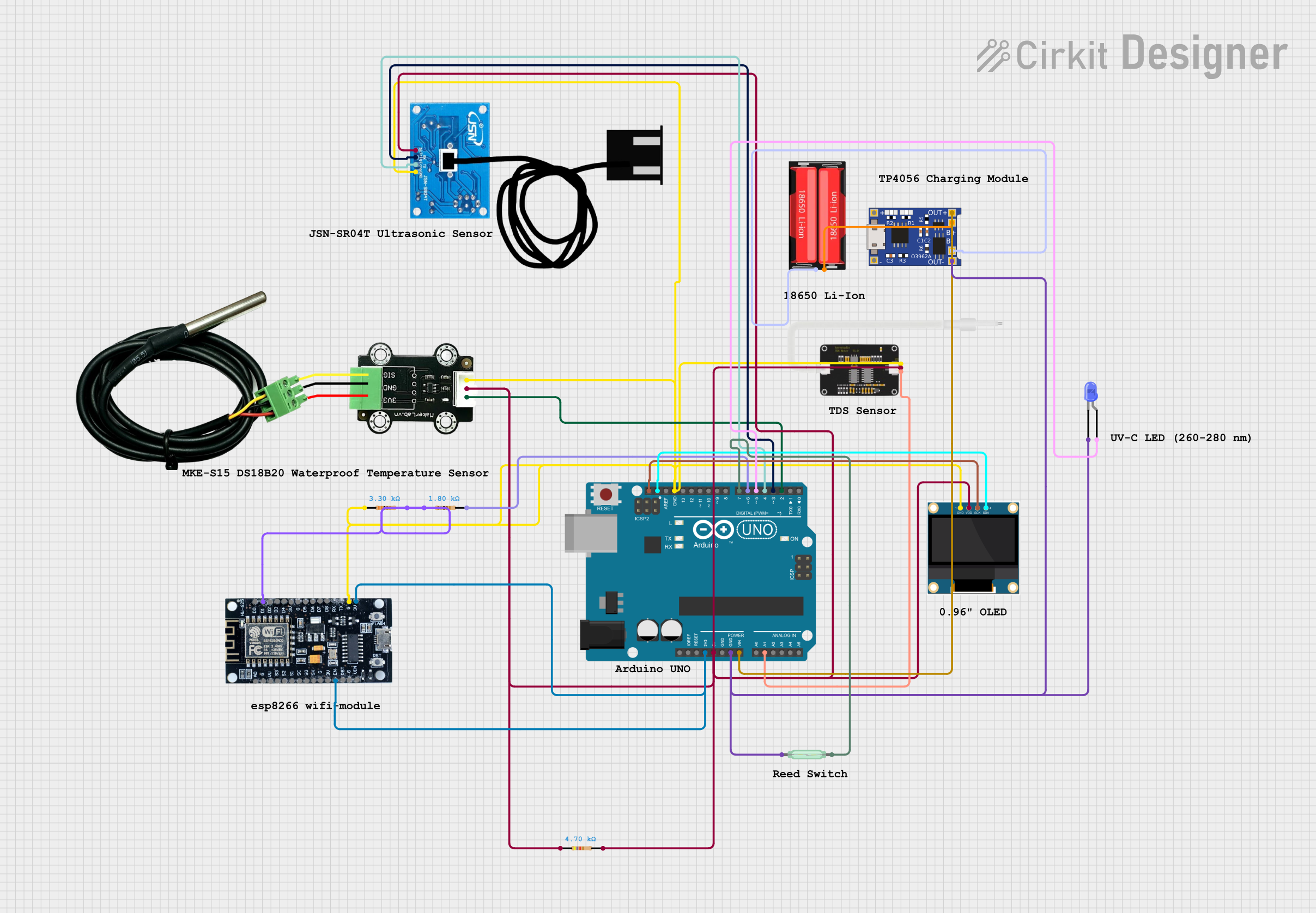
This circuit is a smart water bottle monitoring system that uses an Arduino UNO to read data from various sensors, including a temperature sensor, TDS sensor, ultrasonic sensor, and reed switch. The data is displayed on an OLED screen and transmitted wirelessly via an ESP8266 module, allowing remote monitoring of water quality, temperature, level, and lid status.
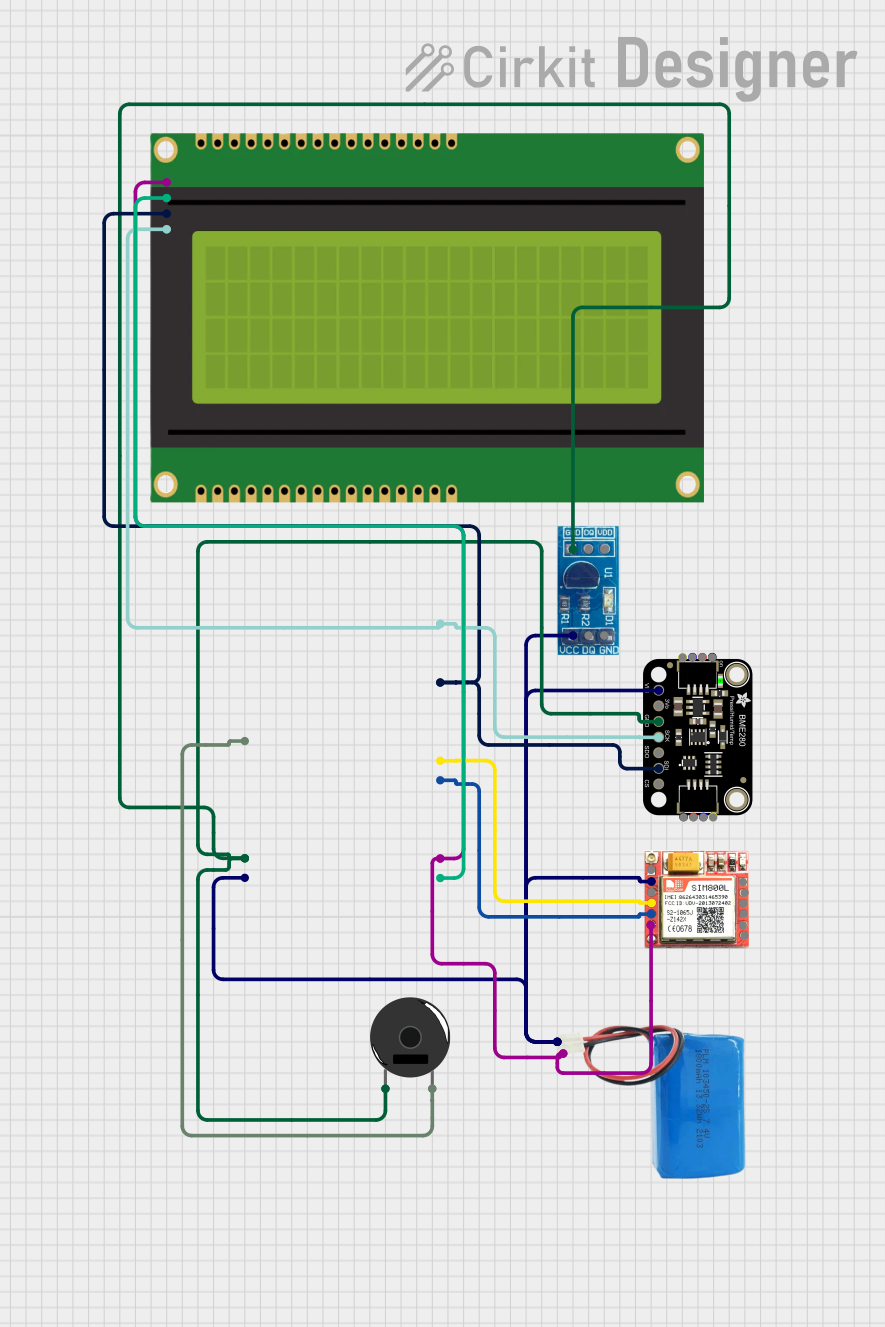
This circuit is a weather monitoring system that uses an ESP32 microcontroller to read temperature data from a DS18B20 sensor and pressure data from a BME280 sensor. The data is displayed on a 20x4 I2C LCD panel, and the system can communicate via a SIM800L module. A piezo buzzer is included for audible alerts, and the entire system is powered by a 5V battery.
Liquid temperature measurement (e.g., aquariums, water tanks)
Industrial temperature sensing
Home automation systems
Scientific experiments
Technical Specifications
Operating Voltage: 3.0V to 5.5V
Temperature Range: -55°C to +125°C (-67°F to +257°F)
Accuracy: ±0.5°C (from -10°C to +85°C)
Resolution: Programmable (9 to 12 bits)
Communication Protocol: 1-Wire
Probe Material: Stainless steel
Cable Length: Typically 1 meter (varies by model)
Waterproof Rating: IP67
Pin Configuration and Descriptions
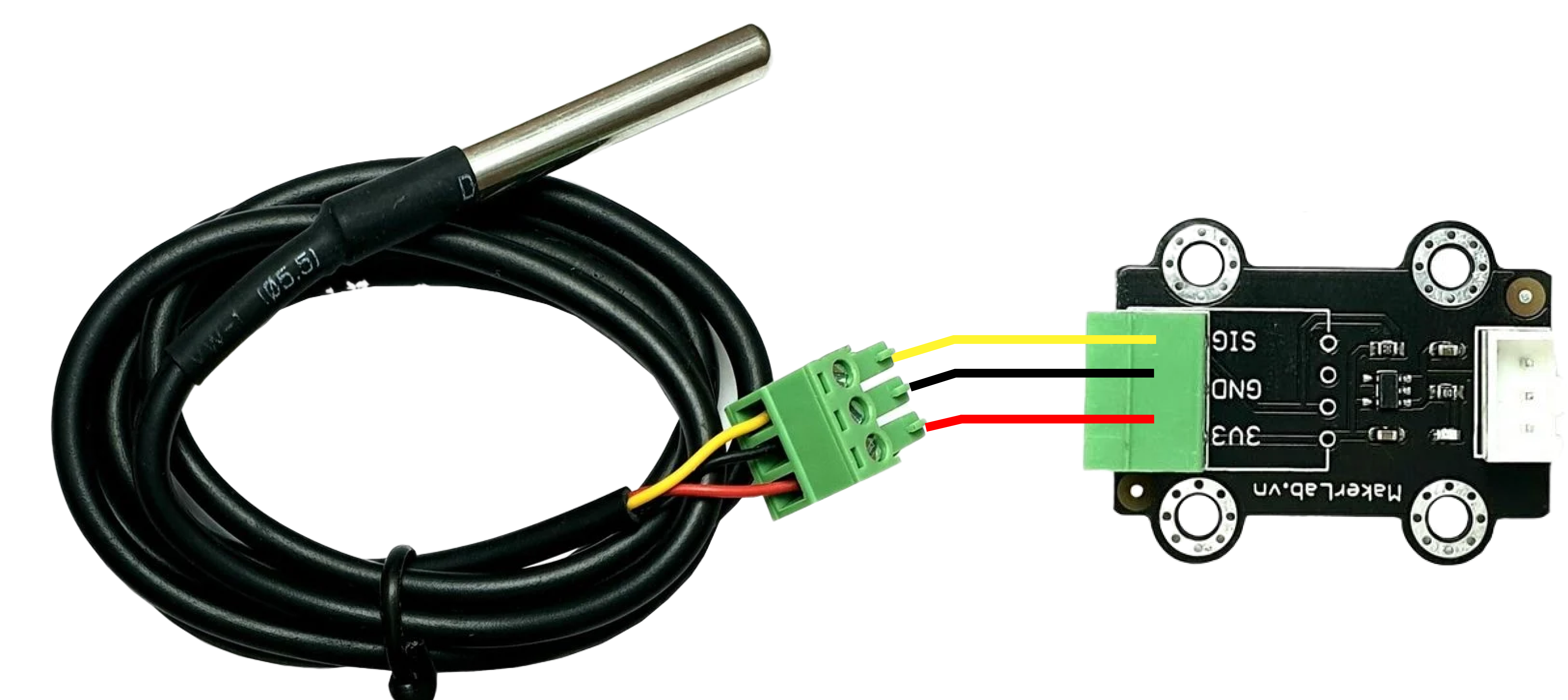
The MKE-S15 DS18B20 sensor typically has three wires for connection:
Wire Color
Pin Name
Description
Red
VCC
Power supply (3.0V to 5.5V)
Yellow
DATA
1-Wire data line for communication
Black
GND
Ground connection
Usage Instructions
Connecting the Sensor to a Circuit
Power Supply: Connect the red wire (VCC) to a 3.3V or 5V power source.
Ground: Connect the black wire (GND) to the ground of your circuit.
Data Line: Connect the yellow wire (DATA) to a digital input pin on your microcontroller. Use a 4.7kΩ pull-up resistor between the DATA line and the VCC line to ensure proper communication.
Example: Connecting to an Arduino UNO
Below is an example of how to connect the MKE-S15 DS18B20 to an Arduino UNO:
Red wire → 5V pin on Arduino
Black wire → GND pin on Arduino
Yellow wire → Digital pin 2 on Arduino (with a 4.7kΩ pull-up resistor to 5V)
Arduino Code Example
The following code demonstrates how to read temperature data from the DS18B20 sensor using the Arduino IDE. This example uses the DallasTemperature and OneWire libraries, which must be installed via the Arduino Library Manager.
#include <OneWire.h>
#include <DallasTemperature.h>

// Pin connected to the DATA line of the DS18B20 sensor
#define ONE_WIRE_BUS 2

// Initialize the OneWire and DallasTemperature libraries
OneWire oneWire(ONE_WIRE_BUS);
DallasTemperature sensors(&oneWire);

void setup() {
  Serial.begin(9600); // Start serial communication at 9600 baud
  sensors.begin();    // Initialize the DS18B20 sensor
  Serial.println("DS18B20 Temperature Sensor Initialized");
}

void loop() {
  sensors.requestTemperatures(); // Request temperature readings
  float temperatureC = sensors.getTempCByIndex(0); // Get temperature in Celsius

  // Check if the reading is valid
  if (temperatureC != DEVICE_DISCONNECTED_C) {
    Serial.print("Temperature: ");
    Serial.print(temperatureC);
    Serial.println(" °C");
  } else {
    Serial.println("Error: Sensor not detected");
  }

  delay(1000); // Wait 1 second before the next reading
}
Important Considerations:
Ensure the pull-up resistor (4.7kΩ) is properly connected to the DATA line.
Avoid exposing the sensor to temperatures beyond its specified range (-55°C to +125°C).
For long cable runs, consider using a lower pull-up resistor value (e.g., 2.2kΩ) to maintain signal integrity.
Troubleshooting and FAQs
Common Issues:
No Temperature Reading:
Cause: The pull-up resistor is missing or incorrectly connected.
Solution: Verify the 4.7kΩ resistor is connected between the DATA line and VCC.
Incorrect Temperature Values:
Cause: Electrical noise or poor connections.
Solution: Ensure all connections are secure and use shielded cables for long runs.
Sensor Not Detected:
Cause: Faulty wiring or damaged sensor.
Solution: Check the wiring and test the sensor with a different microcontroller or circuit.
Intermittent Readings:
Cause: Insufficient power supply or long cable length.
Solution: Use a stable power source and consider adding a capacitor (e.g., 0.1µF) across VCC and GND.
FAQs:
Q: Can I connect multiple DS18B20 sensors to the same data line?
A: Yes, the 1-Wire protocol supports multiple sensors on a single data line. Each sensor has a unique 64-bit address for identification.
Q: Is the sensor safe for use in food-grade applications?
A: While the stainless steel probe is waterproof, confirm with the manufacturer if it meets food-grade standards for your specific use case.
Q: Can I extend the cable length?
A: Yes, but long cables may require a lower pull-up resistor value (e.g., 2.2kΩ) and shielded cables to reduce noise.
Q: What happens if the sensor is exposed to temperatures beyond its range?
A: Prolonged exposure to extreme temperatures may damage the sensor or result in inaccurate readings. Always operate within the specified range.
This concludes the documentation for the MKE-S15 DS18B20 Waterproof Temperature Sensor.

 Open Project in Cirkit Designer