
How to Use BNC Female Jack Terminal Block: Examples, Pinouts, and Specs
 Design with BNC Female Jack Terminal Block in Cirkit Designer
Introduction
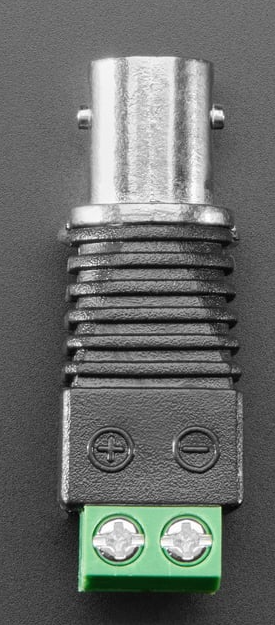
The BNC Female Jack Terminal Block (Adafruit Product ID: 2889) is a versatile connector designed for use with coaxial cables. It features a female BNC connector mounted on a terminal block, enabling quick and secure wiring without the need for soldering. This component is ideal for applications requiring reliable transmission of video or RF signals, such as in surveillance systems, test equipment, and communication devices.
Explore Projects Built with BNC Female Jack Terminal Block
 Open Project in Cirkit Designer
 Open Project in Cirkit Designer
 Open Project in Cirkit Designer
 Open Project in Cirkit Designer
Explore Projects Built with BNC Female Jack Terminal Block
Open Project in Cirkit DesignerOpen Project in Cirkit DesignerOpen Project in Cirkit DesignerOpen Project in Cirkit DesignerCommon Applications
- Video Signal Transmission: Used in CCTV systems, video monitors, and broadcast equipment.
- RF Signal Applications: Suitable for radio frequency signal connections in communication systems.
- Test and Measurement: Commonly used in oscilloscopes, signal generators, and other lab equipment.
- Prototyping and DIY Projects: Simplifies integration of BNC connections into custom circuits.
Technical Specifications
Key Technical Details
| Parameter | Specification |
|---|---|
| Manufacturer | Adafruit |
| Manufacturer Part ID | Product ID: 2889 |
| Connector Type | BNC Female Jack |
| Terminal Block Type | Screw terminal block |
| Supported Cable Type | Coaxial cables |
| Signal Compatibility | Video signals, RF signals |
| Mounting Style | Panel mount or free-standing |
| Dimensions | 38mm x 18mm x 15mm (approx.) |
| Weight | ~10g |
Pin Configuration and Descriptions
The BNC Female Jack Terminal Block has two primary connections on the terminal block:
| Terminal Block Pin | Description |
|---|---|
| Signal Pin | Connects to the center conductor of the coaxial cable (signal). |
| Ground Pin | Connects to the outer shield of the coaxial cable (ground). |
Usage Instructions
How to Use the Component in a Circuit
Prepare the Coaxial Cable:
- Strip the coaxial cable to expose the center conductor and the outer shield.
- Ensure the exposed wires are clean and free of fraying.
Connect the Cable to the Terminal Block:
- Loosen the screws on the terminal block using a small screwdriver.
- Insert the center conductor of the coaxial cable into the Signal Pin terminal.
- Insert the outer shield of the coaxial cable into the Ground Pin terminal.
- Tighten the screws to secure the connections.
Integrate into Your Circuit:
- Use the terminal block connections to interface the BNC connector with your circuit.
- Ensure proper grounding to avoid signal interference.
Connect the BNC Jack:
- Attach a male BNC connector to the female jack for signal transmission.
Important Considerations and Best Practices
- Signal Integrity: Ensure the coaxial cable is properly terminated to maintain signal quality.
- Grounding: Proper grounding is critical for RF and video signals to avoid noise or interference.
- Cable Compatibility: Verify that the coaxial cable matches the impedance requirements of your system (e.g., 50Ω or 75Ω).
- Secure Connections: Double-check that all screws are tightened to prevent loose connections.
Example: Connecting to an Arduino UNO
While the BNC Female Jack Terminal Block itself does not directly interface with an Arduino, it can be used to connect sensors or devices that output analog signals via a BNC connector. Below is an example of reading an analog signal from a BNC-connected sensor:
// Example: Reading an analog signal from a BNC-connected sensor
// Connect the signal pin of the terminal block to an Arduino analog pin (e.g., A0)
// Connect the ground pin of the terminal block to the Arduino GND pin

const int analogPin = A0;  // Analog pin connected to the signal pin
int sensorValue = 0;       // Variable to store the sensor reading

void setup() {
  Serial.begin(9600);  // Initialize serial communication at 9600 baud
}

void loop() {
  sensorValue = analogRead(analogPin);  // Read the analog value
  Serial.print("Sensor Value: ");
  Serial.println(sensorValue);         // Print the value to the Serial Monitor
  delay(500);                          // Wait for 500ms before the next reading
}
Troubleshooting and FAQs
Common Issues and Solutions
| Issue | Solution |
|---|---|
| Loose Connections | Ensure the terminal block screws are tightened securely. |
| Signal Interference or Noise | Verify proper grounding and use shielded coaxial cables. |
| No Signal Transmission | Check the continuity of the coaxial cable and ensure correct wiring. |
| Incompatible Cable Impedance | Use a coaxial cable with the correct impedance (e.g., 50Ω or 75Ω). |
| BNC Connector Not Fitting | Ensure the male BNC connector is compatible with the female jack. |
FAQs
Can this component handle high-frequency RF signals?
- Yes, the BNC Female Jack Terminal Block is designed for RF signals, but ensure the cable and system impedance match for optimal performance.
Is soldering required to use this component?
- No, the terminal block allows for solder-free connections, making it easy to use.
Can I use this with a digital signal?
- Yes, the terminal block can transmit digital signals, provided the signal levels are within the supported range of the connected devices.
What tools are needed to install this component?
- A small screwdriver is required to secure the wires in the terminal block.
Is this component weatherproof?
- No, this component is not weatherproof. Use it in indoor or protected environments.
This concludes the documentation for the BNC Female Jack Terminal Block (Adafruit Product ID: 2889). For further assistance, refer to the Adafruit website or contact their support team.