
How to Use battery: Examples, Pinouts, and Specs
 Design with battery in Cirkit Designer
Introduction
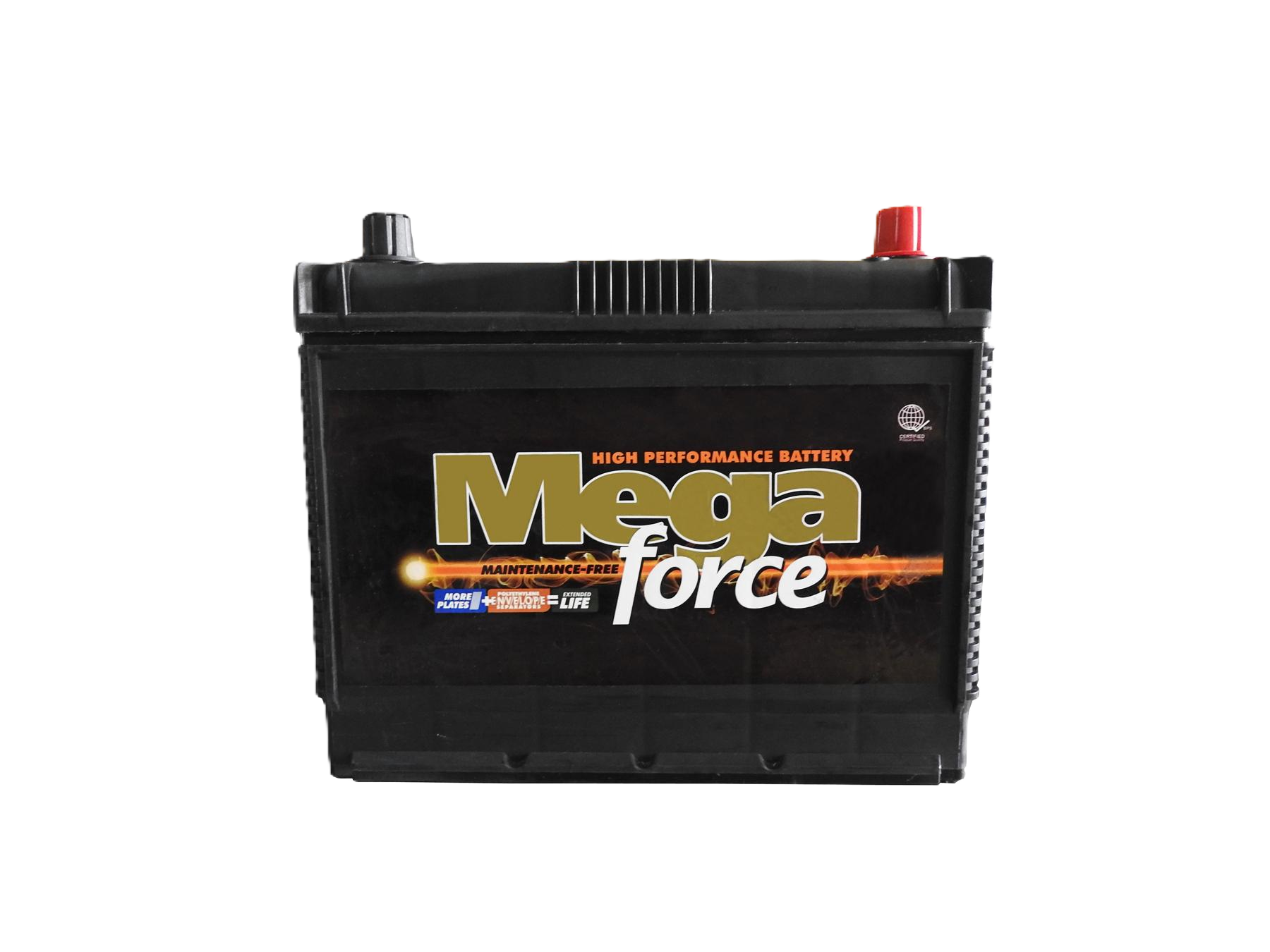
A battery is a device that stores electrical energy in chemical form and converts it to electrical energy when needed, providing power to electronic circuits. The Megaforce Battery 65Ah is a high-capacity rechargeable battery designed for a wide range of applications, including automotive systems, renewable energy storage, and backup power supplies. Its robust design and reliable performance make it suitable for both industrial and consumer use.
Explore Projects Built with battery
 Open Project in Cirkit Designer
 Open Project in Cirkit Designer
 Open Project in Cirkit Designer
 Open Project in Cirkit Designer
Explore Projects Built with battery
Open Project in Cirkit DesignerOpen Project in Cirkit DesignerOpen Project in Cirkit DesignerOpen Project in Cirkit DesignerCommon Applications and Use Cases
- Automotive power systems (e.g., starting, lighting, and ignition)
- Uninterruptible Power Supplies (UPS) for critical systems
- Renewable energy storage (e.g., solar and wind systems)
- Portable electronic devices and tools
- Emergency backup power for homes and offices
Technical Specifications
The following table outlines the key technical details of the Megaforce Battery 65Ah:
| Parameter | Specification |
|---|---|
| Manufacturer | Megaforce |
| Part ID | Megaforce Battery 65Ah |
| Battery Type | Lead-acid, rechargeable |
| Nominal Voltage | 12V |
| Capacity | 65Ah |
| Maximum Discharge Current | 650A (10C for 5 seconds) |
| Operating Temperature | -20°C to 50°C |
| Storage Temperature | -10°C to 40°C |
| Terminal Type | M6 threaded terminals |
| Weight | 18.5 kg |
| Dimensions (L x W x H) | 350mm x 175mm x 190mm |
Terminal Configuration
The Megaforce Battery 65Ah has two terminals: positive (+) and negative (-). The table below describes the terminal configuration:
| Terminal | Description |
|---|---|
| Positive (+) | Connects to the positive side of the circuit |
| Negative (-) | Connects to the ground or negative side of the circuit |
Usage Instructions
How to Use the Battery in a Circuit
- Determine the Load Requirements: Ensure the connected load does not exceed the battery's capacity (65Ah) or maximum discharge current (650A for short durations).
- Connect the Terminals:
- Connect the positive terminal of the battery to the positive input of your circuit.
- Connect the negative terminal to the ground or negative input of your circuit.
- Use Proper Cables: Use cables rated for the current your application requires to avoid overheating or voltage drops.
- Charge the Battery: Use a compatible 12V battery charger with a recommended charging current of 6.5A (C/10 rate) for optimal performance and longevity.
- Monitor Voltage Levels: Avoid discharging the battery below 10.5V to prevent damage to the cells.
Important Considerations and Best Practices
- Ventilation: Ensure proper ventilation during charging and discharging to prevent the buildup of gases.
- Polarity: Always double-check the polarity of the connections to avoid short circuits or damage to the battery.
- Storage: Store the battery in a cool, dry place when not in use. Recharge the battery every 3-6 months during storage to maintain its capacity.
- Safety: Wear protective gear (e.g., gloves and goggles) when handling the battery to avoid contact with corrosive materials.
Example: Connecting the Battery to an Arduino UNO
The Megaforce Battery 65Ah can be used to power an Arduino UNO via a voltage regulator or DC-DC converter to step down the 12V to 5V. Below is an example circuit and code:
Circuit Setup
- Connect the positive terminal of the battery to the input of a 12V-to-5V DC-DC converter.
- Connect the output of the converter to the Arduino UNO's 5V pin and GND pin.
- Ensure the battery's negative terminal is connected to the GND of the Arduino circuit.
Arduino Code Example
// Example code to blink an LED using an Arduino UNO powered by the battery
// Ensure the battery is connected via a 12V-to-5V DC-DC converter

const int ledPin = 13; // Pin connected to the onboard LED

void setup() {
  pinMode(ledPin, OUTPUT); // Set the LED pin as an output
}

void loop() {
  digitalWrite(ledPin, HIGH); // Turn the LED on
  delay(1000); // Wait for 1 second
  digitalWrite(ledPin, LOW); // Turn the LED off
  delay(1000); // Wait for 1 second
}
Troubleshooting and FAQs
Common Issues and Solutions
Battery Not Charging:
- Cause: Faulty charger or incorrect charging voltage.
- Solution: Verify the charger output voltage and current. Ensure it matches the battery's specifications.
Battery Drains Quickly:
- Cause: Excessive load or aging battery.
- Solution: Reduce the load or replace the battery if it has reached the end of its life cycle.
Overheating During Use:
- Cause: High discharge current or poor ventilation.
- Solution: Ensure the load is within the battery's rated capacity and improve ventilation.
Corroded Terminals:
- Cause: Exposure to moisture or acid leakage.
- Solution: Clean the terminals with a baking soda solution and apply a protective coating.
FAQs
Can I use this battery in a solar power system?
- Yes, the Megaforce Battery 65Ah is suitable for solar power systems. Ensure the charge controller is compatible with 12V lead-acid batteries.
What is the recommended charging current?
- The recommended charging current is 6.5A (C/10 rate) for optimal performance and longevity.
How long will the battery last on a full charge?
- The runtime depends on the load. For example, a 6.5A load will last approximately 10 hours (65Ah ÷ 6.5A).
Is the battery safe for indoor use?
- Yes, but ensure proper ventilation to prevent the buildup of gases during charging and discharging.
By following this documentation, users can effectively utilize the Megaforce Battery 65Ah in their applications while ensuring safety and optimal performance.