
How to Use 6-Outlet Power Strip: Examples, Pinouts, and Specs
 Design with 6-Outlet Power Strip in Cirkit Designer
Introduction
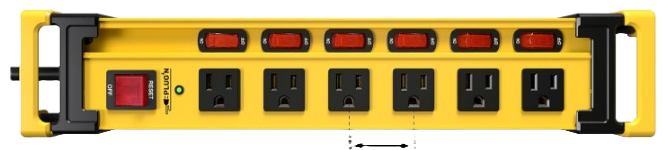
The VILONG 6-Outlet Power Strip (Part ID: 120v/15a/1800W) is a versatile and reliable power distribution device designed to provide six electrical outlets from a single wall socket. This power strip is ideal for powering multiple devices simultaneously, making it a convenient solution for home, office, and workshop environments. Many models also include surge protection to safeguard connected devices from voltage spikes, as well as individual switches for enhanced control.
Explore Projects Built with 6-Outlet Power Strip
 Open Project in Cirkit Designer
 Open Project in Cirkit Designer
 Open Project in Cirkit Designer
 Open Project in Cirkit Designer
Explore Projects Built with 6-Outlet Power Strip
Open Project in Cirkit DesignerOpen Project in Cirkit DesignerOpen Project in Cirkit DesignerOpen Project in Cirkit DesignerCommon Applications and Use Cases
- Home Use: Powering entertainment systems, kitchen appliances, or charging multiple devices.
- Office Use: Connecting computers, monitors, printers, and other office equipment.
- Workshops: Providing power to tools, chargers, and other equipment.
- Travel: Compact models can be used in hotels or temporary setups to expand available outlets.
Technical Specifications
The following table outlines the key technical details of the VILONG 6-Outlet Power Strip:
| Specification | Details |
|---|---|
| Manufacturer | VILONG |
| Part ID | 120v/15a/1800W |
| Input Voltage | 120V AC |
| Maximum Current | 15A |
| Maximum Power Rating | 1800W |
| Number of Outlets | 6 |
| Surge Protection | Yes (varies by model) |
| Cord Length | Typically 4-6 feet (varies by model) |
| Switches | Individual or master switch (varies) |
| Certifications | UL Listed, FCC Certified |
Pin Configuration and Descriptions
The VILONG 6-Outlet Power Strip does not have traditional pins like electronic ICs but instead features standard North American AC outlets. Below is a description of the key components:
| Component | Description |
|---|---|
| AC Outlets (x6) | Standard 3-prong outlets for connecting devices. |
| Master Switch | Controls power to all outlets (if present). |
| Individual Switches | Optional feature to control power to each outlet independently. |
| Surge Protection LED | Indicates whether surge protection is active (if surge protection is included). |
| Power Cord | Heavy-duty cord for connecting the power strip to a wall socket. |
Usage Instructions
How to Use the Component in a Circuit
- Placement: Place the power strip on a flat, stable surface away from water or heat sources.
- Connection: Plug the power strip's cord into a standard 120V AC wall socket.
- Device Connection: Insert the plugs of your devices into the available outlets. Ensure the total power consumption does not exceed 1800W.
- Switch Operation:
- If the power strip has a master switch, turn it on to supply power to all outlets.
- For models with individual switches, turn on the desired outlets as needed.
- Surge Protection: If the power strip includes surge protection, ensure the LED indicator is lit to confirm active protection.
Important Considerations and Best Practices
- Do Not Overload: Ensure the total current drawn by connected devices does not exceed 15A or 1800W.
- Avoid Daisy-Chaining: Do not connect multiple power strips in series, as this can create a fire hazard.
- Surge Protection: Replace the power strip if the surge protection LED is no longer lit, as this indicates the protection has been depleted.
- Environment: Use the power strip indoors in a dry environment. Avoid exposure to moisture or extreme temperatures.
- Cord Management: Avoid bending or pinching the power cord to prevent damage.
Arduino UNO Connection (Example Use Case)
While the power strip itself is not directly connected to an Arduino UNO, it can be used to power devices in an Arduino project setup. For example, you can use the power strip to supply power to an external power supply or peripherals like motors, sensors, or lights.
// Example Arduino code to control a relay module powered via the power strip
// This setup allows the Arduino to control a device connected to the relay.

const int relayPin = 7; // Pin connected to the relay module

void setup() {
  pinMode(relayPin, OUTPUT); // Set the relay pin as an output
  digitalWrite(relayPin, LOW); // Ensure the relay is off at startup
}

void loop() {
  digitalWrite(relayPin, HIGH); // Turn on the relay (device powered)
  delay(5000); // Keep the device on for 5 seconds
  digitalWrite(relayPin, LOW); // Turn off the relay (device off)
  delay(5000); // Keep the device off for 5 seconds
}
Note: Ensure the relay module and connected devices do not exceed the power strip's ratings.
Troubleshooting and FAQs
Common Issues Users Might Face
Power Strip Not Working:
- Cause: The master switch is off or the wall socket is not supplying power.
- Solution: Check the master switch and ensure the wall socket is functional.
Surge Protection LED Not Lit:
- Cause: Surge protection has been depleted due to previous voltage spikes.
- Solution: Replace the power strip to restore surge protection.
Overheating:
- Cause: The power strip is overloaded or placed in a poorly ventilated area.
- Solution: Reduce the load and ensure proper ventilation.
Individual Outlet Not Working:
- Cause: The individual switch is off or the outlet is damaged.
- Solution: Turn on the individual switch or inspect for physical damage.
Solutions and Tips for Troubleshooting
- Inspect Connections: Ensure all plugs are securely connected to the outlets.
- Test with a Known Good Device: Use a device you know works to test the outlets.
- Reset the Circuit Breaker: If the power strip has a built-in circuit breaker, press the reset button to restore functionality.
- Replace the Power Strip: If the power strip shows signs of damage or wear, replace it immediately to ensure safety.
By following this documentation, users can safely and effectively utilize the VILONG 6-Outlet Power Strip for their power distribution needs.