
How to Use biscute emg sensor: Examples, Pinouts, and Specs
 Design with biscute emg sensor in Cirkit Designer
Introduction
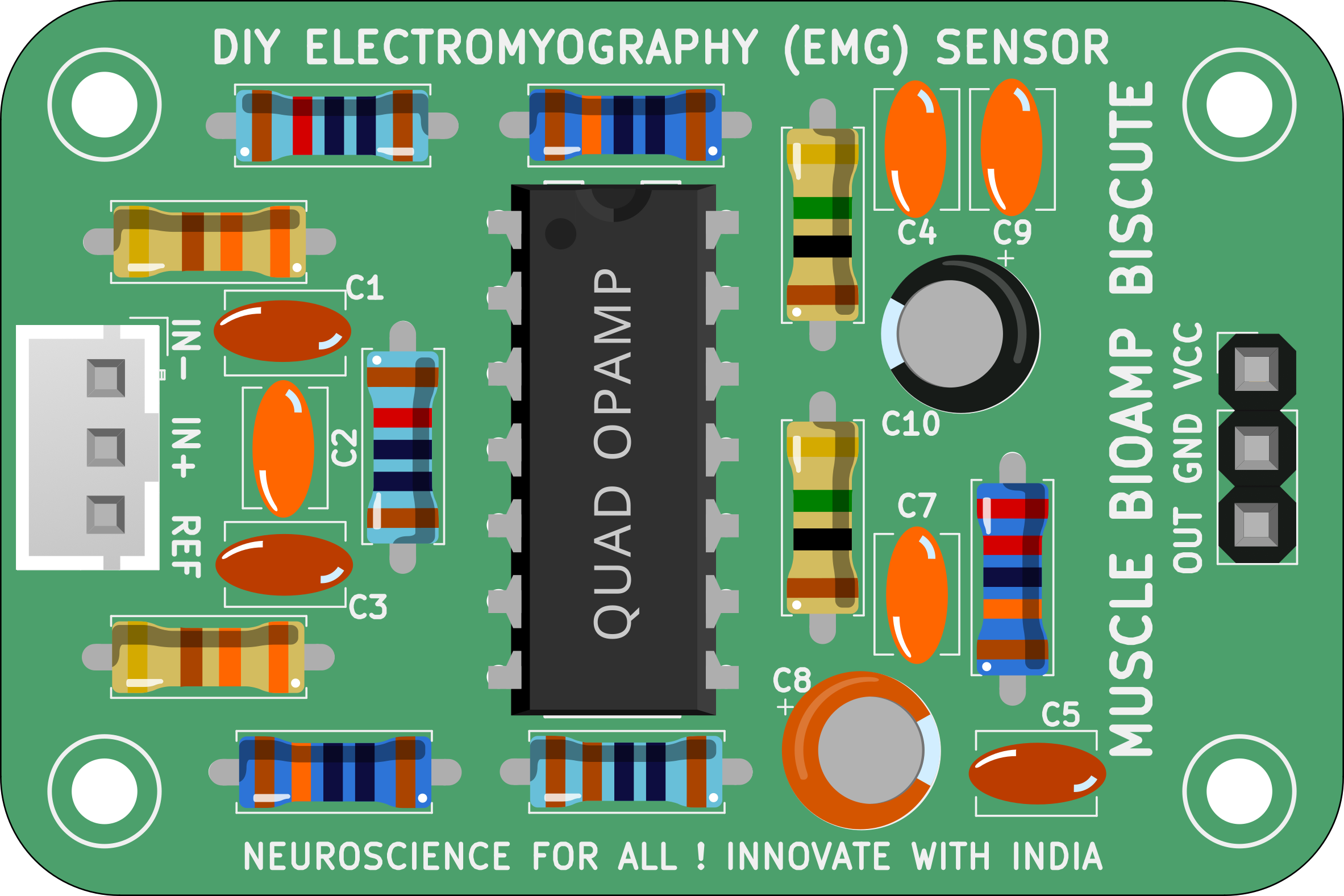
The Biscute EMG Sensor, manufactured by Upside Down Labs (Part ID: EMG Sensor Biscute DIY Kit), is a compact and efficient device designed to measure the electrical activity generated by skeletal muscles. This sensor captures electromyographic (EMG) signals, which are essential for applications in prosthetics control, rehabilitation, human-computer interaction, and biofeedback systems. Its small form factor and ease of use make it ideal for DIY projects, research, and educational purposes.
Explore Projects Built with biscute emg sensor
 Open Project in Cirkit Designer
 Open Project in Cirkit Designer
 Open Project in Cirkit Designer
 Open Project in Cirkit Designer
Explore Projects Built with biscute emg sensor
Open Project in Cirkit DesignerOpen Project in Cirkit DesignerOpen Project in Cirkit DesignerOpen Project in Cirkit DesignerCommon Applications
- Prosthetics and robotic limb control
- Rehabilitation and physiotherapy monitoring
- Gesture-based human-computer interaction
- Wearable technology and biofeedback systems
- Research and development in biomedical engineering
Technical Specifications
The Biscute EMG Sensor is designed to provide reliable and accurate EMG signal acquisition. Below are its key technical details:
| Parameter | Specification |
|---|---|
| Operating Voltage | 3.3V to 5V DC |
| Operating Current | < 10mA |
| Output Signal | Analog (0V to 3.3V) |
| Gain | Adjustable (default: 1000x) |
| Frequency Response | 20Hz to 500Hz |
| Input Impedance | > 10MΩ |
| Electrode Type | Snap-on or adhesive gel electrodes |
| Dimensions | 35mm x 25mm x 5mm |
Pin Configuration
The Biscute EMG Sensor has a simple pinout for easy integration into circuits:
| Pin | Name | Description |
|---|---|---|
| 1 | VCC | Power supply input (3.3V to 5V DC) |
| 2 | GND | Ground connection |
| 3 | SIG | Analog output signal representing EMG activity |
Usage Instructions
How to Use the Biscute EMG Sensor in a Circuit
- Power the Sensor: Connect the
VCCpin to a 3.3V or 5V DC power source and theGNDpin to the ground of your circuit. - Connect Electrodes: Attach the snap-on or adhesive gel electrodes to the sensor. Place the electrodes on the target muscle group as follows:
- Two electrodes on the muscle (active electrodes).
- One electrode on a bony or non-muscular area (reference electrode).
- Read the Signal: Connect the
SIGpin to an analog input pin of a microcontroller (e.g., Arduino UNO) or an oscilloscope to monitor the EMG signal. - Adjust Gain (if needed): Use the onboard potentiometer to adjust the gain for optimal signal amplification.
Important Considerations
- Ensure proper skin preparation (clean and dry) before attaching electrodes to reduce noise.
- Use high-quality electrodes for better signal acquisition.
- Avoid placing the sensor near sources of electromagnetic interference (e.g., motors, power supplies).
- Keep the electrode cables as short as possible to minimize noise.
Example: Connecting to an Arduino UNO
Below is an example of how to connect and read data from the Biscute EMG Sensor using an Arduino UNO:
Circuit Connections
VCC→ 5V pin on ArduinoGND→ GND pin on ArduinoSIG→ A0 (Analog Pin 0) on Arduino
Arduino Code
// Biscute EMG Sensor Example Code
// This code reads the analog signal from the EMG sensor and prints it to the Serial Monitor.

const int emgPin = A0; // Analog pin connected to the SIG pin of the sensor

void setup() {
  Serial.begin(9600); // Initialize serial communication at 9600 baud
  pinMode(emgPin, INPUT); // Set the EMG pin as input
}

void loop() {
  int emgValue = analogRead(emgPin); // Read the analog value from the sensor
  Serial.println(emgValue); // Print the value to the Serial Monitor
  delay(10); // Small delay for stable readings
}
Notes:
- Open the Serial Monitor in the Arduino IDE to view the EMG signal values.
- You can process the signal further for applications like gesture recognition or muscle activity monitoring.
Troubleshooting and FAQs
Common Issues and Solutions
No Signal or Weak Signal
- Ensure the electrodes are properly attached to the skin.
- Check the power supply and connections.
- Verify that the gain is set appropriately.
Noisy or Erratic Signal
- Ensure the skin is clean and dry before attaching electrodes.
- Use shielded cables to reduce electromagnetic interference.
- Keep the sensor away from high-frequency noise sources.
Signal Saturation
- Reduce the gain using the onboard potentiometer.
- Ensure the electrodes are not placed too close to each other.
FAQs
Q: Can I use the Biscute EMG Sensor with a 3.3V microcontroller?
A: Yes, the sensor operates at both 3.3V and 5V, making it compatible with 3.3V microcontrollers like the ESP32.
Q: What type of electrodes should I use?
A: Snap-on or adhesive gel electrodes are recommended for optimal performance.
Q: Can I use this sensor for real-time prosthetics control?
A: Yes, the Biscute EMG Sensor is suitable for real-time applications like prosthetics control, provided the signal is processed appropriately.
Q: How do I clean the electrodes?
A: For reusable electrodes, clean them with a damp cloth and mild soap. Do not immerse the sensor in water.
By following this documentation, you can effectively integrate and utilize the Biscute EMG Sensor in your projects.