The HDMI 3-Row Connector (Manufacturer: AKB, Part ID: 1234) is a high-performance interface designed for transmitting high-definition video and audio signals between devices. This connector features a 3-row pin configuration, ensuring reliable and efficient data transfer. It is widely used in consumer electronics, including televisions, monitors, gaming consoles, and home theater systems.
Explore Projects Built with hdmi 3row
Use Cirkit Designer to design, explore, and prototype these projects online. Some projects support real-time simulation. Click "Open Project" to start designing instantly!
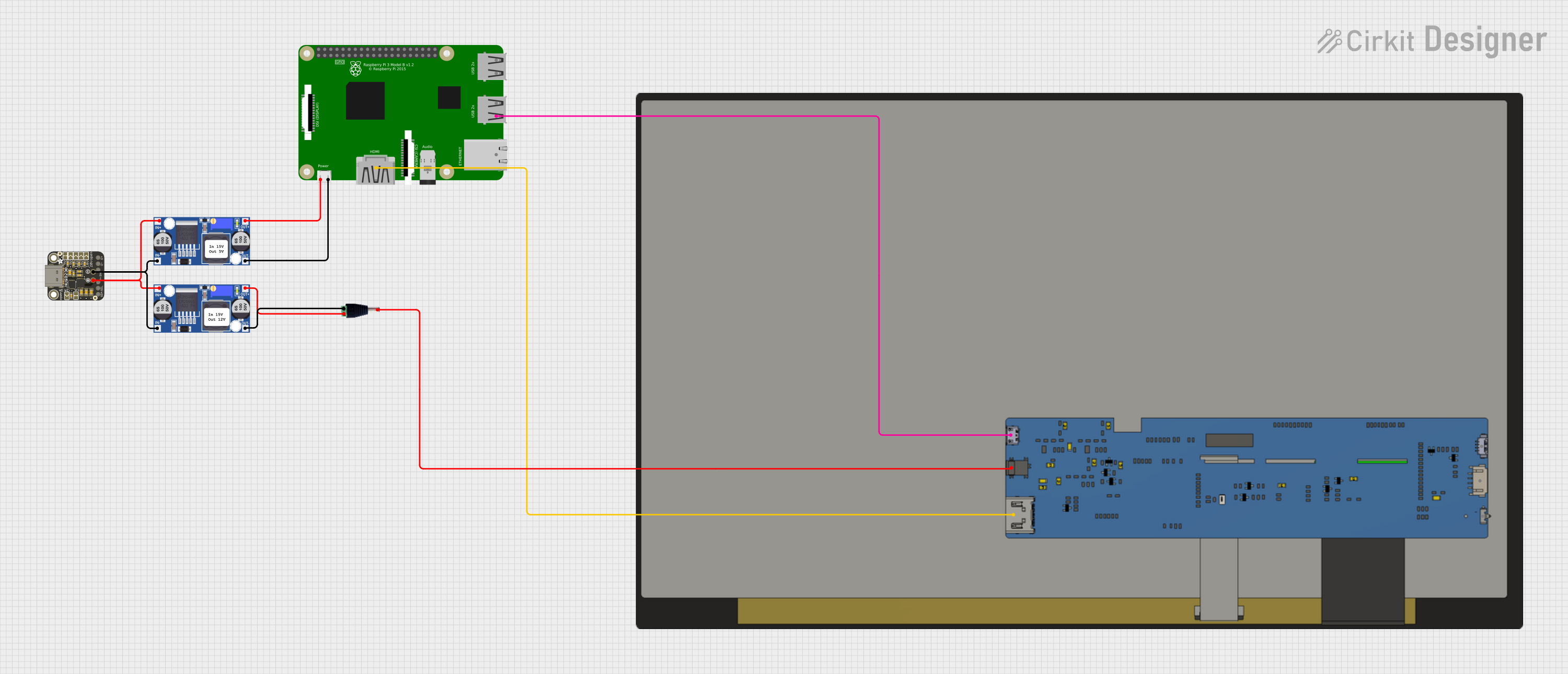
This circuit powers a 15.6-inch capacitive touch display and a Raspberry Pi 3B using a USB Type C power delivery breakout and two buck converters. The Raspberry Pi connects to the display via HDMI and USB for touch functionality, while the power delivery breakout provides regulated power to both the display and the Raspberry Pi through the buck converters.
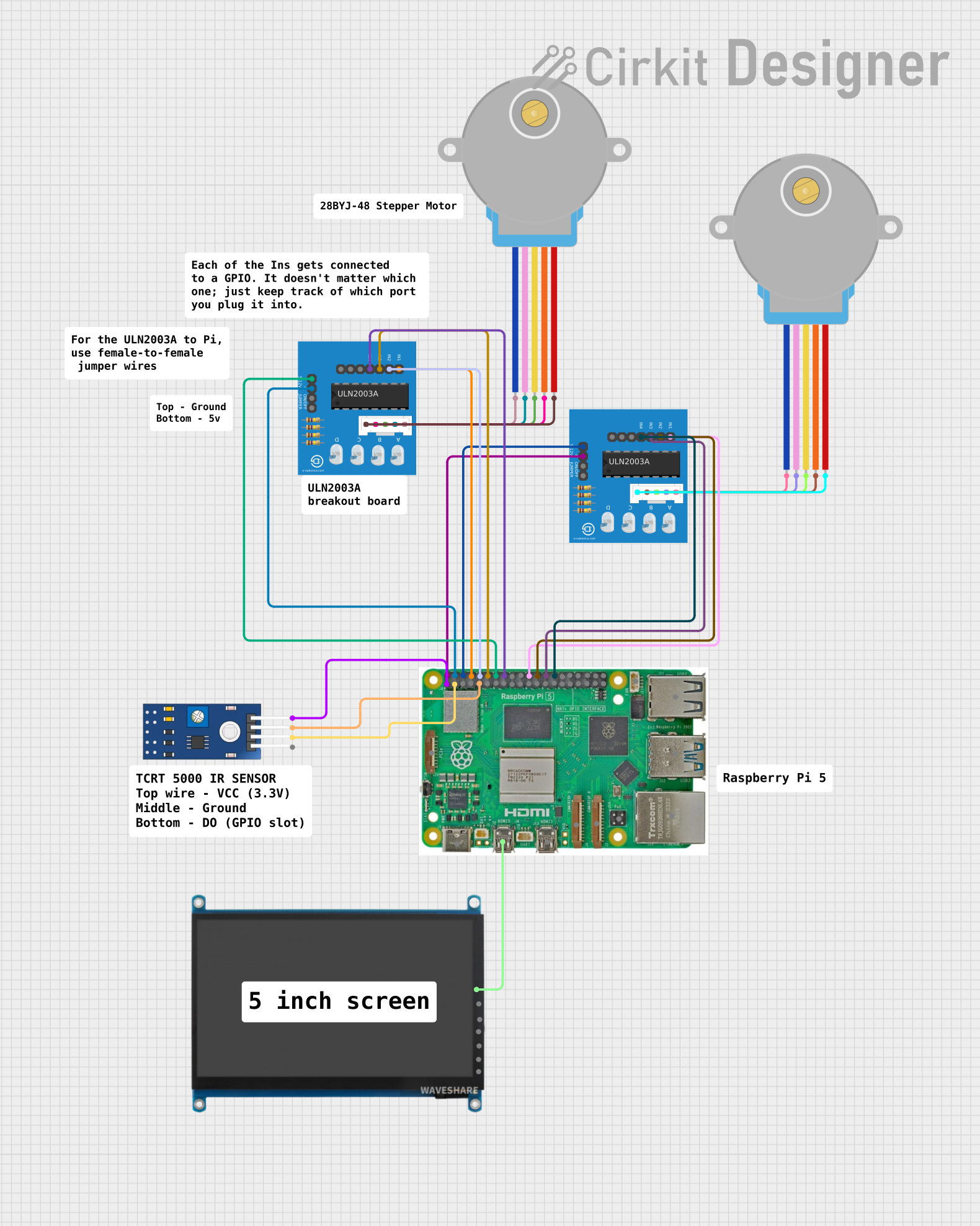
This circuit connects a Raspberry Pi 5 to a 7-inch WaveShare HDMI display for visual output. It also interfaces the Raspberry Pi with two ULN2003A breakout boards, which are in turn connected to two 28BYJ-48 stepper motors, allowing the Raspberry Pi to control the stepper motors. Additionally, a TCRT5000 IR sensor is connected to the Raspberry Pi for object detection or line tracking, with its digital output connected to a GPIO pin and powered by the Raspberry Pi's 3.3V supply.
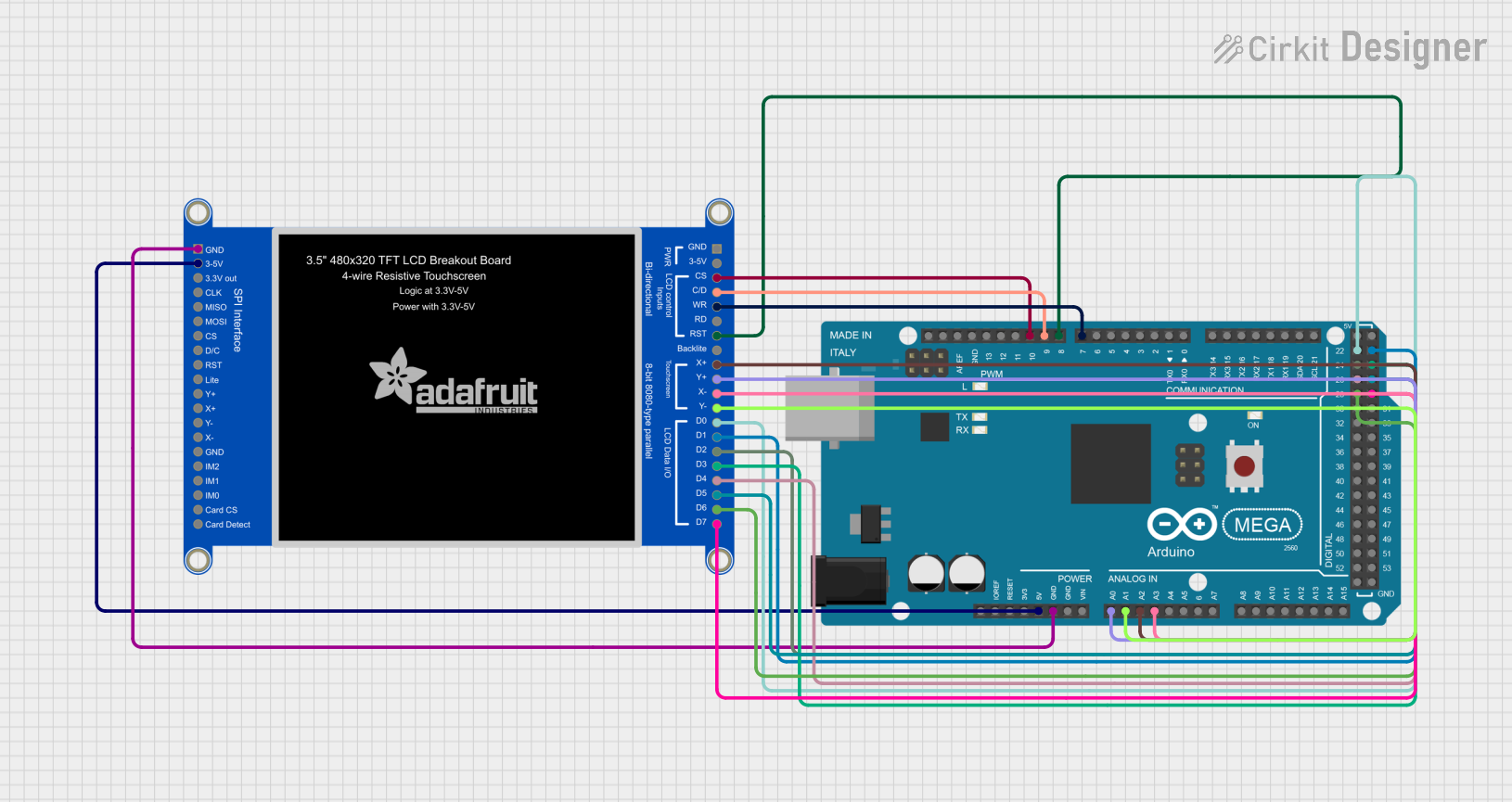
This circuit connects an Arduino Mega 2560 microcontroller to a 3.5-inch 480x320 TFT LCD display. The Arduino provides power, ground, and digital signals to control the display, including data lines for pixel information and control lines for reset, write, and command/data selection. The embedded code initializes the display and configures the Arduino's pins for communication, likely to create a user interface or visual output for a project.
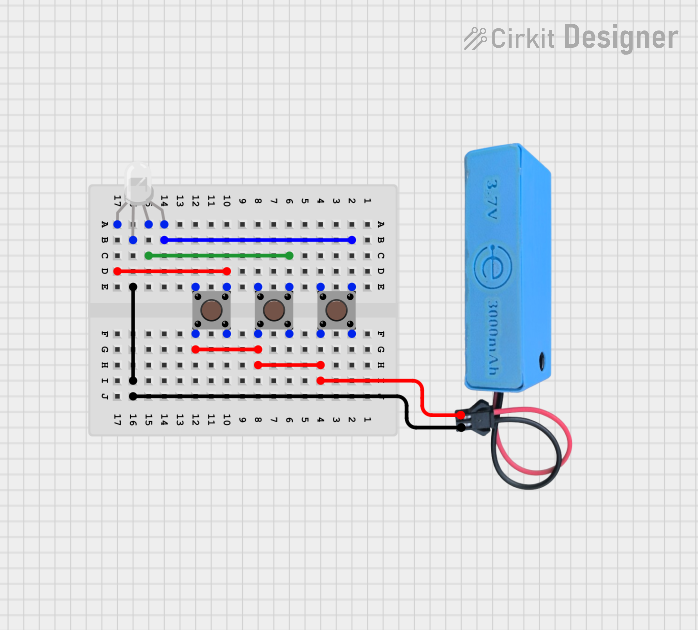
This circuit consists of an RGB LED controlled by three pushbuttons, each corresponding to one of the LED's color channels (Red, Green, and Blue). The pushbuttons are powered by a MAHIR 1.mini power source, allowing the user to manually toggle each color channel of the RGB LED.
Connecting high-definition displays to source devices (e.g., Blu-ray players, gaming consoles, PCs)
Audio-visual setups in home theaters
Professional video production equipment
Digital signage and multimedia systems
Technical Specifications
The HDMI 3-Row Connector is designed to meet the requirements of modern high-definition multimedia systems. Below are its key technical details:
Key Technical Details
Parameter
Specification
Manufacturer
AKB
Part ID
1234
Connector Type
HDMI (High-Definition Multimedia Interface)
Pin Configuration
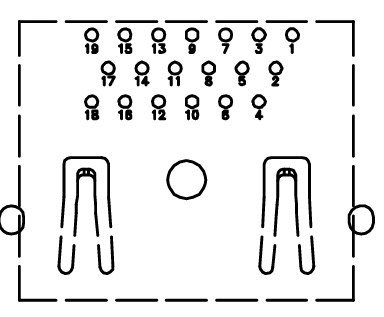
3-row, 19 pins
Supported Resolutions
Up to 4K UHD (3840x2160) at 60Hz
Audio Support
Multi-channel digital audio
Voltage Rating
5V DC
Current Rating
0.5A per pin
Operating Temperature
-20°C to 85°C
Durability
10,000 mating cycles
Pin Configuration and Descriptions
The HDMI 3-Row Connector features 19 pins arranged in three rows. Below is the pinout and description:
Pin Number
Signal Name
Description
1
TMDS Data2+
Positive differential signal for TMDS channel 2
2
TMDS Data2 Shield
Shield for TMDS channel 2
3
TMDS Data2-
Negative differential signal for TMDS channel 2
4
TMDS Data1+
Positive differential signal for TMDS channel 1
5
TMDS Data1 Shield
Shield for TMDS channel 1
6
TMDS Data1-
Negative differential signal for TMDS channel 1
7
TMDS Data0+
Positive differential signal for TMDS channel 0
8
TMDS Data0 Shield
Shield for TMDS channel 0
9
TMDS Data0-
Negative differential signal for TMDS channel 0
10
TMDS Clock+
Positive differential signal for TMDS clock
11
TMDS Clock Shield
Shield for TMDS clock
12
TMDS Clock-
Negative differential signal for TMDS clock
13
CEC
Consumer Electronics Control
14
Reserved (N.C.)
Reserved, no connection
15
SCL
I2C Serial Clock for DDC
16
SDA
I2C Serial Data for DDC
17
DDC/CEC Ground
Ground for DDC and CEC
18
+5V Power
+5V DC power supply
19
Hot Plug Detect
Signal to detect connected devices
Usage Instructions
How to Use the HDMI 3-Row Connector in a Circuit
Mounting the Connector: Secure the HDMI 3-Row Connector to the PCB using the appropriate soldering technique. Ensure all pins are properly aligned and soldered to avoid connectivity issues.
Connecting Devices: Use a standard HDMI cable to connect the source device (e.g., Blu-ray player, PC) to the display or receiver.
Power Supply: Ensure the +5V power pin (Pin 18) is supplied with a stable 5V DC source. This is necessary for proper operation of the HDMI interface.
Signal Integrity: Use high-quality HDMI cables to minimize signal degradation, especially for high-resolution video (e.g., 4K UHD).
Important Considerations and Best Practices
Cable Length: For resolutions up to 4K UHD, use HDMI cables shorter than 15 meters to maintain signal integrity.
Shielding: Ensure proper grounding and shielding to reduce electromagnetic interference (EMI).
Hot Plugging: Avoid frequent hot plugging (connecting/disconnecting while powered) to prevent wear and tear on the connector.
Compatibility: Verify that the connected devices support the same HDMI version and features (e.g., 4K, HDR).
Example: Using with an Arduino UNO
The HDMI 3-Row Connector can be used with an Arduino UNO for basic CEC (Consumer Electronics Control) communication. Below is an example code snippet:
#include <Wire.h> // Include the I2C library for DDC communication

#define CEC_PIN 13 // Define the pin connected to the CEC line

void setup() {
  pinMode(CEC_PIN, OUTPUT); // Set the CEC pin as an output
  digitalWrite(CEC_PIN, LOW); // Initialize the CEC line to LOW
  Serial.begin(9600); // Start serial communication for debugging
  Serial.println("HDMI CEC Communication Initialized");
}

void loop() {
  // Example: Send a simple CEC signal
  digitalWrite(CEC_PIN, HIGH); // Set the CEC line HIGH
  delay(1); // Hold for 1ms
  digitalWrite(CEC_PIN, LOW); // Set the CEC line LOW
  delay(1000); // Wait for 1 second before repeating

  // Debugging output
  Serial.println("CEC signal sent");
}
Note: This example demonstrates basic control of the CEC line. For full HDMI CEC functionality, additional libraries and protocols are required.
Troubleshooting and FAQs
Common Issues and Solutions
No Signal Detected on Display
Cause: Loose or improperly connected HDMI cable.
Solution: Ensure the HDMI cable is securely connected to both the source and display devices.
Intermittent Signal Loss
Cause: Poor-quality HDMI cable or excessive cable length.
Solution: Use a high-quality HDMI cable and keep the cable length within recommended limits.
Audio Not Transmitted
Cause: Incorrect audio settings on the source device.
Solution: Check the audio output settings on the source device and ensure HDMI audio is enabled.
Connector Pins Damaged
Cause: Frequent hot plugging or improper handling.
Solution: Replace the damaged connector and avoid excessive hot plugging.
FAQs
Q: Can this connector support 8K resolution?
A: No, the HDMI 3-Row Connector (AKB 1234) supports resolutions up to 4K UHD at 60Hz. For 8K support, a newer HDMI version is required.
Q: Is this connector backward compatible with older HDMI devices?
A: Yes, HDMI is designed to be backward compatible. However, features like 4K or HDR may not be available on older devices.
Q: Can I use this connector for power delivery?
A: The HDMI 3-Row Connector provides a +5V power pin (Pin 18) for low-power applications, but it is not designed for high-power delivery.
Q: How do I clean the connector?
A: Use a soft, dry cloth or compressed air to remove dust and debris. Avoid using liquids or abrasive materials.

 Open Project in Cirkit Designer