
How to Use ir object sensor: Examples, Pinouts, and Specs
 Design with ir object sensor in Cirkit Designer
Introduction
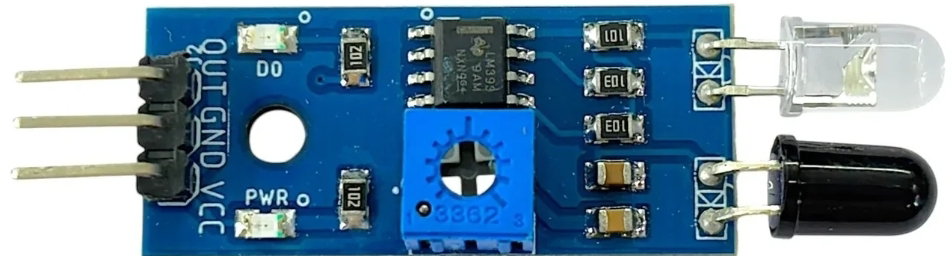
An infrared (IR) object sensor detects the presence of objects by emitting infrared light and measuring the reflection. It is a compact and versatile component widely used in automation, robotics, and security systems. The sensor is ideal for applications such as obstacle detection, line-following robots, proximity sensing, and touchless switches.
Explore Projects Built with ir object sensor
 Open Project in Cirkit Designer
 Open Project in Cirkit Designer
 Open Project in Cirkit Designer
 Open Project in Cirkit Designer
Explore Projects Built with ir object sensor
Open Project in Cirkit DesignerOpen Project in Cirkit DesignerOpen Project in Cirkit DesignerOpen Project in Cirkit DesignerTechnical Specifications
The IR object sensor typically consists of an IR LED (emitter) and a photodiode or phototransistor (receiver). Below are the key technical details:
General Specifications
- Operating Voltage: 3.3V to 5V DC
- Current Consumption: ~20mA
- Detection Range: 2cm to 30cm (varies by model and surface reflectivity)
- Output Type: Digital (High/Low) or Analog (depending on the model)
- Response Time: <1ms
- Operating Temperature: -10°C to 50°C
Pin Configuration and Descriptions
The IR object sensor typically has three or four pins. Below is a table describing the pinout for a common 3-pin IR object sensor:
| Pin Number | Pin Name | Description |
|---|---|---|
| 1 | VCC | Power supply pin (3.3V to 5V DC) |
| 2 | GND | Ground pin |
| 3 | OUT | Output pin (Digital signal: HIGH or LOW) |
For models with an additional analog output pin, the configuration may look like this:
| Pin Number | Pin Name | Description |
|---|---|---|
| 1 | VCC | Power supply pin (3.3V to 5V DC) |
| 2 | GND | Ground pin |
| 3 | DOUT | Digital output pin (HIGH or LOW) |
| 4 | AOUT | Analog output pin (proportional to object distance) |
Usage Instructions
How to Use the IR Object Sensor in a Circuit
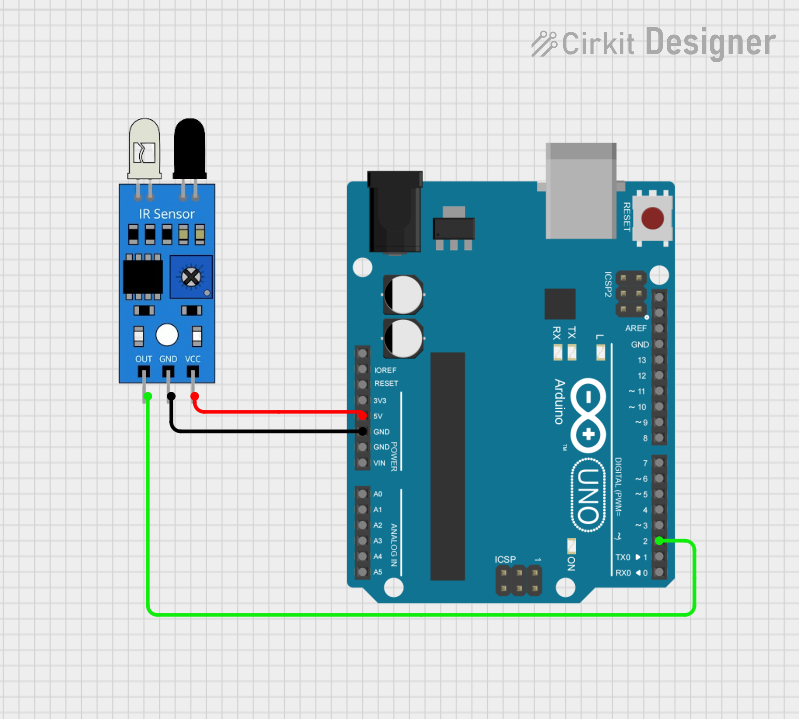
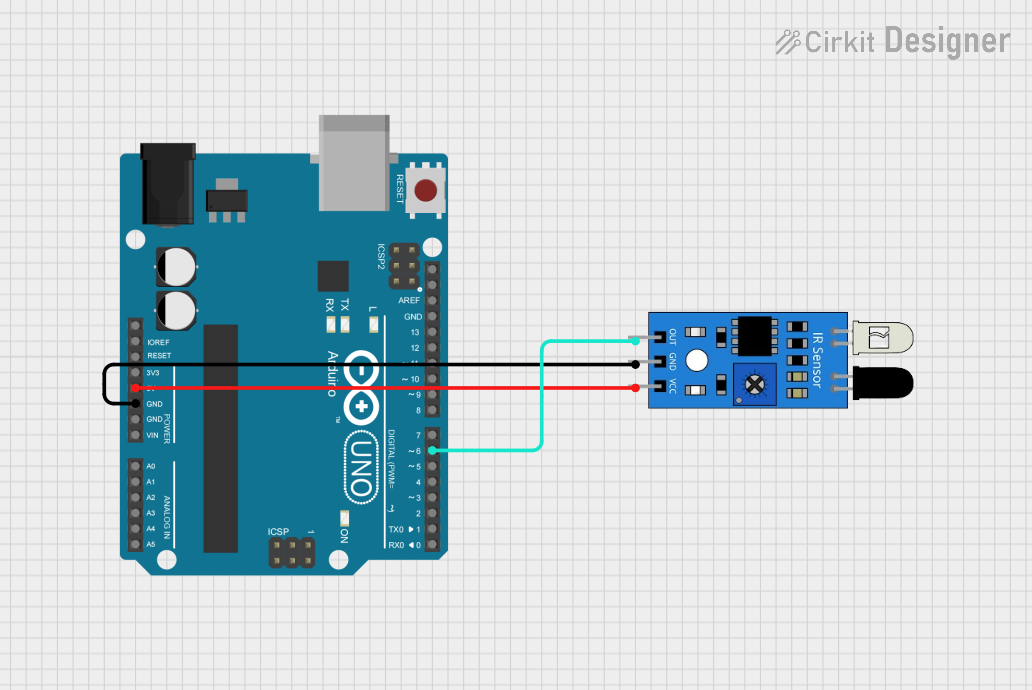
- Power the Sensor: Connect the VCC pin to a 3.3V or 5V power source and the GND pin to the ground.
- Connect the Output:
- For digital output: Connect the OUT (or DOUT) pin to a microcontroller's digital input pin.
- For analog output (if available): Connect the AOUT pin to an analog input pin of the microcontroller.
- Adjust Sensitivity (if applicable): Some IR object sensors have a potentiometer to adjust the detection range. Turn the potentiometer clockwise or counterclockwise to fine-tune the sensitivity.
- Place the Sensor: Position the sensor so that the IR LED faces the object to be detected. Ensure there are no obstructions between the sensor and the object.
Important Considerations and Best Practices
- Reflective Surfaces: The sensor's performance depends on the reflectivity of the object's surface. Highly reflective surfaces (e.g., white or shiny objects) are detected more easily than dark or matte surfaces.
- Ambient Light: Avoid using the sensor in environments with strong ambient IR light (e.g., direct sunlight), as it may interfere with detection.
- Distance Limitations: Ensure the object is within the sensor's specified detection range for accurate results.
- Power Supply: Use a stable power supply to avoid fluctuations in sensor performance.
Example Code for Arduino UNO
Below is an example of how to use a digital IR object sensor with an Arduino UNO:
// Define the pin connected to the sensor's digital output
const int sensorPin = 2; // Digital pin 2
const int ledPin = 13;   // Built-in LED pin for indication

void setup() {
  pinMode(sensorPin, INPUT); // Set sensor pin as input
  pinMode(ledPin, OUTPUT);   // Set LED pin as output
  Serial.begin(9600);        // Initialize serial communication
}

void loop() {
  int sensorValue = digitalRead(sensorPin); // Read the sensor's output

  if (sensorValue == HIGH) {
    // Object detected
    digitalWrite(ledPin, HIGH); // Turn on the LED
    Serial.println("Object detected!");
  } else {
    // No object detected
    digitalWrite(ledPin, LOW); // Turn off the LED
    Serial.println("No object detected.");
  }

  delay(100); // Small delay for stability
}
Troubleshooting and FAQs
Common Issues and Solutions
Sensor Not Detecting Objects
- Cause: Object is outside the detection range or has low reflectivity.
- Solution: Adjust the sensor's position or sensitivity using the potentiometer.
False Positives
- Cause: Strong ambient IR light or electrical noise.
- Solution: Shield the sensor from direct sunlight and use decoupling capacitors on the power supply.
Unstable Output
- Cause: Fluctuations in power supply or loose connections.
- Solution: Ensure a stable power source and check all connections.
Analog Output Not Working
- Cause: Incorrect pin connection or improper reading in the code.
- Solution: Verify the AOUT pin connection and ensure the microcontroller is reading the correct analog pin.
FAQs
Q1: Can the IR object sensor detect transparent objects?
A1: No, most IR object sensors cannot reliably detect transparent objects like glass, as IR light passes through them.
Q2: How do I increase the detection range?
A2: You can adjust the potentiometer (if available) or use a sensor model with a longer detection range.
Q3: Can I use multiple IR sensors in the same project?
A3: Yes, but ensure they are spaced apart to avoid interference between their IR signals.
Q4: What is the difference between digital and analog output?
A4: Digital output provides a HIGH or LOW signal based on object detection, while analog output gives a voltage proportional to the distance of the object.
By following this documentation, you can effectively integrate and troubleshoot an IR object sensor in your projects.