
How to Use adaptor 12v: Examples, Pinouts, and Specs
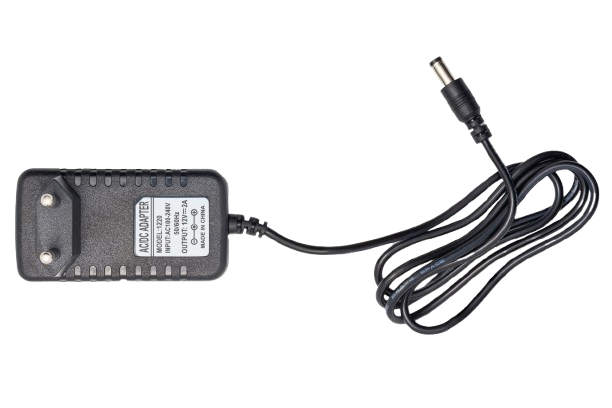
 Design with adaptor 12v in Cirkit Designer
Introduction
The Adaptor 12V by Power (Manufacturer Part ID: Power) is a device designed to convert electrical power from a standard wall outlet (typically 110V or 220V AC) to a stable 12V DC output. This adaptor is widely used to power a variety of electronic devices, including routers, LED strips, small appliances, and DIY electronics projects.
Explore Projects Built with adaptor 12v
 Open Project in Cirkit Designer
 Open Project in Cirkit Designer
 Open Project in Cirkit Designer
 Open Project in Cirkit Designer
Explore Projects Built with adaptor 12v
Open Project in Cirkit DesignerOpen Project in Cirkit DesignerOpen Project in Cirkit DesignerOpen Project in Cirkit DesignerCommon Applications and Use Cases
- Powering LED lighting systems
- Supplying power to routers, modems, and other networking equipment
- Driving small DC motors or actuators
- Providing a stable power source for Arduino or Raspberry Pi projects
- Charging or powering portable devices that require 12V DC input
Technical Specifications
Below are the key technical details of the Adaptor 12V:
| Parameter | Specification |
|---|---|
| Input Voltage | 100-240V AC, 50/60Hz |
| Output Voltage | 12V DC |
| Output Current | 1A, 2A, or 5A (varies by model) |
| Power Rating | Up to 60W (depending on model) |
| Connector Type | Barrel Jack (5.5mm outer, 2.1mm inner) |
| Efficiency | ≥ 85% |
| Operating Temperature | 0°C to 40°C |
| Storage Temperature | -20°C to 70°C |
| Safety Features | Overload, overvoltage, and short-circuit protection |
Pin Configuration and Descriptions
The Adaptor 12V typically uses a barrel jack connector. Below is the pin configuration:
| Pin | Description |
|---|---|
| Outer | Ground (GND) |
| Inner | Positive Voltage (+12V) |
Ensure that the polarity of the barrel jack matches the requirements of your device to avoid damage.
Usage Instructions
How to Use the Adaptor in a Circuit
- Check Compatibility: Verify that the device you intend to power requires a 12V DC input and that the current rating of the adaptor meets or exceeds the device's requirements.
- Connect the Barrel Jack: Plug the barrel jack into the power input port of your device. Ensure the polarity matches (inner pin is positive, outer sleeve is ground).
- Plug into Wall Outlet: Connect the adaptor to a standard AC wall outlet.
- Power On the Device: Turn on your device if it has a power switch. The adaptor will provide a stable 12V DC output.
Important Considerations and Best Practices
- Polarity Check: Always confirm the polarity of the barrel jack matches your device's requirements. Reversed polarity can damage your device.
- Current Rating: Ensure the adaptor's current rating (e.g., 1A, 2A, or 5A) is sufficient for your device. Using an adaptor with a lower current rating than required may cause overheating or failure.
- Ventilation: Place the adaptor in a well-ventilated area to prevent overheating during operation.
- Avoid Overloading: Do not connect devices that exceed the adaptor's maximum power rating.
Example: Using the Adaptor with an Arduino UNO
The Adaptor 12V can be used to power an Arduino UNO via its DC barrel jack. Below is an example of how to connect and use it:
- Plug the adaptor's barrel jack into the Arduino UNO's power input port.
- Ensure the adaptor provides 12V DC with the correct polarity.
- Connect the adaptor to a wall outlet.
- The Arduino UNO will automatically regulate the 12V input to its required operating voltage.
Sample Arduino Code
Here is a simple Arduino sketch to blink an LED while powered by the adaptor:
// This code blinks an LED connected to pin 13 of the Arduino UNO.
// Ensure the Arduino is powered using the 12V adaptor.

void setup() {
  pinMode(13, OUTPUT); // Set pin 13 as an output pin
}

void loop() {
  digitalWrite(13, HIGH); // Turn the LED on
  delay(1000);            // Wait for 1 second
  digitalWrite(13, LOW);  // Turn the LED off
  delay(1000);            // Wait for 1 second
}
Troubleshooting and FAQs
Common Issues and Solutions
| Issue | Possible Cause | Solution |
|---|---|---|
| Device does not power on | Incorrect polarity or loose connection | Verify the polarity and ensure a secure connection. |
| Adaptor overheats | Overloading or poor ventilation | Reduce the load or place the adaptor in a well-ventilated area. |
| Output voltage is unstable | Faulty adaptor or fluctuating input voltage | Replace the adaptor or use a voltage stabilizer. |
| Device powers off intermittently | Insufficient current rating | Use an adaptor with a higher current rating. |
FAQs
Can I use this adaptor with a device that requires less than 12V?
- No, using a 12V adaptor with a device that requires a lower voltage may damage the device. Use an adaptor with the correct voltage rating.
Is the adaptor waterproof?
- No, the adaptor is not waterproof. Avoid using it in wet or humid environments.
Can I use this adaptor to charge a 12V battery?
- This adaptor is not designed for charging batteries. Use a dedicated battery charger for this purpose.
What should I do if the adaptor stops working?
- Check for visible damage, ensure the wall outlet is functional, and verify the load does not exceed the adaptor's rating. If the issue persists, replace the adaptor.
By following this documentation, you can safely and effectively use the Adaptor 12V for your electronic projects and devices.