
How to Use HLK LD2450: Examples, Pinouts, and Specs
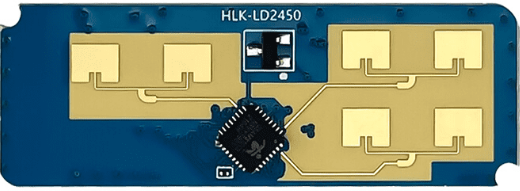
 Design with HLK LD2450 in Cirkit Designer
Introduction
The HLK LD2450 is a compact and efficient AC-DC power supply module manufactured by Hi-Link Electronics. It is designed to convert a wide range of AC input voltages (85-265V AC) into a stable 5V DC output, making it ideal for powering low-power electronic devices. With its high efficiency, low ripple, and integrated protection features, the HLK LD2450 is a reliable choice for various applications.
Explore Projects Built with HLK LD2450
 Open Project in Cirkit Designer
 Open Project in Cirkit Designer
 Open Project in Cirkit Designer
 Open Project in Cirkit Designer
Explore Projects Built with HLK LD2450
Open Project in Cirkit DesignerOpen Project in Cirkit DesignerOpen Project in Cirkit DesignerOpen Project in Cirkit DesignerCommon Applications and Use Cases
- Powering microcontrollers (e.g., Arduino, ESP32, Raspberry Pi Pico)
- IoT devices and smart home systems
- Industrial control systems
- Low-power sensors and actuators
- Embedded systems requiring a stable 5V DC supply
Technical Specifications
The HLK LD2450 is designed to meet the needs of modern electronic systems with the following specifications:
| Parameter | Value |
|---|---|
| Input Voltage Range | 85-265V AC |
| Output Voltage | 5V DC |
| Output Current | 0-450mA |
| Output Power | 2.25W |
| Efficiency | ≥ 75% |
| Ripple and Noise | ≤ 50mV |
| Operating Temperature | -25°C to +70°C |
| Storage Temperature | -40°C to +85°C |
| Protection Features | Over-voltage, Over-current, Short-circuit |
| Dimensions | 35mm x 18mm x 15mm |
| Weight | ~10g |
Pin Configuration and Descriptions
The HLK LD2450 module has six pins, as described in the table below:
| Pin Number | Pin Name | Description |
|---|---|---|
| 1 | AC IN (L) | Live input for AC voltage (85-265V AC) |
| 2 | AC IN (N) | Neutral input for AC voltage |
| 3 | GND | Ground connection for the DC output |
| 4 | +5V OUT | 5V DC output |
| 5 | NC | Not connected (leave unconnected) |
| 6 | NC | Not connected (leave unconnected) |
Usage Instructions
How to Use the HLK LD2450 in a Circuit
Connect the AC Input:
- Connect the
AC IN (L)pin to the live wire of the AC mains supply. - Connect the
AC IN (N)pin to the neutral wire of the AC mains supply. - Ensure proper insulation and safety precautions when working with high-voltage AC.
- Connect the
Connect the DC Output:
- Connect the
+5V OUTpin to the positive terminal of your load or circuit. - Connect the
GNDpin to the ground terminal of your load or circuit.
- Connect the
Mounting and Placement:
- Place the module in a well-ventilated area to prevent overheating.
- Avoid placing the module near sources of electromagnetic interference (EMI).
Safety Precautions:
- Do not touch the module while it is powered, as it handles high-voltage AC.
- Use a fuse or circuit breaker on the AC input for added protection.
Important Considerations and Best Practices
- Load Requirements: Ensure the connected load does not exceed the maximum output current of 450mA.
- Heat Dissipation: If the module operates near its maximum power rating, consider adding heat sinks or improving ventilation.
- Isolation: For safety, ensure proper isolation between the AC and DC sides of the circuit.
- Testing: Before connecting the module to your final circuit, test it with a dummy load to verify its performance.
Example: Using HLK LD2450 with Arduino UNO
The HLK LD2450 can be used to power an Arduino UNO by providing a stable 5V DC supply. Below is an example circuit and Arduino code:
Circuit Diagram
- Connect the
+5V OUTpin of the HLK LD2450 to the5Vpin of the Arduino UNO. - Connect the
GNDpin of the HLK LD2450 to theGNDpin of the Arduino UNO. - Connect the
AC IN (L)andAC IN (N)pins to the AC mains supply (ensure safety precautions).
Arduino Code Example
// Example code to blink an LED using Arduino UNO powered by HLK LD2450

const int ledPin = 13; // Pin connected to the built-in LED on Arduino UNO

void setup() {
  pinMode(ledPin, OUTPUT); // Set the LED pin as an output
}

void loop() {
  digitalWrite(ledPin, HIGH); // Turn the LED on
  delay(1000);                // Wait for 1 second
  digitalWrite(ledPin, LOW);  // Turn the LED off
  delay(1000);                // Wait for 1 second
}
Troubleshooting and FAQs
Common Issues and Solutions
No Output Voltage:
- Cause: Incorrect AC input connections or no AC power supply.
- Solution: Verify the AC input connections and ensure the mains supply is active.
Output Voltage Too Low or Unstable:
- Cause: Overloading the module or insufficient ventilation.
- Solution: Reduce the load to within the module's rated current (450mA) and improve ventilation.
Module Overheating:
- Cause: Operating near maximum power rating for extended periods.
- Solution: Add heat sinks or improve airflow around the module.
Noise or Ripple in Output Voltage:
- Cause: Poor filtering or interference from nearby components.
- Solution: Add a capacitor (e.g., 100µF electrolytic) across the output terminals to reduce noise.
FAQs
Q1: Can the HLK LD2450 be used with a 12V DC input?
A1: No, the HLK LD2450 is designed to work with an AC input voltage range of 85-265V. It cannot operate with a DC input.
Q2: Is the module safe to use in outdoor environments?
A2: The HLK LD2450 is not waterproof or weatherproof. It should be used in indoor environments or enclosed in a protective casing for outdoor use.
Q3: Can I use the HLK LD2450 to power a Raspberry Pi?
A3: The HLK LD2450 provides a maximum current of 450mA, which may not be sufficient for a Raspberry Pi. It is better suited for low-power devices like microcontrollers or sensors.
Q4: What is the lifespan of the HLK LD2450?
A4: The module is designed for long-term use under normal operating conditions. However, factors like overheating or overloading can reduce its lifespan.