Cirkit Designer Logo
Cirkit Designer
Your all-in-one circuit design IDE
Home / 
Component Documentation

How to Use Terminal Block KTB1 20A 6P: Examples, Pinouts, and Specs
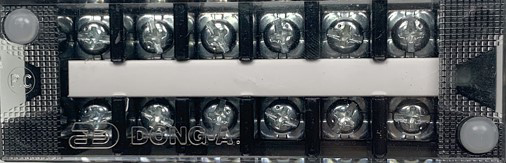

Image of Terminal Block KTB1 20A 6P
Cirkit Designer LogoDesign with Terminal Block KTB1 20A 6P in Cirkit Designer

Introduction

The Terminal Block KTB1 20A 6P is a versatile and robust electrical connector designed by GPS for connecting multiple circuits together. This component is essential in creating a secure and organized point of connection for wiring in a variety of applications, including industrial control panels, power supply units, and electronic devices. Its ability to handle up to 20 amps makes it suitable for high-current applications.

Explore Projects Built with Terminal Block KTB1 20A 6P

Use Cirkit Designer to design, explore, and prototype these projects online. Some projects support real-time simulation. Click "Open Project" to start designing instantly!
Modular Power Distribution System with Multiple SMPS Units and 120V Outlet
Image of Cellion-Tesla: A project utilizing Terminal Block KTB1 20A 6P in a practical application
This circuit is designed to convert 240V AC power to both 12V and 24V DC outputs using multiple SMPS units. Terminal blocks are used to organize and distribute the power, while a 120V outlet provides additional AC power access. The circuit is likely used for powering various electronic devices that require different voltage levels.
Cirkit Designer LogoOpen Project in Cirkit Designer
Peltier-Controlled Thermal Management System with SPST Switch
Image of Mini car refrigerator circuit: A project utilizing Terminal Block KTB1 20A 6P in a practical application
This circuit consists of multiple Peltier modules and fans connected in parallel to a digital power supply, with a rocker switch (SPST) controlling the power flow to one of the Peltier modules and multiple fans. The 2.1mm Barrel Jack with Terminal Block serves as the power input connector, and the rocker switch allows for selective enabling or disabling of the connected devices. The circuit is designed to provide cooling or heating through the Peltier modules while the fans assist in heat dissipation or air circulation.
Cirkit Designer LogoOpen Project in Cirkit Designer
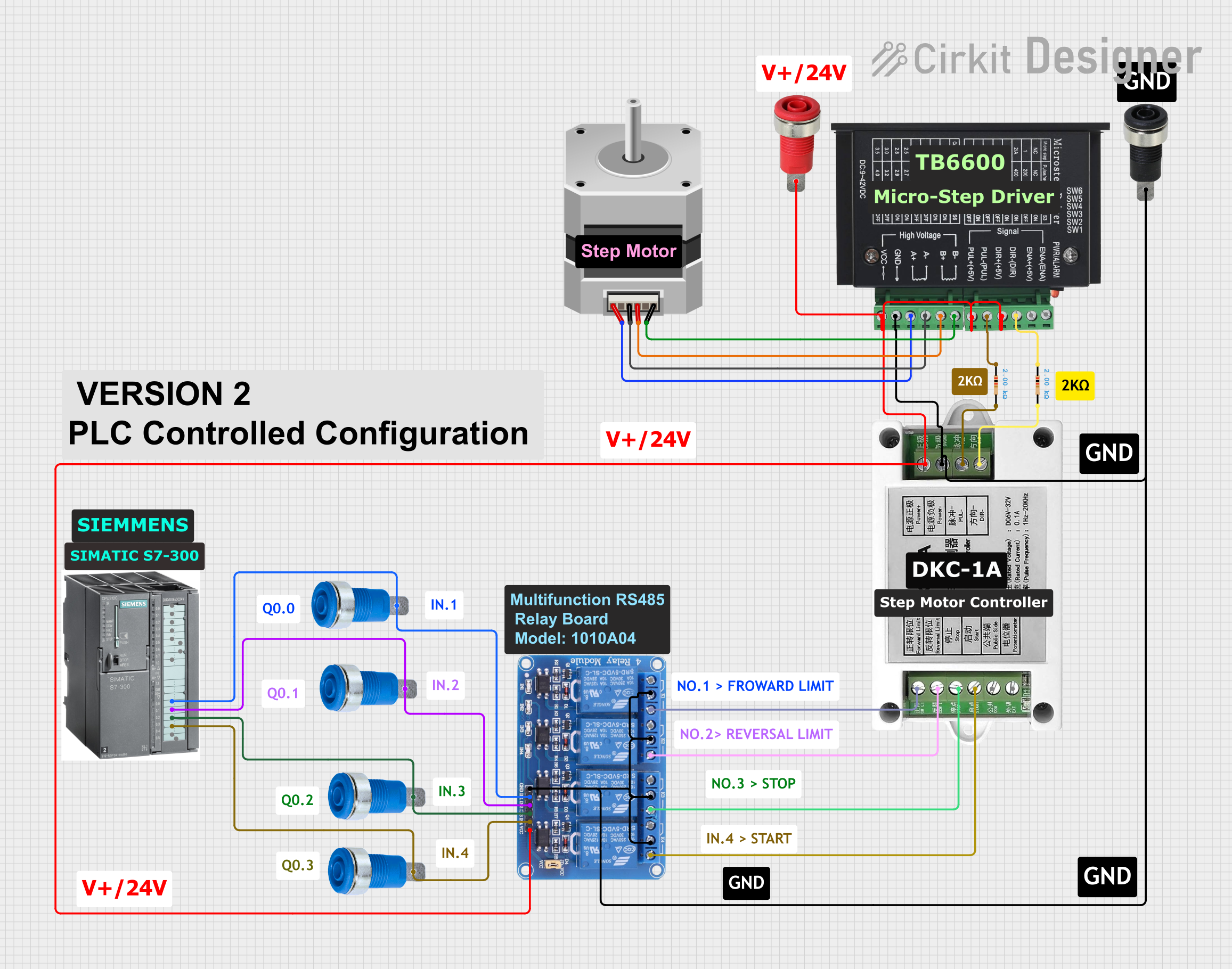
Stepper Motor Control System with SIMATIC S7-300 and TB6600 Driver
Image of Copy of PLC-Based Step Motor Speed and Direction Control System: A project utilizing Terminal Block KTB1 20A 6P in a practical application
This circuit controls a stepper motor using a tb6600 micro stepping motor driver and a DKC-1A stepper motor controller. The system is powered through panel mount banana sockets and includes a relay module for additional control, interfaced with a SIMATIC S7-300 PLC for automation.
Cirkit Designer LogoOpen Project in Cirkit Designer
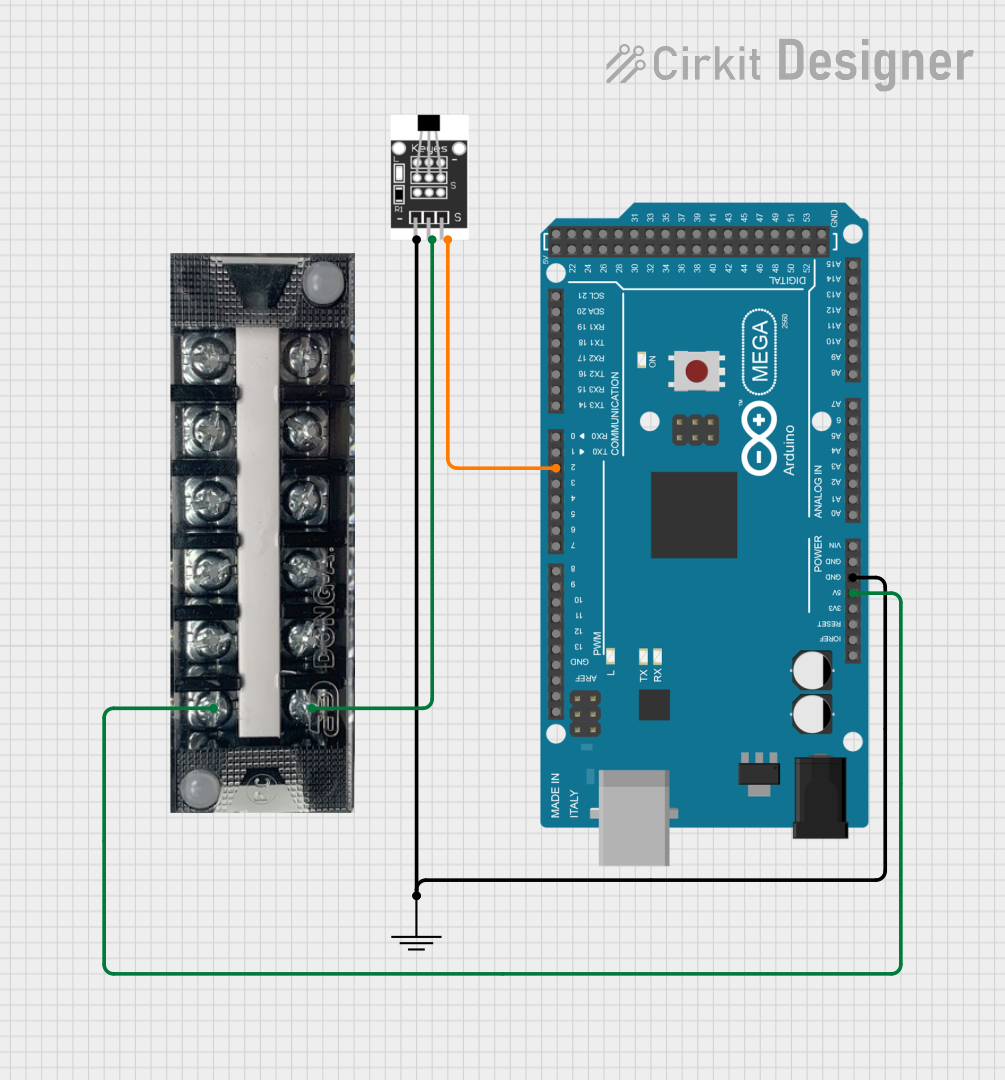
Arduino Mega 2560 Hall Sensor Interface for Real-Time Magnetic Field Detection
Image of Hall Effect CD: A project utilizing Terminal Block KTB1 20A 6P in a practical application
This circuit uses an Arduino Mega 2560 to read data from a Hall Sensor, which is powered through a terminal block connected to the Arduino's 5V supply. The sensor's ground is connected to the Arduino's ground, and its signal output is read by the Arduino on pin D2.
Cirkit Designer LogoOpen Project in Cirkit Designer

Explore Projects Built with Terminal Block KTB1 20A 6P

Use Cirkit Designer to design, explore, and prototype these projects online. Some projects support real-time simulation. Click "Open Project" to start designing instantly!
Image of Cellion-Tesla: A project utilizing Terminal Block KTB1 20A 6P in a practical application
Modular Power Distribution System with Multiple SMPS Units and 120V Outlet
This circuit is designed to convert 240V AC power to both 12V and 24V DC outputs using multiple SMPS units. Terminal blocks are used to organize and distribute the power, while a 120V outlet provides additional AC power access. The circuit is likely used for powering various electronic devices that require different voltage levels.
Cirkit Designer LogoOpen Project in Cirkit Designer
Image of Mini car refrigerator circuit: A project utilizing Terminal Block KTB1 20A 6P in a practical application
Peltier-Controlled Thermal Management System with SPST Switch
This circuit consists of multiple Peltier modules and fans connected in parallel to a digital power supply, with a rocker switch (SPST) controlling the power flow to one of the Peltier modules and multiple fans. The 2.1mm Barrel Jack with Terminal Block serves as the power input connector, and the rocker switch allows for selective enabling or disabling of the connected devices. The circuit is designed to provide cooling or heating through the Peltier modules while the fans assist in heat dissipation or air circulation.
Cirkit Designer LogoOpen Project in Cirkit Designer
Image of Copy of PLC-Based Step Motor Speed and Direction Control System: A project utilizing Terminal Block KTB1 20A 6P in a practical application
Stepper Motor Control System with SIMATIC S7-300 and TB6600 Driver
This circuit controls a stepper motor using a tb6600 micro stepping motor driver and a DKC-1A stepper motor controller. The system is powered through panel mount banana sockets and includes a relay module for additional control, interfaced with a SIMATIC S7-300 PLC for automation.
Cirkit Designer LogoOpen Project in Cirkit Designer
Image of Hall Effect CD: A project utilizing Terminal Block KTB1 20A 6P in a practical application
Arduino Mega 2560 Hall Sensor Interface for Real-Time Magnetic Field Detection
This circuit uses an Arduino Mega 2560 to read data from a Hall Sensor, which is powered through a terminal block connected to the Arduino's 5V supply. The sensor's ground is connected to the Arduino's ground, and its signal output is read by the Arduino on pin D2.
Cirkit Designer LogoOpen Project in Cirkit Designer

Common Applications and Use Cases

  • Industrial control systems
  • Power distribution units
  • HVAC systems
  • Automotive wiring
  • Marine and boating applications
  • DIY electronics projects

Technical Specifications

Key Technical Details

  • Rated Voltage: Up to 600V
  • Rated Current: Up to 20A
  • Positions: 6
  • Wire Size: 12-22 AWG
  • Operating Temperature Range: -40°C to 105°C
  • Material: Polyamide 66, UL 94V-0 flame retardant
  • Color: Grey

Pin Configuration and Descriptions

Pin Number Description
1 Input/Output Line 1
2 Input/Output Line 2
3 Input/Output Line 3
4 Input/Output Line 4
5 Input/Output Line 5
6 Input/Output Line 6

Usage Instructions

How to Use the Component in a Circuit

  1. Wire Stripping: Strip approximately 5-7mm of insulation from the end of each wire to be connected.
  2. Insertion: Loosen the screws on the terminal block using a screwdriver. Insert the stripped end of the wire into the corresponding terminal hole.
  3. Securing Wires: Tighten the screws to secure the wires in place. Ensure a firm connection without over-tightening, which could damage the wire.
  4. Testing: Once all connections are made, test the circuit for continuity and proper operation before applying power.

Important Considerations and Best Practices

  • Ensure that the total current through the terminal block does not exceed 20A.
  • Use wires that are within the specified gauge range (12-22 AWG) to ensure a secure fit and proper electrical contact.
  • Do not expose the terminal block to temperatures outside the specified operating range.
  • Periodically check the connections for any signs of corrosion or loosening.
  • Always disconnect power before making any changes to the wiring.

Troubleshooting and FAQs

Common Issues Users Might Face

  • Loose Connections: If a circuit is not functioning as expected, check all connections to the terminal block for tightness.
  • Overheating: If the terminal block is overheating, it may be due to excessive current. Verify that the current does not exceed the 20A rating.
  • Corrosion: In high-humidity environments, corrosion can occur. Inspect the terminal block regularly and clean if necessary.

Solutions and Tips for Troubleshooting

  • Intermittent Connections: If connections are intermittent, re-strip the wire ends and re-tighten the screws.
  • Current Overload: If the current exceeds 20A, redistribute the load across multiple terminal blocks or use a terminal block with a higher current rating.
  • Environmental Protection: If the terminal block is used in an environment where it is exposed to moisture or chemicals, consider using a protective enclosure.

FAQs

Q: Can I use this terminal block for AC and DC applications? A: Yes, the terminal block is suitable for both AC and DC applications within its voltage and current ratings.

Q: Is it possible to connect more than one wire to a single position? A: It is not recommended to connect more than one wire per position as it may not provide a secure connection and could exceed the current rating.

Q: How do I know if my wire gauge is appropriate for this terminal block? A: Check the wire gauge (AWG) and ensure it falls within the 12-22 AWG range specified for this terminal block.

Q: What should I do if the screw does not tighten properly? A: Inspect the screw and terminal for damage. If the screw is stripped or the terminal is damaged, replace the terminal block to ensure a safe and reliable connection.


Note: This documentation is for the Terminal Block KTB1 20A 6P manufactured by GPS with the manufacturer part ID of GPS. Always verify the component and part ID before use in your projects.