
How to Use Terminal Strip 2x6: Examples, Pinouts, and Specs
 Design with Terminal Strip 2x6 in Cirkit Designer
Introduction
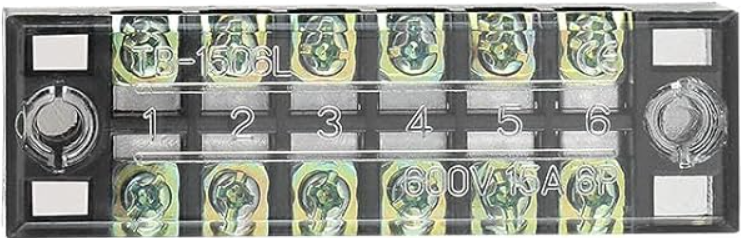
The Terminal Strip 2x6 is a versatile and reliable component designed for organizing and connecting multiple wires in a circuit. It features 2 rows and 6 columns of connection points, providing a total of 12 terminals for efficient wire management. This component is commonly used in electrical and electronic projects to simplify wiring, ensure secure connections, and facilitate troubleshooting.
Explore Projects Built with Terminal Strip 2x6
 Open Project in Cirkit Designer
 Open Project in Cirkit Designer
 Open Project in Cirkit Designer
 Open Project in Cirkit Designer
Explore Projects Built with Terminal Strip 2x6
Open Project in Cirkit DesignerOpen Project in Cirkit DesignerOpen Project in Cirkit DesignerOpen Project in Cirkit DesignerCommon Applications and Use Cases
- Prototyping and testing circuits: Easily connect and disconnect wires during development.
- Industrial control panels: Organize wiring for machines and equipment.
- Home automation systems: Manage connections for sensors, actuators, and controllers.
- Audio and speaker systems: Distribute signals to multiple speakers or devices.
- Renewable energy systems: Connect solar panels, batteries, and inverters.
Technical Specifications
The Terminal Strip 2x6 is designed to handle a wide range of electrical applications. Below are its key technical details:
| Specification | Details |
|---|---|
| Number of Terminals | 12 (2 rows x 6 columns) |
| Terminal Type | Screw-type |
| Maximum Voltage Rating | 600V |
| Maximum Current Rating | 15A |
| Wire Gauge Compatibility | 22 AWG to 12 AWG |
| Material | Insulated plastic base, metal screws |
| Mounting Style | Panel mount or free-standing |
| Dimensions | 60mm x 20mm x 15mm (approx.) |
Pin Configuration and Descriptions
The Terminal Strip 2x6 does not have traditional "pins" like an IC but instead features screw terminals for wire connections. Below is a description of its layout:
| Row | Column | Description |
|---|---|---|
| 1 | 1 to 6 | First row of terminals for wire connections |
| 2 | 1 to 6 | Second row of terminals for wire connections |
Each terminal pair (e.g., Row 1, Column 1 and Row 2, Column 1) is electrically isolated from the others unless bridged manually.
Usage Instructions
How to Use the Terminal Strip 2x6 in a Circuit
Prepare the wires:
- Strip approximately 5-7mm of insulation from the ends of the wires you want to connect.
- Ensure the exposed wire is clean and free of frayed strands.
Insert the wires:
- Loosen the screw on the desired terminal using a screwdriver.
- Insert the stripped end of the wire into the terminal opening.
- Tighten the screw to secure the wire in place. Avoid overtightening to prevent damage.
Connect additional wires:
- Repeat the process for other wires, ensuring each wire is securely fastened.
Optional bridging:
- If you need to electrically connect multiple terminals, use jumper wires or metal bridging strips.
Mount the terminal strip:
- For permanent installations, mount the terminal strip to a panel or enclosure using screws.
Important Considerations and Best Practices
- Avoid overloading: Ensure the total current and voltage do not exceed the specified ratings (15A and 600V).
- Use appropriate wire gauges: Match the wire gauge to the terminal strip's compatibility range (22 AWG to 12 AWG).
- Check connections: Periodically inspect and tighten screws to maintain secure connections.
- Prevent short circuits: Use insulated wires and avoid leaving exposed conductors near other terminals.
Example: Connecting to an Arduino UNO
The Terminal Strip 2x6 can be used to organize connections between an Arduino UNO and external components like sensors or LEDs. Below is an example of wiring an LED and a resistor through the terminal strip:
- Connect the Arduino's digital pin (e.g., pin 8) to one terminal on the strip.
- Connect a resistor (e.g., 220Ω) from the corresponding terminal in the second row to the LED's anode.
- Connect the LED's cathode to another terminal, and then connect the corresponding terminal in the second row to the Arduino's GND.
Here is the Arduino code to blink the LED:
// Define the pin connected to the LED
const int ledPin = 8;

void setup() {
  pinMode(ledPin, OUTPUT); // Set the LED pin as an output
}

void loop() {
  digitalWrite(ledPin, HIGH); // Turn the LED on
  delay(1000);                // Wait for 1 second
  digitalWrite(ledPin, LOW);  // Turn the LED off
  delay(1000);                // Wait for 1 second
}
Troubleshooting and FAQs
Common Issues and Solutions
Loose connections:
- Issue: Wires are not securely fastened, leading to intermittent connections.
- Solution: Tighten the screws and ensure the wire is properly inserted.
Overheating terminals:
- Issue: Excessive current flow causes terminals to heat up.
- Solution: Verify that the current does not exceed the 15A rating. Use thicker wires if necessary.
Short circuits:
- Issue: Exposed wires or improper bridging cause unintended connections.
- Solution: Use insulated wires and double-check all connections.
Corrosion or oxidation:
- Issue: Terminals become corroded over time, reducing conductivity.
- Solution: Clean the terminals with a contact cleaner and ensure the environment is dry.
FAQs
Can I use the Terminal Strip 2x6 for AC circuits? Yes, it is suitable for both AC and DC circuits, provided the voltage and current ratings are not exceeded.
How do I bridge terminals for common connections? Use metal bridging strips or jumper wires to connect adjacent terminals.
Is the terminal strip reusable? Yes, it can be reused multiple times as long as the screws and terminals remain in good condition.
Can I mount the terminal strip on a DIN rail? This specific model is not designed for DIN rail mounting, but adapters may be available.
By following this documentation, you can effectively use the Terminal Strip 2x6 in your projects for organized and reliable wiring.