
How to Use SOURCE 3P: Examples, Pinouts, and Specs
 Design with SOURCE 3P in Cirkit Designer
Introduction
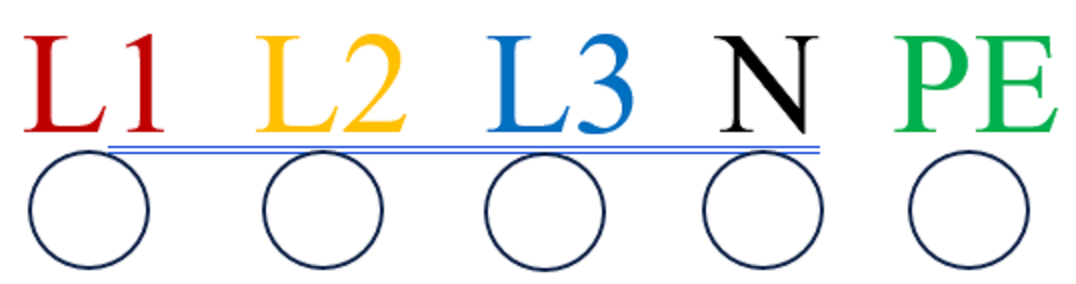
The SOURCE 3P is a 3-pin power source component designed to provide electrical power to circuits. It is commonly used in industrial and residential applications where a reliable AC power source is required. The component features connections for live (L1, L2, L3), neutral (N), and protective earth (PE), ensuring safe and efficient power delivery. With a rated voltage of 400V AC, the SOURCE 3P is ideal for powering three-phase systems and equipment.
Explore Projects Built with SOURCE 3P
 Open Project in Cirkit Designer
 Open Project in Cirkit Designer
 Open Project in Cirkit Designer
 Open Project in Cirkit Designer
Explore Projects Built with SOURCE 3P
Open Project in Cirkit DesignerOpen Project in Cirkit DesignerOpen Project in Cirkit DesignerOpen Project in Cirkit DesignerCommon Applications and Use Cases
- Powering three-phase motors and industrial machinery
- Supplying power to HVAC systems
- Distribution of power in electrical panels
- Use in renewable energy systems, such as wind turbines and solar inverters
- General-purpose three-phase power delivery in commercial and residential setups
Technical Specifications
Key Technical Details
| Parameter | Value |
|---|---|
| Manufacturer Part ID | 400V AC |
| Rated Voltage | 400V AC |
| Number of Pins | 5 (L1, L2, L3, N, PE) |
| Frequency | 50/60 Hz |
| Maximum Current Rating | 32A (typical) |
| Insulation Resistance | ≥ 10 MΩ |
| Operating Temperature | -25°C to 70°C |
| Protection Class | IP20 (or higher, depending on enclosure) |
Pin Configuration and Descriptions
| Pin Name | Description | Notes |
|---|---|---|
| L1 | Phase 1 (Live) | Supplies one phase of AC power |
| L2 | Phase 2 (Live) | Supplies second phase of AC power |
| L3 | Phase 3 (Live) | Supplies third phase of AC power |
| N | Neutral | Returns current to the source |
| PE | Protective Earth (Ground) | Ensures safety by grounding |
Usage Instructions
How to Use the SOURCE 3P in a Circuit
Wiring the Component:
- Connect the L1, L2, and L3 pins to the corresponding live wires of the three-phase power source.
- Connect the N pin to the neutral wire.
- Connect the PE pin to the protective earth (ground) wire for safety.
Ensure Proper Insulation:
- Use appropriate insulation materials to prevent accidental contact with live wires.
- Verify that the component is housed in an enclosure with a suitable IP rating for the environment.
Verify Voltage and Current Ratings:
- Ensure that the connected load does not exceed the rated voltage (400V AC) or current (32A).
- Use circuit breakers or fuses for overcurrent protection.
Testing the Connection:
- After wiring, use a multimeter to verify the voltage across the L1, L2, L3, and N pins.
- Check the continuity of the PE connection to ensure proper grounding.
Important Considerations and Best Practices
- Always disconnect the power supply before wiring or modifying the circuit.
- Use cables with appropriate current-carrying capacity to prevent overheating.
- Ensure that the PE connection is securely fastened to avoid safety hazards.
- For three-phase motors, verify the phase sequence to ensure correct rotation direction.
- If used in conjunction with an Arduino UNO or other microcontrollers, use a step-down transformer or relay module to interface safely with low-voltage circuits.
Example: Connecting SOURCE 3P to a Three-Phase Motor
// Note: This example assumes the SOURCE 3P is used to power a three-phase motor.
// The Arduino UNO is used to control a relay module for motor operation.

const int relayPin = 7; // Pin connected to the relay module

void setup() {
  pinMode(relayPin, OUTPUT); // Set the relay pin as an output
  digitalWrite(relayPin, LOW); // Ensure the relay is off initially
}

void loop() {
  // Turn on the motor by activating the relay
  digitalWrite(relayPin, HIGH);
  delay(5000); // Keep the motor running for 5 seconds

  // Turn off the motor
  digitalWrite(relayPin, LOW);
  delay(5000); // Wait for 5 seconds before restarting
}
Note: The SOURCE 3P directly powers the motor, while the Arduino controls the relay. Ensure proper isolation between the high-voltage and low-voltage sides.
Troubleshooting and FAQs
Common Issues and Solutions
| Issue | Possible Cause | Solution |
|---|---|---|
| No power output from SOURCE 3P | Loose or incorrect wiring | Verify all connections are secure |
| Overheating of wires or component | Exceeding current rating | Use cables with higher capacity |
| Circuit breaker trips frequently | Short circuit or overload | Check for short circuits or reduce load |
| Motor rotates in the wrong direction | Incorrect phase sequence | Swap any two phase wires (L1, L2, or L3) |
| Ground fault detected | Improper PE connection | Ensure proper grounding |
FAQs
Can the SOURCE 3P be used with single-phase equipment?
- Yes, by connecting one live pin (e.g., L1) and the neutral (N) pin, the SOURCE 3P can supply single-phase power.
What safety precautions should I take when using the SOURCE 3P?
- Always disconnect the power supply before handling the component.
- Ensure proper grounding and use circuit protection devices like fuses or breakers.
Can I use the SOURCE 3P outdoors?
- The SOURCE 3P itself must be housed in an enclosure with an appropriate IP rating (e.g., IP65) for outdoor use.
How do I test the phase sequence?
- Use a phase sequence meter to verify the order of L1, L2, and L3. Adjust connections if necessary.
By following this documentation, users can safely and effectively integrate the SOURCE 3P into their electrical systems.