The 28BYJ-48 is a unipolar stepper motor manufactured by xxxxxxx with the part ID 28BYJ-48 driver. This motor is widely used in robotics, automation, and DIY electronics projects due to its affordability, reliability, and precise control capabilities. It features a 5-phase design, enabling accurate rotation and positioning. The motor is typically paired with a ULN2003 driver board, which simplifies interfacing with microcontrollers such as Arduino.
Explore Projects Built with 28BYJ-48
Use Cirkit Designer to design, explore, and prototype these projects online. Some projects support real-time simulation. Click "Open Project" to start designing instantly!
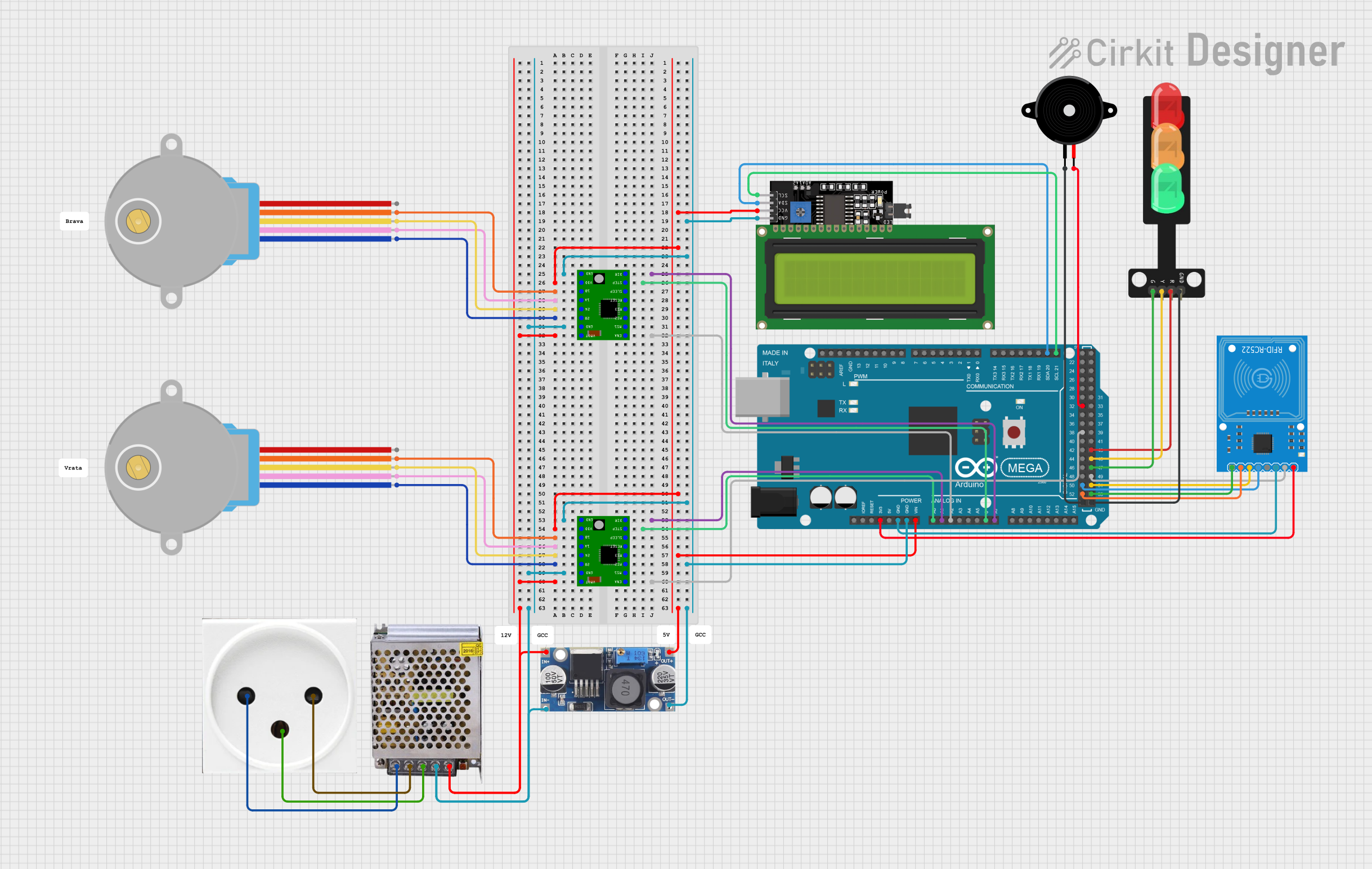
This circuit controls two 28BYJ-48 stepper motors using A4988 stepper motor driver carriers, interfaced with an Arduino Mega 2560 microcontroller. It features an RFID-RC522 module for RFID reading, a 16x4 LCD display with I2C interface for user interaction, and a piezo speaker for audio feedback. Additionally, there is a traffic light module controlled by the Arduino, and a 48V to 5V converter to step down voltage for the logic levels. The power supply provides 12V to the motor drivers and is connected to a standard power outlet.
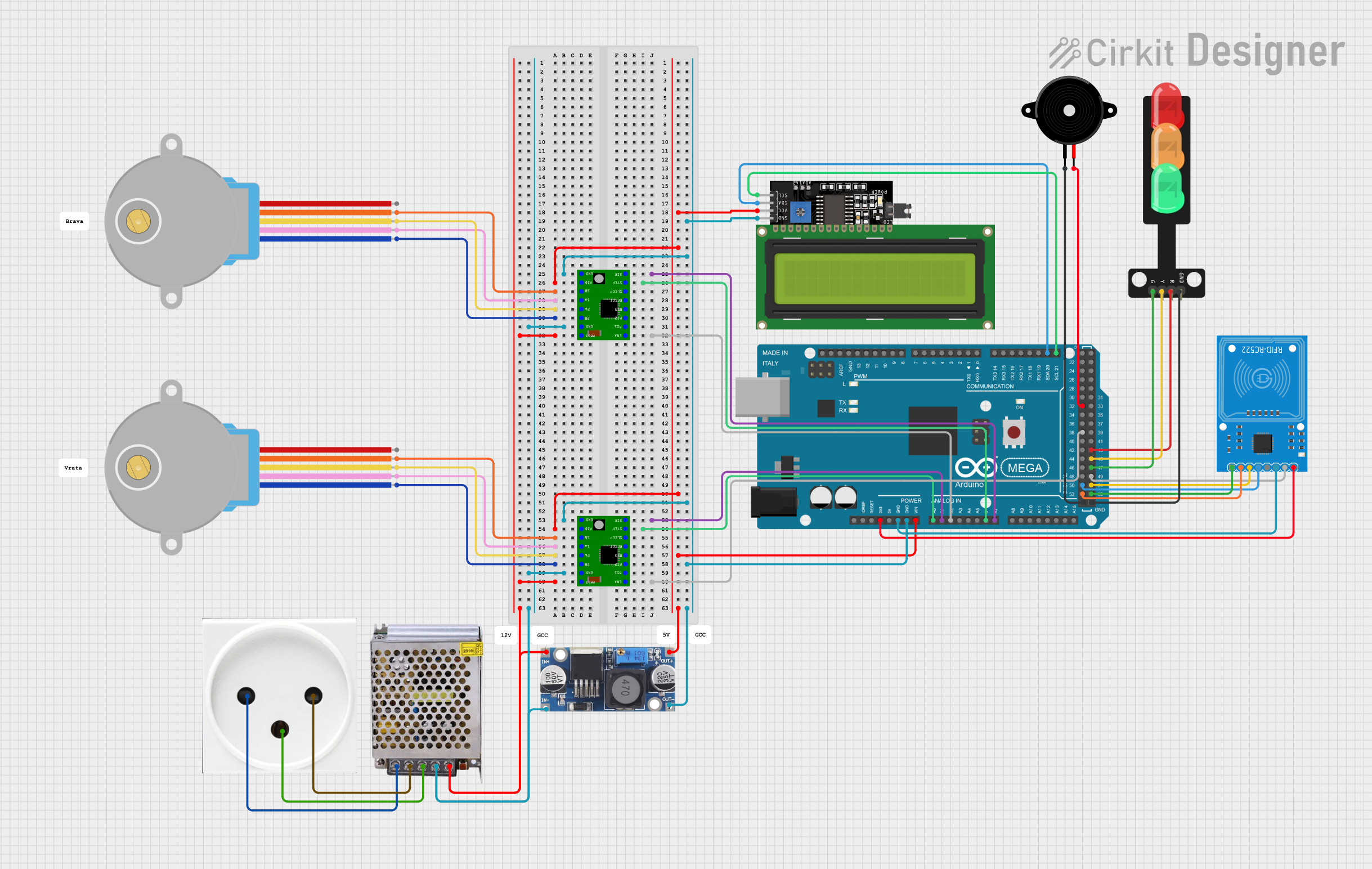
This circuit is designed to control two 28BYJ-48 stepper motors using A4988 stepper motor driver carriers, with an Arduino Mega 2560 as the central microcontroller. It includes an RFID-RC522 module for RFID reading, an LCD display for user interface, and a traffic light and piezo speaker for visual and audio signaling. The circuit is powered by a 12V 5A power supply, which is stepped down to 5V for logic level components, and it interfaces with a power outlet for AC to DC conversion.
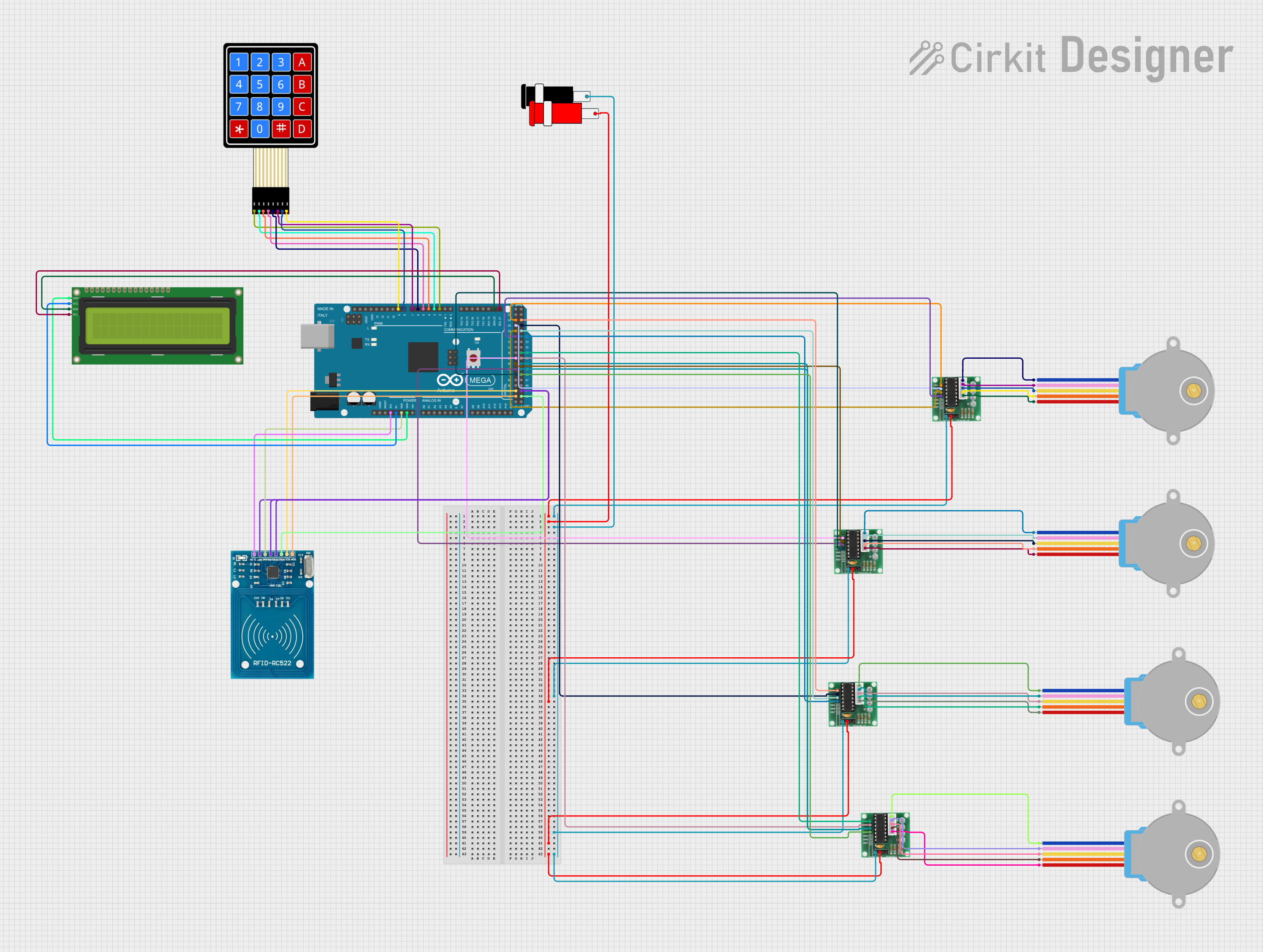
This circuit features an Arduino Mega 2560 microcontroller interfacing with multiple components including four 28BYJ-48 stepper motors controlled via ULN 2003 drivers, a 16x2 I2C LCD for display, an RFID-RC522 module for RFID reading, and a 4x4 membrane matrix keypad for user input. The setup is designed for applications requiring motor control, user interaction, and RFID-based identification.
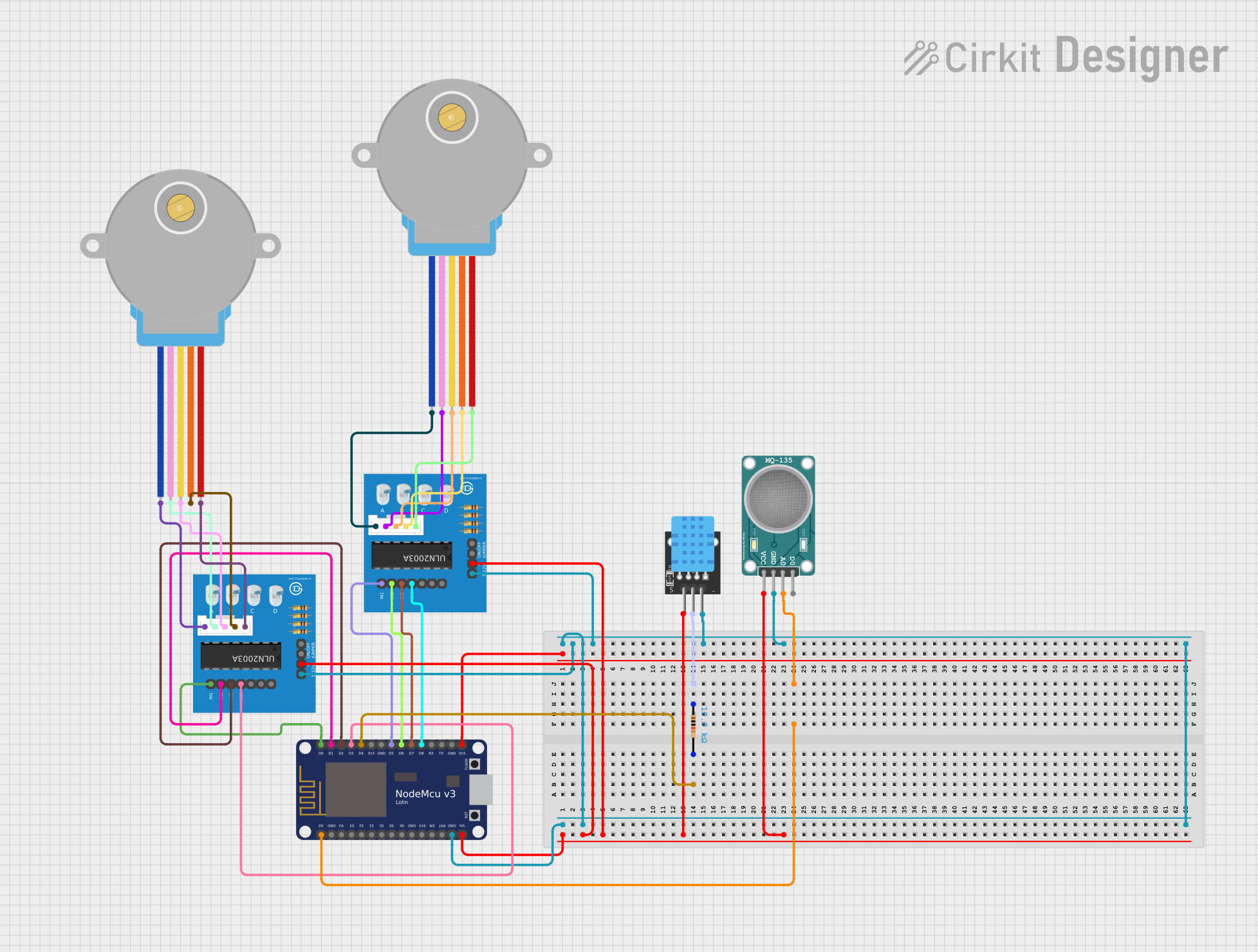
This circuit features two 28BYJ-48 stepper motors controlled by ULN2003A breakout boards, interfaced with a NodeMCU V3 ESP8266 microcontroller. The NodeMCU collects environmental data from a DHT11 temperature and humidity sensor and an MQ-135 air quality sensor. The microcontroller uses WiFi for connectivity and controls the stepper motors based on the sensor inputs, likely for regulating environmental conditions.
Below are the key technical details of the 28BYJ-48 stepper motor:
Parameter
Value
Operating Voltage
5V DC
Step Angle
5.625° (64 steps per revolution)
Gear Ratio
1:64
Phases
4
Drive Type
Unipolar
Rated Current
240 mA
Coil Resistance
~50 Ω
Holding Torque
~300 gf.cm
Dimensions
28 mm diameter, 20 mm height
Shaft Diameter
5 mm
Pin Configuration (ULN2003 Driver Board)
The 28BYJ-48 is commonly used with the ULN2003 driver board. Below is the pin configuration for the driver board:
Pin Name
Description
IN1
Input for Coil A
IN2
Input for Coil B
IN3
Input for Coil C
IN4
Input for Coil D
VCC
Power supply (5V)
GND
Ground
Motor Pins
Connects to the 28BYJ-48 motor (4 pins)
Usage Instructions
Connecting the 28BYJ-48 to an Arduino UNO
To use the 28BYJ-48 stepper motor with an Arduino UNO, follow these steps:
Connect the 4-pin connector of the motor to the ULN2003 driver board.
Connect the ULN2003 board to the Arduino as follows:
IN1 → Arduino Pin 8
IN2 → Arduino Pin 9
IN3 → Arduino Pin 10
IN4 → Arduino Pin 11
Connect the VCC and GND pins of the ULN2003 board to the 5V and GND pins of the Arduino, respectively.
Power the Arduino and upload the control code.
Sample Arduino Code
Below is an example code to control the 28BYJ-48 stepper motor using the Arduino Stepper library:
#include <Stepper.h>

// Define the number of steps per revolution for the motor
#define STEPS_PER_REV 2048  // 64 steps * 64 gear ratio

// Initialize the Stepper library with the motor's pin connections
Stepper stepper(STEPS_PER_REV, 8, 10, 9, 11);

void setup() {
  stepper.setSpeed(10);  // Set motor speed to 10 RPM
  Serial.begin(9600);   // Initialize serial communication
  Serial.println("28BYJ-48 Stepper Motor Test");
}

void loop() {
  Serial.println("Rotating clockwise...");
  stepper.step(STEPS_PER_REV);  // Rotate one full revolution clockwise
  delay(1000);                  // Wait for 1 second

  Serial.println("Rotating counterclockwise...");
  stepper.step(-STEPS_PER_REV); // Rotate one full revolution counterclockwise
  delay(1000);                  // Wait for 1 second
}
Important Considerations
Power Supply: Ensure the motor is powered with a stable 5V DC supply. Using a higher voltage may damage the motor.
Speed and Torque: The motor's torque decreases as speed increases. Adjust the speed to balance performance and torque.
Driver Board: Always use the ULN2003 driver board or a compatible driver to avoid damaging the motor or microcontroller.
Troubleshooting and FAQs
Common Issues
Motor Not Rotating
Cause: Incorrect wiring or insufficient power supply.
Solution: Double-check the connections between the motor, driver board, and Arduino. Ensure the power supply provides 5V.
Motor Vibrates but Does Not Rotate
Cause: Incorrect step sequence or low current.
Solution: Verify the control code and ensure the step sequence matches the motor's requirements. Check the power supply.
Motor Overheating
Cause: Prolonged operation at high current.
Solution: Reduce the operating time or use a heat sink to dissipate heat.
Inconsistent Movement
Cause: Loose connections or insufficient power.
Solution: Secure all connections and ensure a stable power supply.
FAQs
Q: Can I power the motor directly from the Arduino? A: It is not recommended, as the Arduino's 5V pin may not provide enough current. Use an external 5V power supply.
Q: What is the maximum speed of the 28BYJ-48? A: The motor can achieve a maximum speed of approximately 15 RPM, depending on the load and power supply.
Q: Can I use the 28BYJ-48 with other microcontrollers? A: Yes, the motor can be used with other microcontrollers like Raspberry Pi, ESP32, or STM32, provided you use a compatible driver board.
This concludes the documentation for the 28BYJ-48 stepper motor.


 Open Project in Cirkit Designer