
How to Use Water Turbine Generator (5VDC): Examples, Pinouts, and Specs
 Design with Water Turbine Generator (5VDC) in Cirkit Designer
Introduction
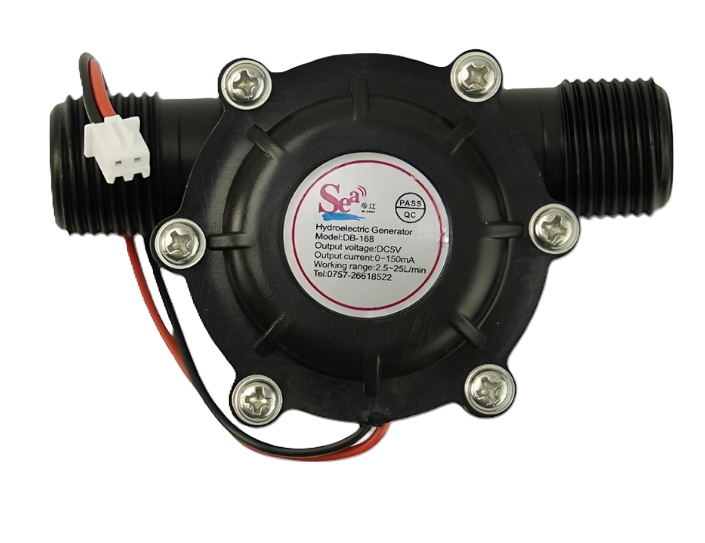
The Water Turbine Generator (5VDC), manufactured by DFRobot (Part ID: SEN0229), is a compact and efficient device designed to convert the kinetic energy of flowing water into electrical energy. It outputs a stable 5V DC, making it ideal for powering small electronic devices, charging batteries, or serving as a renewable energy source in DIY projects.
This generator is particularly useful in applications such as:
- Renewable energy experiments and projects
- Off-grid power solutions
- Educational demonstrations of energy conversion
- Low-power IoT devices in remote areas
Explore Projects Built with Water Turbine Generator (5VDC)
 Open Project in Cirkit Designer
 Open Project in Cirkit Designer
 Open Project in Cirkit Designer
 Open Project in Cirkit Designer
Explore Projects Built with Water Turbine Generator (5VDC)
Open Project in Cirkit DesignerOpen Project in Cirkit DesignerOpen Project in Cirkit DesignerOpen Project in Cirkit DesignerTechnical Specifications
Below are the key technical details of the Water Turbine Generator (5VDC):
| Parameter | Specification |
|---|---|
| Manufacturer | DFRobot |
| Part ID | SEN0229 |
| Output Voltage | 5V DC |
| Output Current | 0.1A to 0.3A (depending on flow rate) |
| Power Output | Up to 1.5W |
| Operating Water Flow | 1.5 L/min to 30 L/min |
| Material | Durable plastic and metal |
| Dimensions | 88mm x 60mm x 35mm |
| Weight | 75g |
| Connector Type | 2-pin JST |
Pin Configuration and Descriptions
The Water Turbine Generator (5VDC) has a simple 2-pin output connector. The pin configuration is as follows:
| Pin | Label | Description |
|---|---|---|
| 1 | VCC | Positive DC output (5V) |
| 2 | GND | Ground (0V) |
Usage Instructions
How to Use the Component in a Circuit
Connect the Output:
- Use the 2-pin JST connector to connect the generator to your circuit. Ensure the polarity is correct: connect the
VCCpin to the positive terminal of your load and theGNDpin to the ground.
- Use the 2-pin JST connector to connect the generator to your circuit. Ensure the polarity is correct: connect the
Water Flow Setup:
- Place the turbine in a water flow with a rate between 1.5 L/min and 30 L/min. Ensure the water flow is steady and directed properly to spin the turbine.
Load Connection:
- The generator can directly power small devices or charge a battery. For sensitive electronics, consider adding a capacitor or voltage regulator to stabilize the output.
Monitor Output:
- Use a multimeter to verify the output voltage and current. Ensure the load does not exceed the generator's maximum power output of 1.5W.
Important Considerations and Best Practices
- Flow Rate: Ensure the water flow is within the specified range. Insufficient flow will result in low or no power output, while excessive flow may damage the turbine.
- Load Matching: Avoid connecting loads that exceed the generator's maximum current output (0.3A).
- Waterproofing: While the turbine is designed for water flow, ensure the electrical connections are kept dry to prevent short circuits.
- Stabilization: For sensitive electronics, use a capacitor (e.g., 100µF) across the output terminals to smooth out voltage fluctuations.
Example: Connecting to an Arduino UNO
The generator can be used to power an Arduino UNO in low-power applications. Below is an example of how to monitor the generator's output using the Arduino's analog input.
Circuit Setup
- Connect the generator's
VCCpin to the Arduino's5Vpin. - Connect the generator's
GNDpin to the Arduino'sGNDpin. - Optionally, connect a capacitor (100µF) across the generator's output for voltage stabilization.
Arduino Code
// This code reads the voltage from the Water Turbine Generator (5VDC)
// and displays it on the Serial Monitor.

const int sensorPin = A0; // Analog pin connected to the generator output
float voltage = 0.0;

void setup() {
  Serial.begin(9600); // Initialize serial communication at 9600 baud
}

void loop() {
  int sensorValue = analogRead(sensorPin); // Read the analog value
  voltage = sensorValue * (5.0 / 1023.0); // Convert to voltage (5V reference)

  // Print the voltage to the Serial Monitor
  Serial.print("Generator Voltage: ");
  Serial.print(voltage);
  Serial.println(" V");

  delay(1000); // Wait 1 second before the next reading
}
Troubleshooting and FAQs
Common Issues and Solutions
| Issue | Possible Cause | Solution |
|---|---|---|
| No output voltage | Insufficient water flow | Increase the water flow rate. |
| Output voltage is unstable | Fluctuating water flow or no capacitor | Add a capacitor across the output pins. |
| Generator overheats | Excessive load connected | Reduce the load to within 0.3A limit. |
| Electrical connections shorted | Water exposure to connections | Ensure all connections are waterproof. |
FAQs
Can this generator charge a smartphone?
- No, the output current (0.3A max) is insufficient for most smartphones. It is better suited for low-power devices.
What happens if the water flow exceeds 30 L/min?
- Excessive flow may damage the turbine or reduce its lifespan. Always operate within the specified range.
Can I use this generator in saltwater?
- It is not recommended, as saltwater may corrode the components. Use in freshwater environments only.
How can I increase the power output?
- The power output is limited by the water flow and the generator's design. To increase power, consider using multiple turbines in parallel.
By following this documentation, you can effectively integrate the Water Turbine Generator (5VDC) into your projects and ensure optimal performance.