
How to Use RC Battery 2S LiPo Battery: Examples, Pinouts, and Specs
 Design with RC Battery 2S LiPo Battery in Cirkit Designer
Introduction
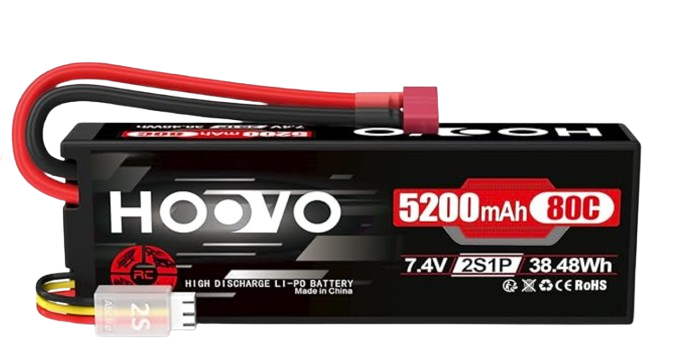
The HOOVO RC Battery 2S LiPo Battery is a 2-cell lithium polymer (LiPo) battery designed for high-performance remote control (RC) applications. With its lightweight construction and high energy density, this battery is ideal for powering RC vehicles, drones, and other hobbyist electronics requiring reliable and efficient energy storage.
Explore Projects Built with RC Battery 2S LiPo Battery
 Open Project in Cirkit Designer
 Open Project in Cirkit Designer
 Open Project in Cirkit Designer
 Open Project in Cirkit Designer
Explore Projects Built with RC Battery 2S LiPo Battery
Open Project in Cirkit DesignerOpen Project in Cirkit DesignerOpen Project in Cirkit DesignerOpen Project in Cirkit DesignerCommon Applications
- RC cars, trucks, and buggies
- RC drones and quadcopters
- RC boats and planes
- Robotics and DIY electronics projects
Technical Specifications
Below are the key technical details of the HOOVO RC Battery 2S LiPo Battery:
| Specification | Value |
|---|---|
| Nominal Voltage | 7.4V (2S configuration) |
| Capacity | 2200mAh (varies by model) |
| Discharge Rate (C-Rating) | 50C (constant), 100C (burst) |
| Cell Configuration | 2S (2 cells in series) |
| Dimensions | 106mm x 33mm x 18mm (approx.) |
| Weight | ~120g |
| Connector Type | XT60 or Deans T-Plug (varies) |
| Charging Voltage | 8.4V (maximum) |
| Minimum Discharge Voltage | 6.0V |
| Operating Temperature | -20°C to 60°C |
| Storage Temperature | 0°C to 40°C |
Pin Configuration and Descriptions
The battery typically includes two connectors:
- Main Power Connector (XT60 or Deans T-Plug):
- Supplies power to the RC device.
- Positive and negative terminals are clearly marked.
- Balance Connector (JST-XH):
- Used for charging and balancing the cells.
- Pinout for JST-XH (3-pin):
Pin Description Pin 1 Cell 1 Positive (+) Pin 2 Cell 2 Positive (+) Pin 3 Common Ground (-)
Usage Instructions
How to Use the Battery in a Circuit
Connecting the Battery:
- Connect the main power connector (XT60 or Deans T-Plug) to the input of your RC device or electronic circuit.
- Ensure the polarity matches the device's input terminals to avoid damage.
- Use the balance connector with a compatible LiPo charger for safe charging.
Charging the Battery:
- Use a LiPo-compatible balance charger.
- Set the charger to 2S (7.4V) mode and ensure the charging current does not exceed 1C (e.g., 2.2A for a 2200mAh battery).
- Connect the balance connector to the charger for proper cell balancing.
Discharging the Battery:
- Avoid discharging below 6.0V to prevent damage to the cells.
- Use a low-voltage alarm or cutoff circuit to monitor the battery voltage during use.
Important Considerations and Best Practices
- Storage: Store the battery at 3.8V per cell (storage charge) in a cool, dry place.
- Safety: Never puncture, short-circuit, or expose the battery to fire or water.
- Inspection: Regularly inspect the battery for swelling, damage, or loose connectors.
- Charging Location: Always charge the battery on a non-flammable surface and never leave it unattended.
Example: Using with Arduino UNO
While the battery is not directly connected to an Arduino UNO, it can power an Arduino-based RC project via a voltage regulator or motor driver. Below is an example of using the battery with an Arduino UNO and a motor driver:
// Example: Controlling a motor with Arduino UNO and 2S LiPo Battery
#include <Servo.h> // Include Servo library for motor control

Servo motor; // Create a Servo object to control the motor

void setup() {
  motor.attach(9); // Attach motor control to pin 9
  motor.write(0);  // Set motor to initial position (stopped)
}

void loop() {
  motor.write(90); // Set motor to half-speed
  delay(2000);     // Run motor for 2 seconds

  motor.write(0);  // Stop motor
  delay(1000);     // Wait for 1 second
}
Note: Use a voltage regulator (e.g., LM7805) to step down the 7.4V from the battery to 5V for the Arduino UNO.
Troubleshooting and FAQs
Common Issues
Battery Swelling:
- Cause: Overcharging, over-discharging, or physical damage.
- Solution: Stop using the battery immediately. Dispose of it safely according to local regulations.
Battery Not Charging:
- Cause: Faulty charger, damaged balance connector, or incorrect settings.
- Solution: Verify charger settings (2S mode, correct current). Inspect connectors for damage.
RC Device Shuts Down Prematurely:
- Cause: Low battery voltage or high current draw.
- Solution: Check the battery voltage and ensure it is above the minimum discharge limit (6.0V). Use a battery with a higher capacity or C-rating if needed.
FAQs
Q1: Can I use this battery with a 3S charger?
A1: No, always use a charger compatible with 2S LiPo batteries to avoid overcharging and damage.
Q2: How do I know when the battery is fully charged?
A2: The charger will indicate a full charge when the voltage reaches 8.4V (4.2V per cell).
Q3: What is the maximum safe discharge current?
A3: For a 2200mAh 50C battery, the maximum safe discharge current is 110A (2200mAh × 50C).
Q4: Can I use this battery in cold weather?
A4: Yes, but performance may decrease below -10°C. Warm the battery to room temperature before use for optimal performance.