
How to Use ACS712: Examples, Pinouts, and Specs
 Design with ACS712 in Cirkit Designer
Introduction
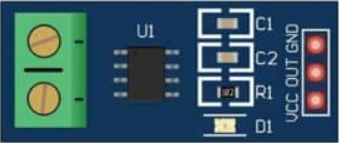
The ACS712 is a Hall effect-based linear current sensor manufactured by Allegro MicroSystems LLC. It provides an analog output voltage proportional to the current flowing through its input terminals. This sensor is capable of measuring both AC and DC currents, making it versatile for a wide range of applications. The ACS712 is widely used due to its high accuracy, electrical isolation, and ease of integration into electronic systems.
Explore Projects Built with ACS712
 Open Project in Cirkit Designer
 Open Project in Cirkit Designer
 Open Project in Cirkit Designer
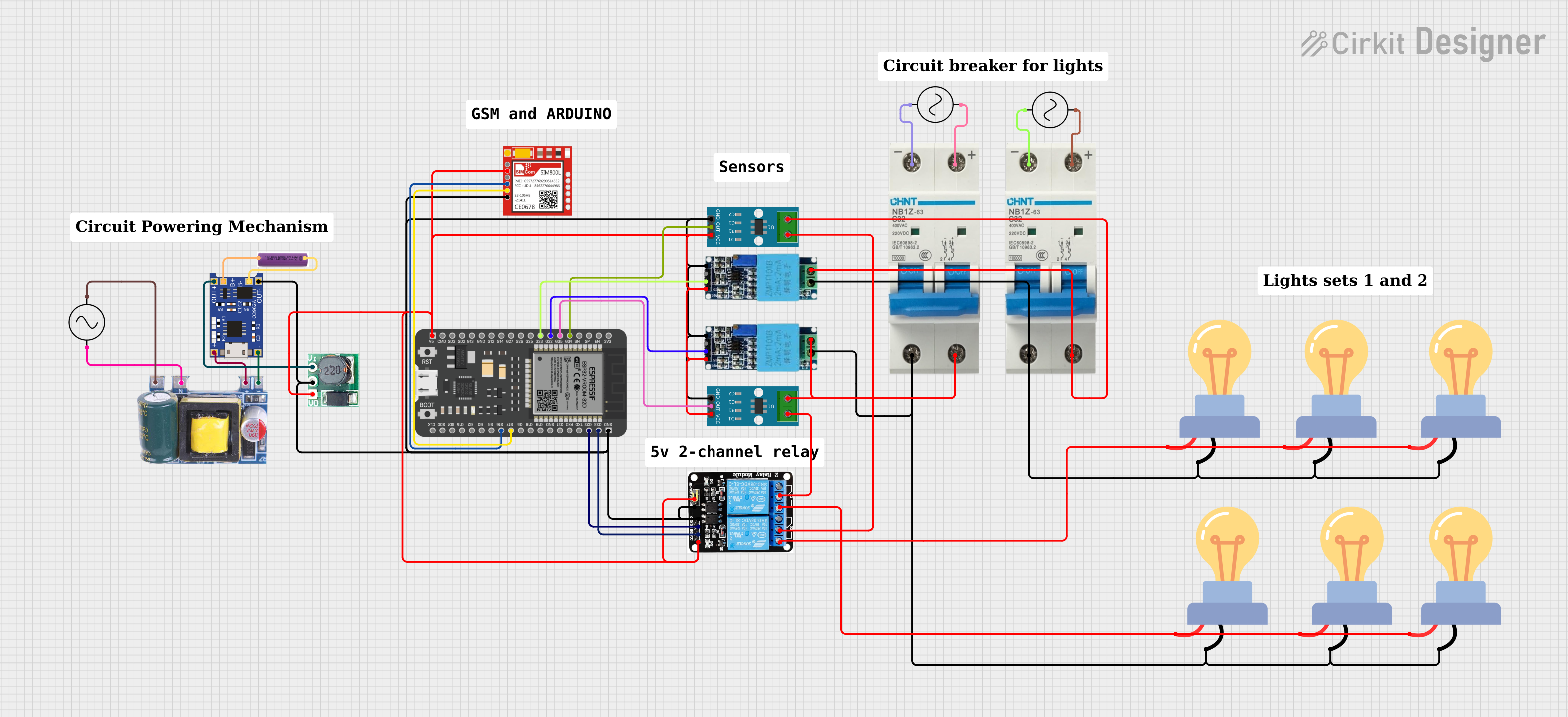 Open Project in Cirkit Designer
Explore Projects Built with ACS712
Open Project in Cirkit DesignerOpen Project in Cirkit DesignerOpen Project in Cirkit DesignerOpen Project in Cirkit DesignerCommon Applications
- Power monitoring in household appliances
- Overcurrent protection in industrial equipment
- Battery management systems
- Motor control and monitoring
- Solar power systems
- Inverter current sensing
Technical Specifications
The ACS712 is available in multiple variants, each designed for different current ranges. Below are the key technical details:
| Parameter | Value |
|---|---|
| Manufacturer | Allegro MicroSystems LLC |
| Part Number | ACS712 |
| Current Measurement Range | ±5A, ±20A, ±30A (depending on variant) |
| Supply Voltage (Vcc) | 4.5V to 5.5V |
| Output Voltage Range | 0V to Vcc |
| Sensitivity (Typ.) | 185 mV/A (±5A), 100 mV/A (±20A), 66 mV/A (±30A) |
| Bandwidth | 80 kHz |
| Response Time | 5 µs |
| Isolation Voltage | 2.1 kV RMS |
| Operating Temperature Range | -40°C to 85°C |
| Package Type | SOIC-8 |
Pin Configuration and Descriptions
The ACS712 is housed in an 8-pin SOIC package. Below is the pinout and description:
| Pin Number | Pin Name | Description |
|---|---|---|
| 1, 2 | IP+ | Current input terminal (positive) |
| 3, 4 | IP- | Current input terminal (negative) |
| 5 | GND | Ground pin |
| 6 | FILTER | External capacitor connection for bandwidth control |
| 7 | VIOUT | Analog output voltage proportional to current |
| 8 | VCC | Supply voltage (4.5V to 5.5V) |
Usage Instructions
How to Use the ACS712 in a Circuit
- Power Supply: Connect the VCC pin to a 5V power supply and the GND pin to the ground.
- Current Input: Pass the current to be measured through the IP+ and IP- terminals. Ensure the current does not exceed the rated range of the specific ACS712 variant.
- Output Signal: The VIOUT pin provides an analog voltage proportional to the current. This output can be read using an ADC (Analog-to-Digital Converter) on a microcontroller.
- Bandwidth Control: Connect a capacitor between the FILTER pin and GND to set the desired bandwidth. For most applications, a 1 nF capacitor is recommended.
Important Considerations
- Isolation: The ACS712 provides electrical isolation between the current-carrying circuit and the output signal, ensuring safety and reducing noise.
- Calibration: The output voltage at zero current is approximately VCC/2. Calibrate your system to account for this offset.
- Filtering: Use an appropriate capacitor on the FILTER pin to reduce noise and improve measurement stability.
- Current Direction: Positive current flows from IP+ to IP-, resulting in an output voltage above VCC/2. Negative current results in an output below VCC/2.
Example: Using ACS712 with Arduino UNO
Below is an example of how to interface the ACS712 with an Arduino UNO to measure current:
// Define the analog pin connected to the ACS712 output
const int sensorPin = A0;

// Sensitivity of the ACS712 (e.g., 185 mV/A for ±5A variant)
const float sensitivity = 0.185; // in V/A

// Voltage at zero current (VCC/2 for 5V supply)
const float zeroCurrentVoltage = 2.5; // in volts

void setup() {
  Serial.begin(9600); // Initialize serial communication
}

void loop() {
  // Read the analog value from the sensor
  int sensorValue = analogRead(sensorPin);

  // Convert the analog value to voltage
  float sensorVoltage = sensorValue * (5.0 / 1023.0);

  // Calculate the current in amperes
  float current = (sensorVoltage - zeroCurrentVoltage) / sensitivity;

  // Print the current to the Serial Monitor
  Serial.print("Current: ");
  Serial.print(current);
  Serial.println(" A");

  delay(1000); // Wait for 1 second before the next reading
}
Notes:
- Replace
sensitivitywith the appropriate value for your ACS712 variant. - Ensure the Arduino's ADC reference voltage matches the ACS712's VCC (typically 5V).
Troubleshooting and FAQs
Common Issues
No Output Signal:
- Ensure the VCC and GND pins are properly connected.
- Verify that the current is flowing through the IP+ and IP- terminals.
Inaccurate Readings:
- Check for proper calibration of the zero-current voltage.
- Use a capacitor on the FILTER pin to reduce noise.
- Ensure the current does not exceed the sensor's rated range.
Output Voltage Stuck at VCC/2:
- Verify that current is flowing through the sensor.
- Check for loose or incorrect connections on the IP+ and IP- terminals.
FAQs
Q: Can the ACS712 measure both AC and DC currents?
A: Yes, the ACS712 can measure both AC and DC currents. The output voltage varies proportionally with the instantaneous current.
Q: How do I select the correct ACS712 variant?
A: Choose a variant based on the maximum current you need to measure. For example, use the ±5A variant for small currents and the ±30A variant for larger currents.
Q: What is the purpose of the FILTER pin?
A: The FILTER pin allows you to connect an external capacitor to control the sensor's bandwidth and reduce noise in the output signal.
Q: Is the ACS712 suitable for high-voltage applications?
A: Yes, the ACS712 provides electrical isolation up to 2.1 kV RMS, making it suitable for high-voltage applications.
By following this documentation, you can effectively integrate the ACS712 into your projects for accurate current measurement.