
How to Use MAX17048 Breakout: Examples, Pinouts, and Specs
 Design with MAX17048 Breakout in Cirkit Designer
Introduction
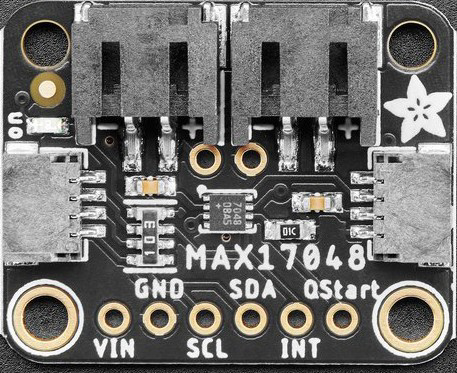
The MAX17048 Breakout (Adafruit Part ID: 5580) is a compact and efficient breakout board featuring the MAX17048 battery fuel gauge IC. This component provides accurate battery state-of-charge (SoC) information using a simple I2C interface, making it ideal for battery-powered projects. The MAX17048 eliminates the need for complex battery characterization or calibration, offering a plug-and-play solution for monitoring lithium-ion (Li-ion) or lithium-polymer (LiPo) batteries.
Explore Projects Built with MAX17048 Breakout
 Open Project in Cirkit Designer
 Open Project in Cirkit Designer
 Open Project in Cirkit Designer
 Open Project in Cirkit Designer
Explore Projects Built with MAX17048 Breakout
Open Project in Cirkit DesignerOpen Project in Cirkit DesignerOpen Project in Cirkit DesignerOpen Project in Cirkit DesignerCommon Applications and Use Cases
- Battery-powered IoT devices
- Wearable electronics
- Portable medical devices
- Robotics and drones
- Power banks and battery management systems
Technical Specifications
The MAX17048 Breakout is designed for ease of use and integration. Below are its key technical details:
Key Specifications
| Parameter | Value |
|---|---|
| Input Voltage Range | 2.5V to 4.5V |
| Communication Interface | I2C |
| Operating Current | 50 µA (typical) |
| Battery Chemistry | Lithium-ion (Li-ion) or Lithium-polymer |
| State-of-Charge Accuracy | ±1% |
| Operating Temperature Range | -40°C to +85°C |
| Dimensions | 0.7" x 0.7" (17.8mm x 17.8mm) |
Pin Configuration and Descriptions
The MAX17048 Breakout has six pins, as detailed below:
| Pin Name | Description |
|---|---|
| VIN | Power input (2.5V to 5.5V). Connect to the power source. |
| GND | Ground. Connect to the ground of the circuit. |
| SCL | I2C clock line. Connect to the SCL pin of the microcontroller. |
| SDA | I2C data line. Connect to the SDA pin of the microcontroller. |
| ALERT | Open-drain interrupt output. Can be used to signal low battery conditions. |
| BAT | Battery input. Connect directly to the positive terminal of the battery. |
Usage Instructions
The MAX17048 Breakout is straightforward to use in a circuit. Follow the steps below to integrate it into your project:
Connecting the MAX17048 Breakout
- Power Supply: Connect the VIN pin to a 3.3V or 5V power source and the GND pin to ground.
- Battery Connection: Connect the BAT pin to the positive terminal of the Li-ion or LiPo battery.
- I2C Interface: Connect the SCL and SDA pins to the corresponding I2C pins on your microcontroller.
- Optional ALERT Pin: If you want to use the ALERT feature, connect the ALERT pin to a GPIO pin on your microcontroller.
Important Considerations
- Ensure the battery voltage is within the 2.5V to 4.5V range for accurate readings.
- Use pull-up resistors (typically 4.7kΩ) on the SCL and SDA lines if your microcontroller does not have internal pull-ups.
- Avoid connecting the BAT pin to a power supply; it is designed specifically for battery input.
Example Code for Arduino UNO
Below is an example Arduino sketch to read the battery state-of-charge using the MAX17048 Breakout:
#include <Wire.h>

// MAX17048 I2C address
#define MAX17048_ADDRESS 0x36

void setup() {
  Wire.begin(); // Initialize I2C communication
  Serial.begin(9600); // Start serial communication for debugging

  // Check if the MAX17048 is connected
  Wire.beginTransmission(MAX17048_ADDRESS);
  if (Wire.endTransmission() != 0) {
    Serial.println("MAX17048 not detected. Check connections.");
    while (1); // Halt execution if the device is not found
  }
  Serial.println("MAX17048 detected successfully.");
}

void loop() {
  float soc = readStateOfCharge(); // Read battery state-of-charge
  Serial.print("Battery State-of-Charge: ");
  Serial.print(soc);
  Serial.println("%");
  delay(1000); // Wait 1 second before the next reading
}

float readStateOfCharge() {
  Wire.beginTransmission(MAX17048_ADDRESS);
  Wire.write(0x04); // Register address for state-of-charge
  Wire.endTransmission(false); // Send repeated start condition
  Wire.requestFrom(MAX17048_ADDRESS, 2); // Request 2 bytes of data

  if (Wire.available() < 2) {
    return -1; // Return -1 if data is not available
  }

  uint16_t socRaw = (Wire.read() << 8) | Wire.read(); // Combine MSB and LSB
  return socRaw / 256.0; // Convert to percentage
}
Notes on the Code
- The
readStateOfCharge()function reads the state-of-charge register (0x04) and converts the raw data into a percentage. - Ensure the I2C address (0x36) matches the default address of the MAX17048. If the address is different, update it in the code.
Troubleshooting and FAQs
Common Issues
MAX17048 Not Detected
- Cause: Incorrect wiring or I2C address mismatch.
- Solution: Verify the connections to the SCL and SDA pins. Ensure pull-up resistors are present if required. Check that the I2C address in the code matches the device's address.
Incorrect State-of-Charge Readings
- Cause: Battery voltage outside the supported range or poor battery connection.
- Solution: Ensure the battery voltage is between 2.5V and 4.5V. Check the BAT pin connection.
ALERT Pin Not Functioning
- Cause: ALERT pin not configured or monitored in the code.
- Solution: Configure the ALERT pin as an input on the microcontroller and monitor its state.
FAQs
Q: Can the MAX17048 Breakout monitor multiple batteries?
A: No, the MAX17048 is designed to monitor a single Li-ion or LiPo battery.
Q: Do I need to calibrate the MAX17048?
A: No, the MAX17048 uses Maxim's ModelGauge algorithm, which eliminates the need for calibration.
Q: Can I use the MAX17048 with a 5V microcontroller?
A: Yes, the breakout board is compatible with both 3.3V and 5V logic levels.
Q: What happens if the battery voltage drops below 2.5V?
A: The MAX17048 may provide inaccurate readings or stop functioning. Ensure the battery voltage remains within the specified range.