
How to Use USBA male 3.0: Examples, Pinouts, and Specs
 Design with USBA male 3.0 in Cirkit Designer
Introduction
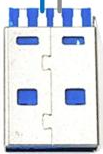
The USBA Male 3.0 connector is a widely used interface for connecting peripheral devices to a host, such as a computer or a USB hub. It is an upgraded version of the USB 2.0 standard, offering significantly faster data transfer rates of up to 5 Gbps. This connector is backward compatible with USB 2.0 and USB 1.1 devices, making it a versatile choice for a variety of applications.
Explore Projects Built with USBA male 3.0
 Open Project in Cirkit Designer
 Open Project in Cirkit Designer
 Open Project in Cirkit Designer
 Open Project in Cirkit Designer
Explore Projects Built with USBA male 3.0
Open Project in Cirkit DesignerOpen Project in Cirkit DesignerOpen Project in Cirkit DesignerOpen Project in Cirkit DesignerCommon Applications and Use Cases
- Connecting external storage devices (e.g., flash drives, external hard drives)
- Data transfer between devices (e.g., cameras, smartphones, and computers)
- Power delivery for charging devices
- Peripheral connections (e.g., keyboards, mice, printers)
Technical Specifications
The USBA Male 3.0 connector is designed to meet the USB 3.0 standard, ensuring high-speed data transfer and reliable performance. Below are the key technical details:
Key Technical Details
- Data Transfer Rate: Up to 5 Gbps (SuperSpeed)
- Voltage Rating: 5V DC
- Current Rating: Up to 900 mA (USB 3.0 standard)
- Connector Type: USB Type-A Male
- Backward Compatibility: USB 2.0 and USB 1.1
- Number of Pins: 9 (4 pins for USB 2.0 compatibility, 5 additional pins for USB 3.0)
Pin Configuration and Descriptions
The USBA Male 3.0 connector has a total of 9 pins, as shown in the table below:
| Pin Number | Name | Description |
|---|---|---|
| 1 | VBUS | Power supply (5V DC) |
| 2 | D- | Data line (negative) for USB 2.0 communication |
| 3 | D+ | Data line (positive) for USB 2.0 communication |
| 4 | GND | Ground |
| 5 | StdA_SSRX- | SuperSpeed receiver (negative) |
| 6 | StdA_SSRX+ | SuperSpeed receiver (positive) |
| 7 | GND_DRAIN | Ground for signal return |
| 8 | StdA_SSTX- | SuperSpeed transmitter (negative) |
| 9 | StdA_SSTX+ | SuperSpeed transmitter (positive) |
Usage Instructions
How to Use the Component in a Circuit
- Identify the Pins: Ensure you correctly identify the pins on the USBA Male 3.0 connector using the pin configuration table above.
- Connect to a Host Device: Plug the USBA Male 3.0 connector into a compatible USB port on the host device (e.g., a computer or USB hub).
- Connect to a Peripheral Device: Attach the other end of the cable to the peripheral device (e.g., a flash drive or external hard drive).
- Power and Data Transfer: The connector will automatically handle power delivery and data transfer based on the USB 3.0 protocol.
Important Considerations and Best Practices
- Cable Quality: Use high-quality USB 3.0 cables to ensure optimal performance and minimize signal loss.
- Backward Compatibility: When connecting to a USB 2.0 port, the data transfer rate will be limited to 480 Mbps.
- Avoid Overloading: Do not exceed the current rating of 900 mA to prevent damage to the connector or host device.
- Secure Connections: Ensure the connector is firmly inserted into the port to avoid intermittent connections.
Example: Connecting to an Arduino UNO
Although the Arduino UNO uses a USB Type-B connector for programming, you can use a USBA Male 3.0 connector on the host side to connect the Arduino to a computer. Below is an example of Arduino code for serial communication:
// Example Arduino code for serial communication
// This code sends "Hello, World!" to the serial monitor every second.

void setup() {
  Serial.begin(9600); // Initialize serial communication at 9600 baud
}

void loop() {
  Serial.println("Hello, World!"); // Send a message to the serial monitor
  delay(1000); // Wait for 1 second
}
Troubleshooting and FAQs
Common Issues Users Might Face
Connector Not Recognized by Host Device:
- Cause: Loose connection or damaged pins.
- Solution: Ensure the connector is securely plugged in and inspect the pins for damage.
Slow Data Transfer Speeds:
- Cause: Using a USB 2.0 port or low-quality cable.
- Solution: Use a USB 3.0 port and a certified USB 3.0 cable.
Device Not Powering On:
- Cause: Insufficient power delivery or faulty cable.
- Solution: Check the power requirements of the device and use a cable that supports the required current.
Solutions and Tips for Troubleshooting
- Inspect the Connector: Check for bent or damaged pins and replace the connector if necessary.
- Test with Another Device: Verify functionality by connecting the USBA Male 3.0 connector to a different host or peripheral device.
- Update Drivers: Ensure the host device has the latest USB drivers installed for proper compatibility.
By following this documentation, you can effectively use the USBA Male 3.0 connector in your projects and troubleshoot common issues with ease.