
How to Use powerbox Pionner: Examples, Pinouts, and Specs
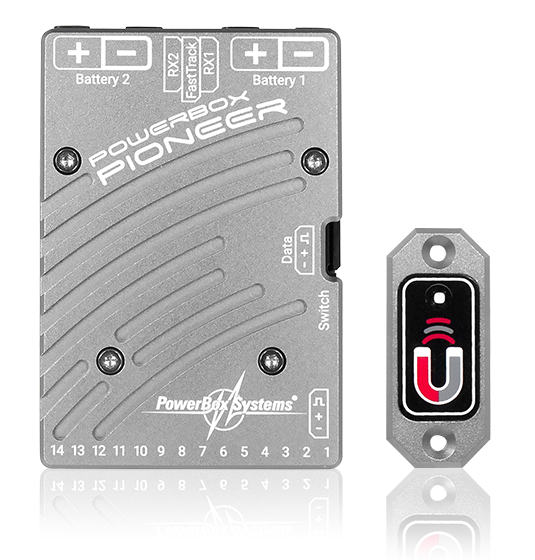
 Design with powerbox Pionner in Cirkit Designer
Introduction
The Powerbox Pioneer, manufactured by Powerbox System, is a power distribution unit designed to manage and supply electrical power to various devices in a circuit. It ensures stable voltage and current levels, making it an essential component for applications requiring reliable power delivery. The Powerbox Pioneer is commonly used in industrial automation, robotics, and embedded systems, where consistent power distribution is critical.
Explore Projects Built with powerbox Pionner
 Open Project in Cirkit Designer
 Open Project in Cirkit Designer
 Open Project in Cirkit Designer
 Open Project in Cirkit Designer
Explore Projects Built with powerbox Pionner
Open Project in Cirkit DesignerOpen Project in Cirkit DesignerOpen Project in Cirkit DesignerOpen Project in Cirkit DesignerCommon Applications and Use Cases
- Powering multiple devices in embedded systems
- Voltage regulation in robotics and automation
- Power management in IoT devices
- Distribution of power in multi-device circuits
Technical Specifications
Key Technical Details
| Parameter | Value |
|---|---|
| Input Voltage Range | 6V to 24V DC |
| Output Voltage | 5V DC (regulated) |
| Maximum Output Current | 3A |
| Efficiency | Up to 92% |
| Operating Temperature | -20°C to 70°C |
| Dimensions | 50mm x 30mm x 15mm |
| Weight | 25g |
| Protection Features | Overcurrent, Overvoltage, |
| Short Circuit Protection |
Pin Configuration and Descriptions
| Pin Number | Pin Name | Description |
|---|---|---|
| 1 | VIN | Input voltage (6V to 24V DC) |
| 2 | GND | Ground connection |
| 3 | VOUT | Regulated 5V DC output |
| 4 | STATUS | Status pin (indicates power status: HIGH = OK) |
| 5 | ENABLE | Enable pin (active HIGH to enable output) |
Usage Instructions
How to Use the Powerbox Pioneer in a Circuit
- Connect Input Voltage: Connect the input voltage (6V to 24V DC) to the
VINpin. Ensure the input voltage is within the specified range to avoid damage. - Connect Ground: Connect the
GNDpin to the ground of your circuit. - Connect Output: Use the
VOUTpin to power your devices. The output voltage is regulated at 5V DC. - Enable the Output: To enable the output, set the
ENABLEpin to HIGH. If left floating or set to LOW, the output will be disabled. - Monitor Status: Use the
STATUSpin to monitor the power status. A HIGH signal indicates normal operation, while a LOW signal indicates a fault.
Important Considerations and Best Practices
- Input Voltage: Always ensure the input voltage is within the specified range (6V to 24V DC). Exceeding this range may damage the component.
- Heat Dissipation: If operating at maximum current (3A), ensure proper ventilation or heat sinking to prevent overheating.
- Load Capacity: Do not exceed the maximum output current of 3A to avoid triggering overcurrent protection.
- Enable Pin: If the
ENABLEpin is not used, connect it to a HIGH signal to keep the output active.
Example: Connecting to an Arduino UNO
The Powerbox Pioneer can be used to power an Arduino UNO and other peripherals. Below is an example circuit and code:
Circuit Connections
- Connect the
VINpin of the Powerbox Pioneer to a 12V DC power supply. - Connect the
GNDpin to the ground of the Arduino UNO. - Connect the
VOUTpin to the 5V pin of the Arduino UNO. - Optionally, connect the
STATUSpin to a digital input pin on the Arduino to monitor power status.
Arduino Code Example
// Define the pin connected to the STATUS pin of Powerbox Pioneer
const int statusPin = 2;

void setup() {
  pinMode(statusPin, INPUT); // Set the STATUS pin as input
  Serial.begin(9600);        // Initialize serial communication
}

void loop() {
  int status = digitalRead(statusPin); // Read the STATUS pin
  if (status == HIGH) {
    Serial.println("Powerbox Pioneer: Power is stable.");
  } else {
    Serial.println("Powerbox Pioneer: Power fault detected!");
  }
  delay(1000); // Wait for 1 second before checking again
}
Troubleshooting and FAQs
Common Issues and Solutions
| Issue | Possible Cause | Solution |
|---|---|---|
| No output voltage | ENABLE pin is LOW or floating |
Set the ENABLE pin to HIGH. |
| Output voltage is unstable | Input voltage is out of range | Ensure input voltage is between 6V-24V. |
| Overheating | Exceeding maximum current (3A) | Reduce load or improve heat dissipation. |
| STATUS pin reads LOW | Fault condition (e.g., overcurrent) | Check for short circuits or excessive load. |
FAQs
Can the Powerbox Pioneer output voltage be adjusted?
No, the output voltage is fixed at 5V DC.What happens if the input voltage exceeds 24V?
The overvoltage protection will activate, and the unit may shut down to prevent damage.Can I use the Powerbox Pioneer with a battery?
Yes, as long as the battery voltage is within the 6V to 24V range.Is the Powerbox Pioneer suitable for outdoor use?
The component is not weatherproof. Use it in a protected environment or within an enclosure.