The NPK Soil Sensor (mini) is a compact and efficient sensor designed to measure the levels of nitrogen (N), phosphorus (P), and potassium (K) in the soil. These three macronutrients are vital for plant growth and their balanced presence is crucial for agriculture and gardening. The sensor is commonly used in precision farming, smart gardening systems, and environmental monitoring.
Explore Projects Built with NPK Soil Sensor (mini)
Use Cirkit Designer to design, explore, and prototype these projects online. Some projects support real-time simulation. Click "Open Project" to start designing instantly!
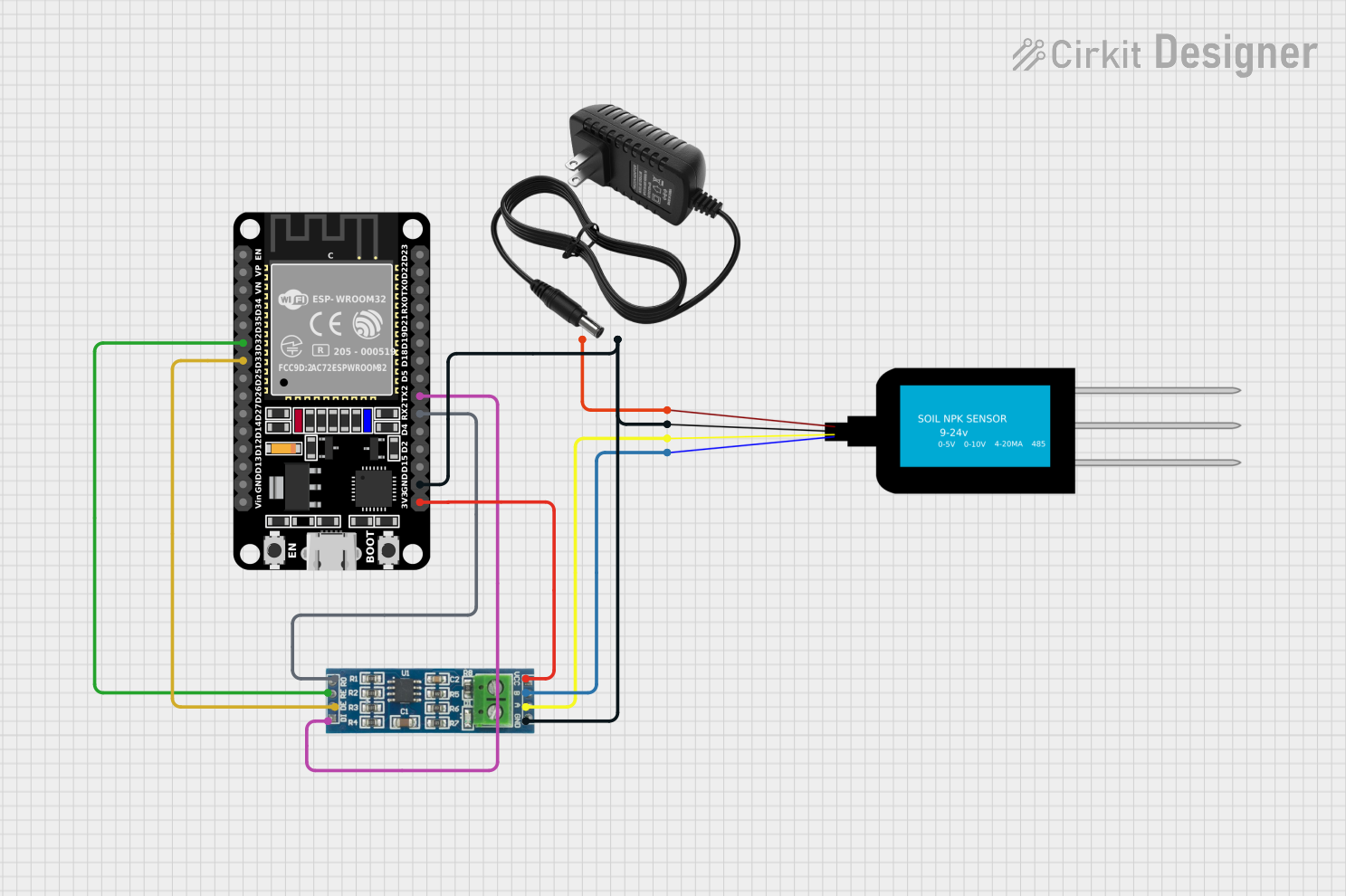
This circuit is designed to measure soil nutrient levels using an NPK Soil Sensor, with data communication facilitated by an RS-485 module. The ESP32 microcontroller is used to process the sensor data, which is likely transmitted over RS-485 for remote monitoring or control. A 12V power supply provides the necessary power to the sensor, while the ESP32 is powered by its 3.3V pin, and the common ground ensures all components share a reference potential.
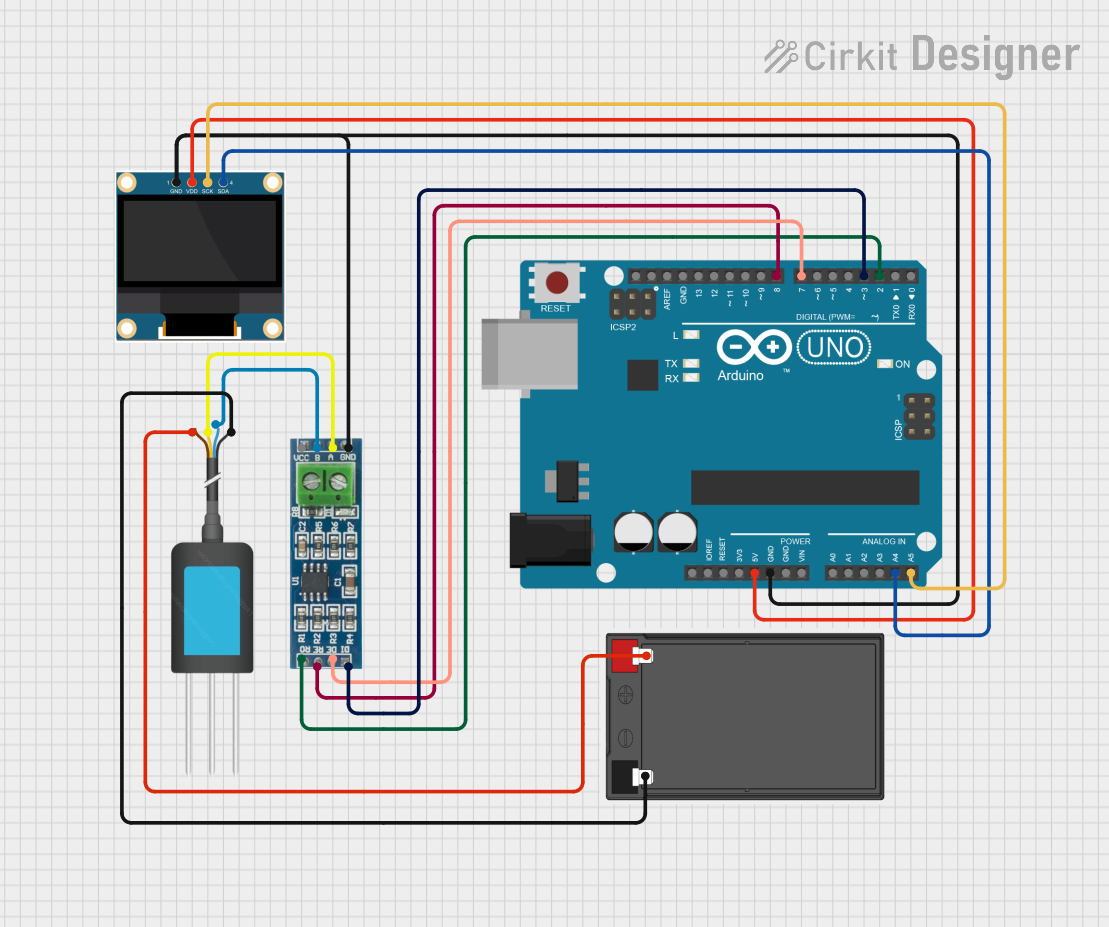
This circuit is designed to measure soil nutrient levels using an NPK soil sensor and display the results on an OLED screen. An Arduino UNO microcontroller reads data from the soil sensor via an RS-485 module and processes the information to display nitrogen, phosphorus, and potassium levels on the OLED display.
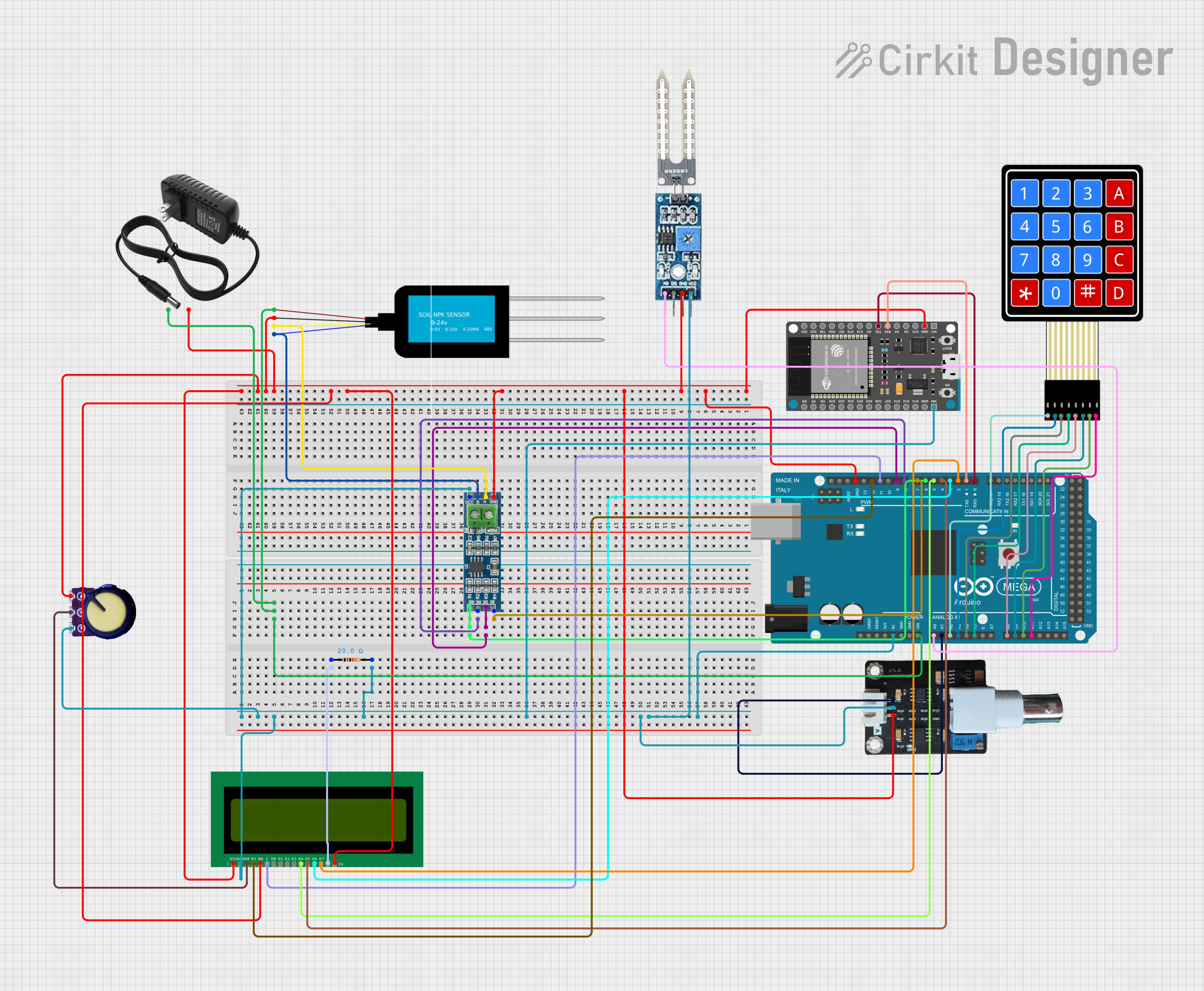
This circuit is a comprehensive soil monitoring system that uses an Arduino Mega 2560 to interface with various sensors, including an NPK soil sensor, a soil moisture sensor, and a pH meter. The system also includes an ESP32 for wireless communication, an LCD for displaying data, and a keypad for user input, all powered by a 12V power supply.
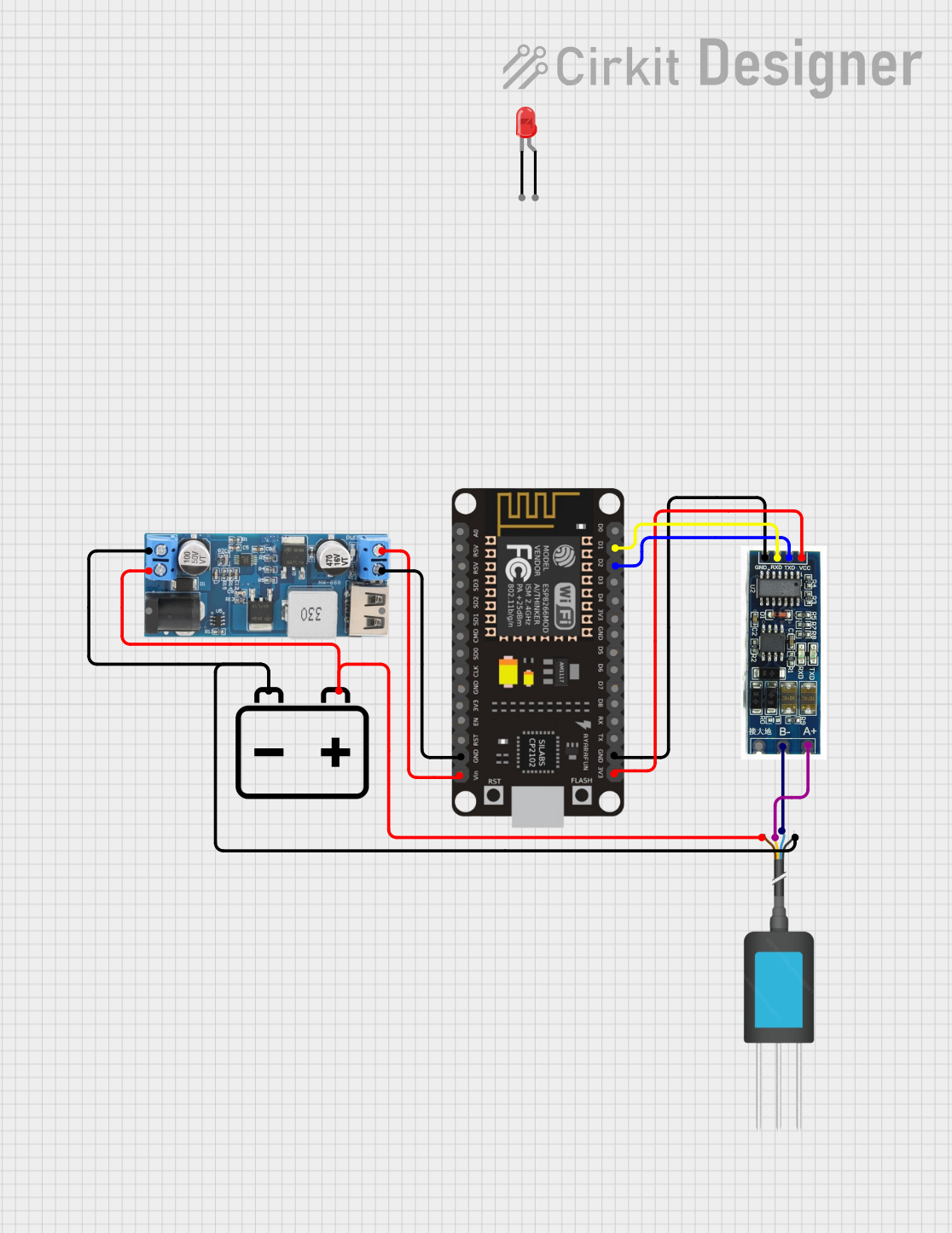
This circuit is a soil monitoring system that uses an NPK soil sensor to measure soil nutrients and an ESP8266 NodeMCU to process and display the data. The system includes a 12V battery, a step-down converter to provide 5V power, and an RS485 to TTL converter for communication between the sensor and the microcontroller. The ESP8266 also controls LEDs to indicate system status and cycles through various soil parameters on an OLED display.
Output: Analog voltage corresponding to NPK values
Operating Temperature: -10°C to 50°C
Pin Configuration and Descriptions
Pin Number
Name
Description
1
VCC
Power supply (3.3V to 5V)
2
GND
Ground
3
SIG
Analog signal output for NPK measurement
4
CAL
Calibration pin (typically not used)
Usage Instructions
How to Use the Component in a Circuit
Connect the VCC pin to a 3.3V or 5V power supply.
Connect the GND pin to the ground of the power supply.
Connect the SIG pin to an analog input pin on your microcontroller (e.g., A0 on an Arduino UNO).
(Optional) Connect the CAL pin if calibration functionality is required.
Important Considerations and Best Practices
Ensure that the sensor is properly calibrated before use for accurate readings.
Avoid exposing the sensor to liquids other than soil moisture to prevent damage.
Use a stable power supply to minimize noise in the analog signal.
Implement a moving average filter in your code to smooth out sensor readings.
Example Code for Arduino UNO
// Define the analog input pin where the sensor is connected
const int npkSensorPin = A0;

void setup() {
  // Initialize serial communication at 9600 baud rate
  Serial.begin(9600);
}

void loop() {
  // Read the value from the NPK sensor
  int sensorValue = analogRead(npkSensorPin);

  // Convert the analog reading (which goes from 0 - 1023) to a voltage (0 - 5V)
  float voltage = sensorValue * (5.0 / 1023.0);

  // Print out the voltage
  Serial.print("Sensor Voltage: ");
  Serial.println(voltage);

  // Wait for a second before reading again
  delay(1000);
}
Troubleshooting and FAQs
Common Issues Users Might Face
Inaccurate Readings: Ensure the sensor is calibrated correctly. Check for any soil contamination or sensor damage.
No Readings: Verify connections and ensure the power supply is within the specified range.
Fluctuating Readings: Use a stable power supply and consider implementing software filtering.
Solutions and Tips for Troubleshooting
Calibration: Follow the manufacturer's instructions for calibration, which may involve using a known soil sample.
Connection Issues: Double-check all wiring and solder joints for any loose connections or breaks.
Filtering Noise: Implement a moving average or other digital filtering technique in your code to reduce noise.
FAQs
Q: Can the sensor be left in the soil permanently?
A: It is not recommended to leave the sensor in the soil permanently as prolonged exposure to moisture and soil chemicals can degrade the sensor.
Q: How often should the sensor be calibrated?
A: Calibration frequency depends on usage, but it is generally recommended to calibrate the sensor before each critical use.
Q: Is the sensor waterproof?
A: The sensor is typically resistant to soil moisture but is not designed to be fully submerged in water. Protect the electronic components from water damage.
Q: Can the sensor measure the NPK levels of liquid fertilizers?
A: The sensor is designed for soil measurement. Using it with liquid fertilizers may require different calibration and could potentially damage the sensor.

 Open Project in Cirkit Designer