
How to Use 2PCS Explorer 1000mAh LiHV 2S 80C Battery (Flywoo XT30UP): Examples, Pinouts, and Specs
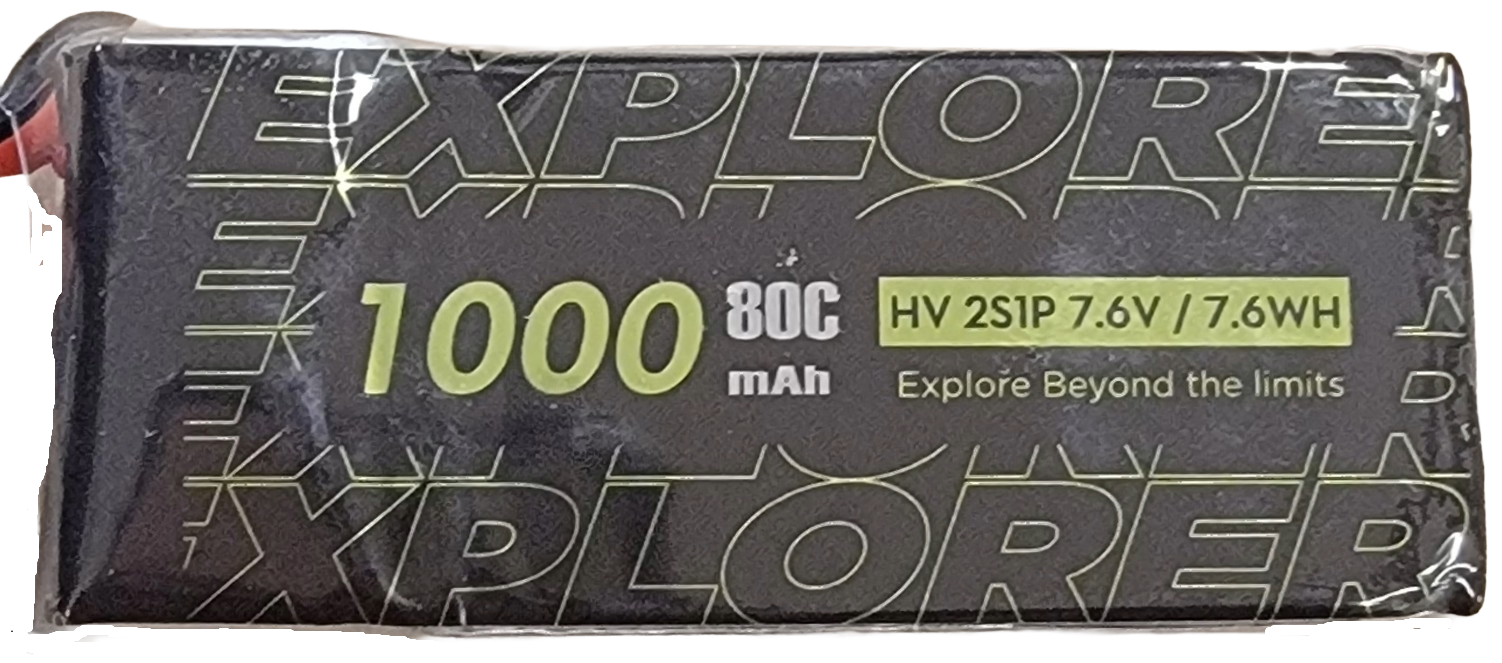
 Design with 2PCS Explorer 1000mAh LiHV 2S 80C Battery (Flywoo XT30UP) in Cirkit Designer
Introduction
The 2PCS Explorer 1000mAh LiHV 2S 80C Battery by Flywoo is a high-performance lithium polymer (LiHV) battery pack designed for applications requiring high power and reliability. With a nominal voltage of 7.4V and a capacity of 1000mAh, this battery is ideal for remote-controlled (RC) vehicles, drones, and other high-demand electronic systems. Its 80C discharge rate ensures it can handle significant current loads, while the XT30UP connectors provide secure and efficient connections.
Explore Projects Built with 2PCS Explorer 1000mAh LiHV 2S 80C Battery (Flywoo XT30UP)
 Open Project in Cirkit Designer
 Open Project in Cirkit Designer
 Open Project in Cirkit Designer
 Open Project in Cirkit Designer
Explore Projects Built with 2PCS Explorer 1000mAh LiHV 2S 80C Battery (Flywoo XT30UP)
Open Project in Cirkit DesignerOpen Project in Cirkit DesignerOpen Project in Cirkit DesignerOpen Project in Cirkit DesignerCommon Applications and Use Cases
- RC drones and quadcopters
- Remote-controlled cars, boats, and planes
- Robotics and high-power portable devices
- DIY electronics projects requiring high current delivery
Technical Specifications
Below are the key technical details of the Flywoo 2PCS Explorer 1000mAh LiHV 2S 80C Battery:
| Specification | Details |
|---|---|
| Battery Type | Lithium Polymer High Voltage (LiHV) |
| Nominal Voltage | 7.4V (2S configuration) |
| Capacity | 1000mAh |
| Discharge Rate | 80C |
| Maximum Burst Discharge | 160C |
| Connector Type | XT30UP |
| Dimensions (per battery) | 70mm x 35mm x 15mm |
| Weight (per battery) | ~60g |
| Charging Voltage | 8.7V (maximum for LiHV cells) |
| Recommended Charge Rate | 1C (1A) |
Pin Configuration and Descriptions
The XT30UP connector and balance lead are the primary interfaces for this battery. Below is a description of the connections:
| Pin/Connector | Description |
|---|---|
| XT30UP (+) | Positive terminal for power delivery. Connects to the positive input of the load. |
| XT30UP (-) | Negative terminal for power delivery. Connects to the ground of the load. |
| Balance Lead | 3-pin JST-XH connector for cell balancing during charging. |
Usage Instructions
How to Use the Battery in a Circuit
Connection to Load:
- Connect the XT30UP connector to the power input of your device. Ensure the polarity matches (positive to positive, negative to negative).
- Use the balance lead during charging to ensure both cells are charged evenly.
Charging the Battery:
- Use a LiHV-compatible charger to charge the battery.
- Set the charger to 2S mode (7.4V nominal) and ensure the maximum charging voltage does not exceed 8.7V.
- Charge at a recommended rate of 1C (1A) for optimal battery life.
Mounting:
- Secure the battery in your device using straps or a battery holder to prevent movement during operation.
Important Considerations and Best Practices
- Avoid Overcharging: Never exceed the maximum charging voltage of 8.7V.
- Discharge Limits: Do not discharge the battery below 3.5V per cell (7.0V total) to prevent damage.
- Storage: Store the battery at a voltage of 3.8V per cell (7.6V total) for long-term storage.
- Temperature: Operate the battery within a temperature range of -10°C to 60°C. Avoid exposing it to extreme heat or cold.
- Inspect Regularly: Check for physical damage, swelling, or leaks before each use.
Example: Using with an Arduino UNO
If you are powering an Arduino UNO with this battery, you can use a voltage regulator or a DC-DC step-down converter to step down the voltage to 5V. Below is an example circuit and code:
Circuit Setup
- Connect the XT30UP connector to the input of a DC-DC step-down converter.
- Set the output of the converter to 5V.
- Connect the output of the converter to the Arduino UNO's VIN and GND pins.
Example Code
// Example Arduino code to blink an LED using power from the Flywoo battery
// Ensure the battery is connected via a step-down converter to provide 5V

const int ledPin = 13; // Pin connected to the onboard LED

void setup() {
  pinMode(ledPin, OUTPUT); // Set the LED pin as an output
}

void loop() {
  digitalWrite(ledPin, HIGH); // Turn the LED on
  delay(1000);                // Wait for 1 second
  digitalWrite(ledPin, LOW);  // Turn the LED off
  delay(1000);                // Wait for 1 second
}
Troubleshooting and FAQs
Common Issues and Solutions
| Issue | Possible Cause | Solution |
|---|---|---|
| Battery does not charge | Charger not set to LiHV mode | Ensure the charger is set to LiHV and 2S configuration. |
| Battery gets hot during use | Overcurrent draw or poor ventilation | Ensure the load does not exceed the 80C discharge rate. Improve ventilation. |
| Swelling or physical damage | Overcharging or physical impact | Stop using the battery immediately. Dispose of it safely. |
| Device shuts off unexpectedly | Battery voltage too low | Recharge the battery. Avoid discharging below 7.0V. |
| Balance lead not detected by charger | Loose or damaged balance lead connection | Check the balance lead for damage and ensure it is securely connected. |
FAQs
Can I use this battery with a 3S device?
- No, this is a 2S battery with a nominal voltage of 7.4V. Using it with a 3S device may result in insufficient power or damage.
What is the difference between LiPo and LiHV batteries?
- LiHV batteries can be charged to a higher voltage (4.35V per cell) compared to standard LiPo batteries (4.2V per cell), providing more energy capacity.
How do I safely dispose of a damaged battery?
- Discharge the battery completely, submerge it in saltwater for 24 hours, and then dispose of it at a battery recycling facility.
By following these guidelines, you can ensure safe and efficient use of the Flywoo 2PCS Explorer 1000mAh LiHV 2S 80C Battery in your projects.