
How to Use zendure 2400AC+: Examples, Pinouts, and Specs
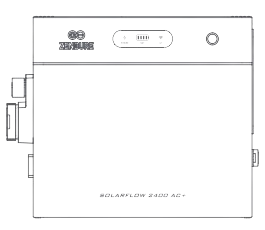
 Design with zendure 2400AC+ in Cirkit Designer
Introduction
The Zendure 2400AC+ is a high-capacity portable power bank designed to provide reliable power for a wide range of devices. Equipped with AC outlets, USB ports, and a robust battery, it is ideal for charging laptops, smartphones, tablets, and other electronics. Its compact and durable design makes it perfect for travel, outdoor activities, and emergency backup power.
Explore Projects Built with zendure 2400AC+
 Open Project in Cirkit Designer
 Open Project in Cirkit Designer
 Open Project in Cirkit Designer
 Open Project in Cirkit Designer
Explore Projects Built with zendure 2400AC+
Open Project in Cirkit DesignerOpen Project in Cirkit DesignerOpen Project in Cirkit DesignerOpen Project in Cirkit DesignerCommon Applications and Use Cases
- Charging laptops, smartphones, and tablets during travel or commutes.
- Providing power for small appliances and electronics during outdoor activities like camping.
- Serving as an emergency power source during power outages.
- Supporting remote work setups by powering devices such as routers and monitors.
Technical Specifications
Key Technical Details
| Specification | Value |
|---|---|
| Battery Capacity | 2400Wh |
| AC Output Power | 1000W (continuous), 2000W (peak) |
| AC Output Voltage | 110V/220V (depending on region) |
| USB Output Ports | 4 USB-A (5V/2.4A each), 1 USB-C PD (100W max) |
| DC Output | 12V/10A |
| Charging Input | 200W (via AC adapter) |
| Dimensions | 12.5 x 8.5 x 7.5 inches |
| Weight | 15 lbs (6.8 kg) |
| Operating Temperature Range | 32°F to 104°F (0°C to 40°C) |
Port and Button Configuration
| Port/Button | Description |
|---|---|
| AC Outlet | Standard AC power outlet for laptops, small appliances, etc. |
| USB-A Ports | 4 USB-A ports for charging smartphones, tablets, and other USB devices. |
| USB-C PD Port | High-power USB-C port for fast charging laptops and other USB-C devices. |
| DC Output Port | 12V output for powering compatible devices like car refrigerators. |
| Power Button | Turns the power bank on/off and activates the display. |
| LCD Display | Shows battery percentage, input/output power, and other status indicators. |
| Charging Input Port | Connects to the AC adapter for recharging the power bank. |
Usage Instructions
How to Use the Zendure 2400AC+
Charging the Power Bank:
- Connect the included AC adapter to the charging input port.
- Plug the adapter into a wall outlet. The LCD display will show the charging status.
- Allow the power bank to fully charge before first use (approximately 10-12 hours).
Powering Devices:
- For AC-powered devices:
- Plug the device into the AC outlet.
- Press the power button to activate the AC output.
- For USB-powered devices:
- Connect the device to one of the USB-A or USB-C ports using the appropriate cable.
- The power bank will automatically detect and start charging the device.
- For DC-powered devices:
- Connect the device to the DC output port using a compatible cable.
- Ensure the device's power requirements match the DC output specifications.
- For AC-powered devices:
Using the USB-C PD Port:
- Connect a USB-C device (e.g., laptop or smartphone) to the USB-C PD port.
- The port supports up to 100W of power for fast charging.
Monitoring Battery and Power Usage:
- Press the power button to activate the LCD display.
- The display will show the remaining battery percentage, input/output power, and active ports.
Important Considerations and Best Practices
- Device Compatibility: Ensure the connected device's power requirements do not exceed the Zendure 2400AC+'s output limits.
- Ventilation: Use the power bank in a well-ventilated area to prevent overheating.
- Storage: Store the power bank in a cool, dry place when not in use. Avoid prolonged exposure to extreme temperatures.
- Safety: Do not use the power bank if it is damaged or if the ports show signs of wear.
Example: Using the Zendure 2400AC+ with an Arduino UNO
The Zendure 2400AC+ can power an Arduino UNO via its USB-A port. Below is an example of how to connect and use it:
- Connect the Arduino UNO to one of the USB-A ports on the Zendure 2400AC+ using a USB cable.
- Press the power button to activate the USB output.
- Upload the following sample code to the Arduino UNO to blink an LED:
// Blink an LED connected to pin 13 on the Arduino UNO
void setup() {
  pinMode(13, OUTPUT); // Set pin 13 as an output pin
}

void loop() {
  digitalWrite(13, HIGH); // Turn the LED on
  delay(1000);            // Wait for 1 second
  digitalWrite(13, LOW);  // Turn the LED off
  delay(1000);            // Wait for 1 second
}
Troubleshooting and FAQs
Common Issues and Solutions
| Issue | Possible Cause | Solution |
|---|---|---|
| Power bank does not turn on | Battery is fully discharged | Recharge the power bank using the AC adapter. |
| Device not charging | Incompatible cable or port | Use a compatible cable and ensure the device is connected to the correct port. |
| AC output not working | AC output not activated | Press the power button to activate the AC output. |
| Overheating during use | Insufficient ventilation | Ensure the power bank is used in a well-ventilated area. Avoid covering it. |
FAQs
Can the Zendure 2400AC+ charge and discharge simultaneously?
- Yes, the power bank supports pass-through charging, allowing you to charge it while powering devices.
What devices can the AC outlet power?
- The AC outlet can power devices up to 1000W continuously, such as laptops, small appliances, and monitors.
How long does it take to fully charge the Zendure 2400AC+?
- It takes approximately 10-12 hours to fully charge using the included AC adapter.
Is the Zendure 2400AC+ safe for air travel?
- Due to its high capacity (2400Wh), the Zendure 2400AC+ exceeds the FAA's limit for lithium-ion batteries on airplanes and is not permitted for air travel.
By following this documentation, users can effectively utilize the Zendure 2400AC+ for a variety of applications while ensuring safe and optimal performance.