
How to Use Convertidor reductor 24V/12V a 5V - 5A 25W USB-C : Examples, Pinouts, and Specs
 Design with Convertidor reductor 24V/12V a 5V - 5A 25W USB-C in Cirkit Designer
Introduction
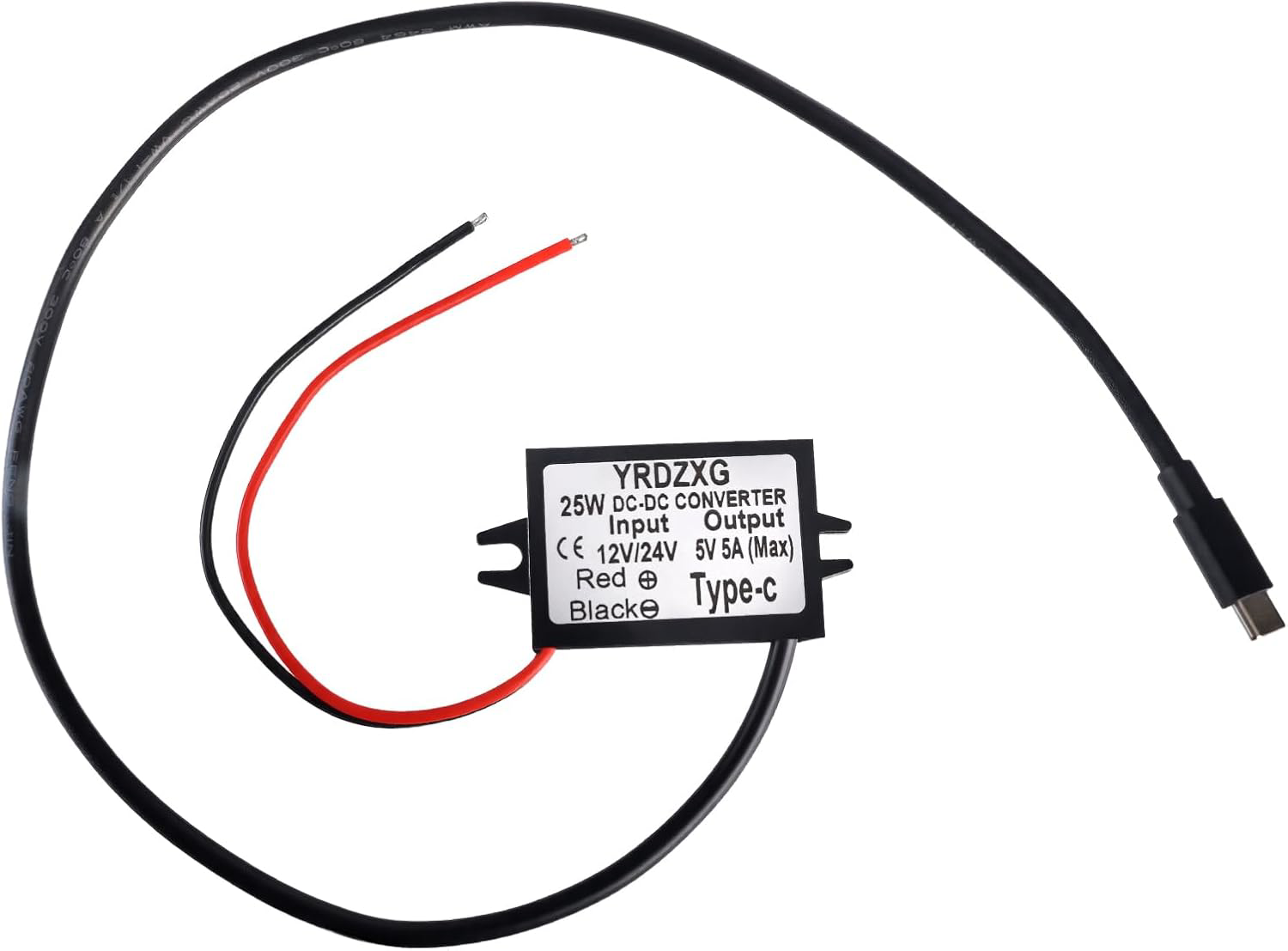
The Convertidor reductor 24V/12V a 5V - 5A 25W USB-C is a DC-DC step-down converter designed to efficiently reduce input voltages of 24V or 12V to a stable 5V output. It is capable of delivering up to 5A of current, providing a maximum power output of 25W. The output is delivered through a USB-C interface, making it ideal for powering or charging USB-C-compatible devices such as smartphones, tablets, single-board computers (e.g., Raspberry Pi), and other electronics.
Explore Projects Built with Convertidor reductor 24V/12V a 5V - 5A 25W USB-C
 Open Project in Cirkit Designer
 Open Project in Cirkit Designer
 Open Project in Cirkit Designer
 Open Project in Cirkit Designer
Explore Projects Built with Convertidor reductor 24V/12V a 5V - 5A 25W USB-C
Open Project in Cirkit DesignerOpen Project in Cirkit DesignerOpen Project in Cirkit DesignerOpen Project in Cirkit DesignerCommon Applications
- Powering USB-C devices from a 24V or 12V power source (e.g., car batteries, solar panels).
- Charging smartphones, tablets, and other USB-C gadgets.
- Supplying power to embedded systems or microcontrollers.
- Providing a stable 5V output for portable electronics in automotive or industrial environments.
Technical Specifications
Key Specifications
| Parameter | Value |
|---|---|
| Input Voltage Range | 8V to 24V |
| Output Voltage | 5V (regulated) |
| Maximum Output Current | 5A |
| Maximum Output Power | 25W |
| Efficiency | Up to 96% |
| Output Interface | USB-C |
| Operating Temperature | -40°C to +85°C |
| Dimensions | Varies by model (e.g., 50x25mm) |
Pin Configuration and Descriptions
The converter typically has the following input and output connections:
Input Side
| Pin Name | Description |
|---|---|
| VIN+ | Positive input voltage (8V to 24V). |
| VIN- | Negative input voltage (ground). |
Output Side
| Pin Name | Description |
|---|---|
| USB-C | 5V regulated output via USB-C port. |
Usage Instructions
How to Use the Component in a Circuit
Connect the Input Voltage:
- Attach the positive terminal of your power source (e.g., 12V or 24V battery) to the
VIN+pin. - Connect the negative terminal of your power source to the
VIN-pin. - Ensure the input voltage is within the specified range (8V to 24V).
- Attach the positive terminal of your power source (e.g., 12V or 24V battery) to the
Connect the Output Device:
- Plug your USB-C-compatible device into the USB-C port of the converter.
- The converter will automatically regulate the input voltage to provide a stable 5V output.
Verify Connections:
- Double-check all connections to ensure proper polarity and secure wiring.
- Use a multimeter to confirm the output voltage is 5V before connecting sensitive devices.
Power On:
- Turn on the power source. The converter will begin operating immediately, providing a 5V output.
Important Considerations and Best Practices
- Input Voltage Range: Ensure the input voltage does not exceed 24V or drop below 8V to avoid damaging the converter.
- Heat Dissipation: At high currents (e.g., 5A), the converter may generate heat. Use proper ventilation or a heatsink if necessary.
- USB-C Compatibility: Verify that the connected device is compatible with a 5V USB-C power source.
- Polarity Protection: Double-check the polarity of the input connections to prevent damage to the converter.
Example: Using with an Arduino UNO
The converter can be used to power an Arduino UNO via its USB port. Below is an example of how to connect the converter to an Arduino UNO:
- Connect the
VIN+andVIN-pins of the converter to a 12V power source. - Plug the USB-C cable from the converter into the Arduino UNO's USB port.
- The Arduino UNO will receive a stable 5V supply from the converter.
Sample Arduino Code
Here is a simple Arduino sketch to blink an LED while powered by the converter:
// This code blinks an LED connected to pin 13 of the Arduino UNO.
// Ensure the Arduino is powered via the USB-C connection from the converter.

void setup() {
  pinMode(13, OUTPUT); // Set pin 13 as an output pin
}

void loop() {
  digitalWrite(13, HIGH); // Turn the LED on
  delay(1000);            // Wait for 1 second
  digitalWrite(13, LOW);  // Turn the LED off
  delay(1000);            // Wait for 1 second
}
Troubleshooting and FAQs
Common Issues and Solutions
| Issue | Possible Cause | Solution |
|---|---|---|
| No output voltage | Incorrect input connections | Verify VIN+ and VIN- connections. |
| Output voltage is unstable | Input voltage is outside the range | Ensure input voltage is between 8V-24V. |
| Device not charging via USB-C | Device requires higher voltage/current | Confirm device compatibility with 5V/5A. |
| Converter overheating | High current draw or poor ventilation | Add a heatsink or improve airflow. |
FAQs
Can this converter be used with a 9V battery?
- Yes, as long as the battery can supply sufficient current and the voltage remains within the 8V-24V range.
Is the USB-C port compatible with fast charging protocols?
- No, this converter provides a fixed 5V output and does not support fast charging protocols like USB Power Delivery (PD) or Qualcomm Quick Charge.
What happens if the input voltage exceeds 24V?
- Exceeding 24V can damage the converter. Always ensure the input voltage is within the specified range.
Can I use this converter to power a Raspberry Pi?
- Yes, the converter can provide a stable 5V output suitable for powering a Raspberry Pi. Ensure the current draw does not exceed 5A.
By following this documentation, you can safely and effectively use the Convertidor reductor 24V/12V a 5V - 5A 25W USB-C in your projects.