
How to Use Fermion SHT40: Examples, Pinouts, and Specs
 Design with Fermion SHT40 in Cirkit Designer
Introduction
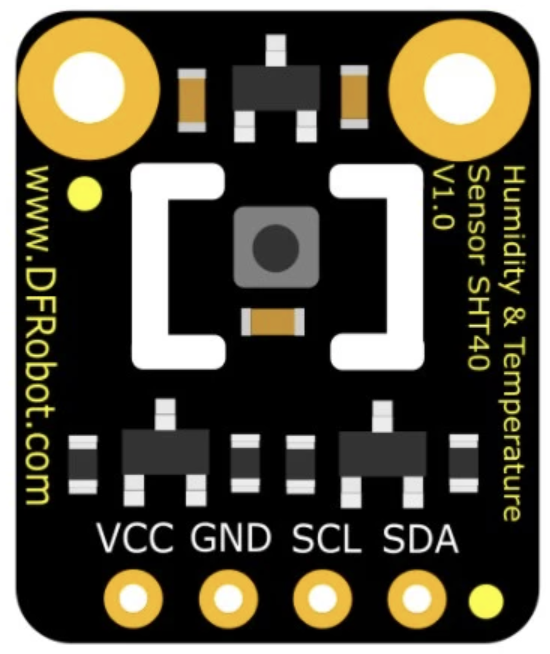
The Fermion SHT40, manufactured by DFRobot (Part ID: SEN0428), is a high-precision digital temperature and humidity sensor. It is designed for environmental monitoring applications, offering accurate and reliable measurements in a compact form factor. With its low power consumption and robust performance, the SHT40 is ideal for integration into IoT devices, smart home systems, HVAC systems, and weather stations.
Explore Projects Built with Fermion SHT40
 Open Project in Cirkit Designer
 Open Project in Cirkit Designer
 Open Project in Cirkit Designer
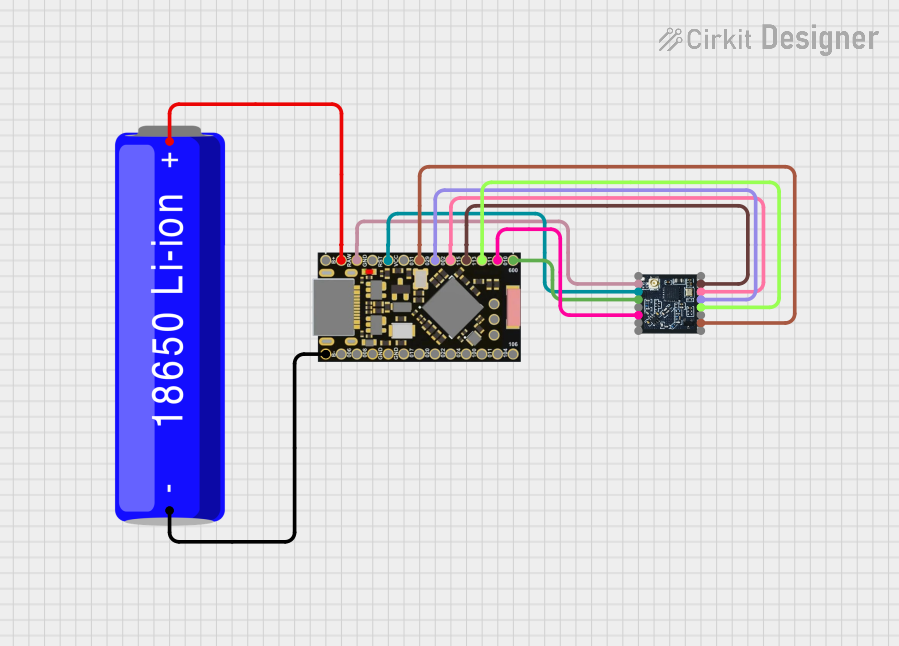 Open Project in Cirkit Designer
Explore Projects Built with Fermion SHT40
Open Project in Cirkit DesignerOpen Project in Cirkit DesignerOpen Project in Cirkit DesignerOpen Project in Cirkit DesignerCommon Applications:
- IoT environmental monitoring
- Smart home automation
- HVAC (Heating, Ventilation, and Air Conditioning) systems
- Weather stations
- Industrial process monitoring
Technical Specifications
The Fermion SHT40 sensor is built to deliver precise temperature and humidity readings with minimal power consumption. Below are its key technical details:
Key Specifications:
| Parameter | Value |
|---|---|
| Supply Voltage | 2.4V to 5.5V |
| Average Current | 0.4 µA (at 1 Hz measurement) |
| Temperature Range | -40°C to +125°C |
| Temperature Accuracy | ±0.2°C (typical) |
| Humidity Range | 0% RH to 100% RH |
| Humidity Accuracy | ±1.8% RH (typical) |
| Communication Interface | I2C |
| I2C Address | 0x44 (default) |
| Operating Temperature | -40°C to +125°C |
| Dimensions | 10mm x 10mm x 2mm |
Pin Configuration:
The Fermion SHT40 module has a standard 4-pin interface for easy integration into circuits. Below is the pinout description:
| Pin Name | Description |
|---|---|
| VCC | Power supply (2.4V to 5.5V) |
| GND | Ground |
| SDA | I2C data line |
| SCL | I2C clock line |
Usage Instructions
The Fermion SHT40 is straightforward to use in a circuit, thanks to its I2C interface. Below are the steps to integrate and use the sensor:
Connecting the Sensor:
- Power Supply: Connect the VCC pin to a 3.3V or 5V power source and the GND pin to ground.
- I2C Communication: Connect the SDA and SCL pins to the corresponding I2C pins on your microcontroller (e.g., Arduino UNO).
- SDA connects to A4 on Arduino UNO.
- SCL connects to A5 on Arduino UNO.
- Use pull-up resistors (typically 4.7kΩ) on the SDA and SCL lines if not already included on the module.
Arduino Example Code:
Below is an example of how to use the Fermion SHT40 with an Arduino UNO. This code reads temperature and humidity data and displays it on the serial monitor.
#include <Wire.h>
#include "DFRobot_SHT40.h" // Include the SHT40 library

DFRobot_SHT40 sht40; // Create an instance of the SHT40 sensor

void setup() {
  Serial.begin(9600); // Initialize serial communication
  Wire.begin();       // Initialize I2C communication

  // Initialize the SHT40 sensor
  if (!sht40.begin()) {
    Serial.println("SHT40 initialization failed!");
    while (1); // Halt execution if initialization fails
  }
  Serial.println("SHT40 initialized successfully.");
}

void loop() {
  float temperature, humidity;

  // Read temperature and humidity
  if (sht40.readTemperatureAndHumidity(temperature, humidity)) {
    Serial.print("Temperature: ");
    Serial.print(temperature);
    Serial.println(" °C");

    Serial.print("Humidity: ");
    Serial.print(humidity);
    Serial.println(" %RH");
  } else {
    Serial.println("Failed to read data from SHT40.");
  }

  delay(1000); // Wait 1 second before the next reading
}
Important Considerations:
- Ensure the I2C address (default: 0x44) matches the address configured in your code.
- Avoid exposing the sensor to extreme conditions (e.g., condensation or high humidity for prolonged periods) to maintain accuracy.
- Use proper decoupling capacitors near the power supply pins to reduce noise.
Troubleshooting and FAQs
Common Issues:
Sensor Not Detected on I2C Bus:
- Cause: Incorrect wiring or I2C address mismatch.
- Solution: Verify the connections and ensure the SDA and SCL lines are correctly connected. Use an I2C scanner sketch to confirm the sensor's address.
Inaccurate Readings:
- Cause: Environmental factors such as condensation or dust on the sensor.
- Solution: Ensure the sensor is clean and placed in a stable environment. Avoid sudden temperature or humidity changes.
Initialization Fails:
- Cause: Library not installed or incorrect initialization code.
- Solution: Ensure the
DFRobot_SHT40library is installed and properly included in your code.
FAQs:
Q1: Can the SHT40 operate at 5V logic levels?
A1: Yes, the SHT40 supports a supply voltage range of 2.4V to 5.5V, making it compatible with both 3.3V and 5V systems.
Q2: What is the typical response time of the sensor?
A2: The SHT40 has a response time of approximately 8 seconds for humidity and less than 2 seconds for temperature.
Q3: Can I use multiple SHT40 sensors on the same I2C bus?
A3: The SHT40 has a fixed I2C address (0x44). To use multiple sensors, you will need an I2C multiplexer or similar solution.
Q4: How do I protect the sensor in harsh environments?
A4: Use a protective enclosure or filter cap to shield the sensor from dust, water, and contaminants while allowing air to pass through.
By following this documentation, you can effectively integrate and utilize the Fermion SHT40 sensor in your projects.