
How to Use Power_unit: Examples, Pinouts, and Specs
 Design with Power_unit in Cirkit Designer
Introduction
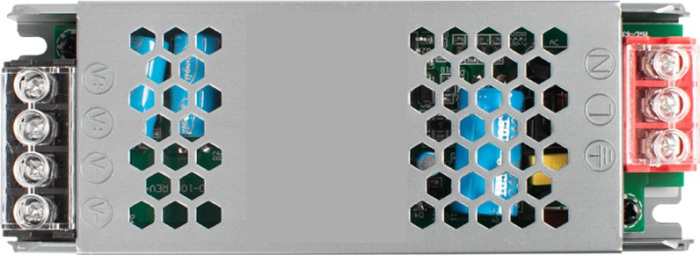
A Power Unit is a device that supplies electrical energy to a circuit, converting various forms of energy (like AC or DC) into usable power for electronic components. It is a critical component in any electronic system, ensuring that all connected devices receive the appropriate voltage and current for proper operation. Power Units are commonly used in applications such as powering microcontrollers, sensors, motors, and other electronic devices.
Explore Projects Built with Power_unit
 Open Project in Cirkit Designer
 Open Project in Cirkit Designer
 Open Project in Cirkit Designer
 Open Project in Cirkit Designer
Explore Projects Built with Power_unit
Open Project in Cirkit DesignerOpen Project in Cirkit DesignerOpen Project in Cirkit DesignerOpen Project in Cirkit DesignerCommon Applications and Use Cases
- Powering microcontroller boards (e.g., Arduino, Raspberry Pi)
- Supplying energy to sensors and actuators in IoT systems
- Providing stable voltage for industrial control systems
- Charging batteries in portable devices
- Powering LED lighting systems
Technical Specifications
Below are the key technical details of a typical Power Unit:
| Parameter | Specification |
|---|---|
| Input Voltage Range | 100-240V AC (for AC-DC units) |
| Output Voltage Range | 3.3V, 5V, 12V, or adjustable |
| Output Current | 0.5A to 10A (depending on model) |
| Power Rating | 5W to 120W |
| Efficiency | Up to 90% |
| Ripple and Noise | <50mV (typical) |
| Protection Features | Overvoltage, Overcurrent, Short Circuit |
| Operating Temperature | -20°C to 70°C |
| Dimensions | Varies by model |
Pin Configuration and Descriptions
The pin configuration for a standard DC Power Unit is as follows:
| Pin | Label | Description |
|---|---|---|
| 1 | VIN | Input voltage (e.g., 100-240V AC or DC input) |
| 2 | GND | Ground connection for input |
| 3 | VOUT | Regulated output voltage (e.g., 5V, 12V) |
| 4 | GND | Ground connection for output |
Usage Instructions
How to Use the Power Unit in a Circuit
- Connect the Input Voltage: Ensure the input voltage matches the Power Unit's specifications. For AC-DC units, connect the AC mains to the VIN and GND input terminals.
- Connect the Output Voltage: Attach the VOUT and GND terminals to the load (e.g., microcontroller, sensor, or motor).
- Verify Polarity: Double-check the polarity of the connections to avoid damage to the Power Unit or connected devices.
- Power On: Switch on the Power Unit and measure the output voltage with a multimeter to confirm proper operation before connecting sensitive components.
Important Considerations and Best Practices
- Heat Dissipation: Ensure adequate ventilation or heat sinking to prevent overheating during operation.
- Load Compatibility: Verify that the load's voltage and current requirements are within the Power Unit's output specifications.
- Protection Features: Use a fuse or circuit breaker on the input side to protect against surges or short circuits.
- Noise Filtering: For sensitive applications, consider adding capacitors or filters to reduce ripple and noise.
Example: Using a Power Unit with an Arduino UNO
Below is an example of how to connect a 5V Power Unit to an Arduino UNO:
- Connect the Power Unit's VOUT (5V) to the Arduino's 5V pin.
- Connect the Power Unit's GND to the Arduino's GND pin.
- Ensure the Power Unit is powered on and providing a stable 5V output.
Sample Arduino Code
// Example code to blink an LED using an Arduino UNO powered by a Power Unit

const int ledPin = 13; // Pin connected to the onboard LED

void setup() {
  pinMode(ledPin, OUTPUT); // Set the LED pin as an output
}

void loop() {
  digitalWrite(ledPin, HIGH); // Turn the LED on
  delay(1000);               // Wait for 1 second
  digitalWrite(ledPin, LOW);  // Turn the LED off
  delay(1000);               // Wait for 1 second
}
Troubleshooting and FAQs
Common Issues and Solutions
No Output Voltage
- Cause: Input voltage is not connected or is outside the specified range.
- Solution: Verify the input voltage and connections. Ensure the Power Unit is switched on.
Overheating
- Cause: Excessive load or poor ventilation.
- Solution: Reduce the load or improve airflow around the Power Unit.
Output Voltage Fluctuations
- Cause: Load exceeds the Power Unit's capacity or input voltage is unstable.
- Solution: Use a load within the Power Unit's specifications and ensure a stable input voltage.
Short Circuit Protection Triggered
- Cause: Output terminals are shorted.
- Solution: Disconnect the load, check for shorts, and reconnect properly.
FAQs
Q: Can I use a Power Unit to charge a battery?
- A: Yes, but ensure the Power Unit's output voltage and current are suitable for the battery type.
Q: How do I know if my Power Unit is overloaded?
- A: Check for symptoms like overheating, voltage drops, or the Power Unit shutting down.
Q: Can I use one Power Unit for multiple devices?
- A: Yes, as long as the total current draw of all devices does not exceed the Power Unit's maximum output current.
This concludes the documentation for the Power Unit. Always follow safety guidelines when working with electrical components.