
How to Use E-stop EAO-84-Series 84-5340.0020: Examples, Pinouts, and Specs

 Design with E-stop EAO-84-Series 84-5340.0020 in Cirkit Designer
Introduction
The EAO 84-5340.0020 is a safety pushbutton switch designed for emergency stop (E-stop) applications. It features a robust and durable design, making it ideal for use in industrial environments where safety and reliability are paramount. This component is part of the EAO Series 84, known for its high-quality construction and compliance with international safety standards.
Explore Projects Built with E-stop EAO-84-Series 84-5340.0020
 Open Project in Cirkit Designer
 Open Project in Cirkit Designer
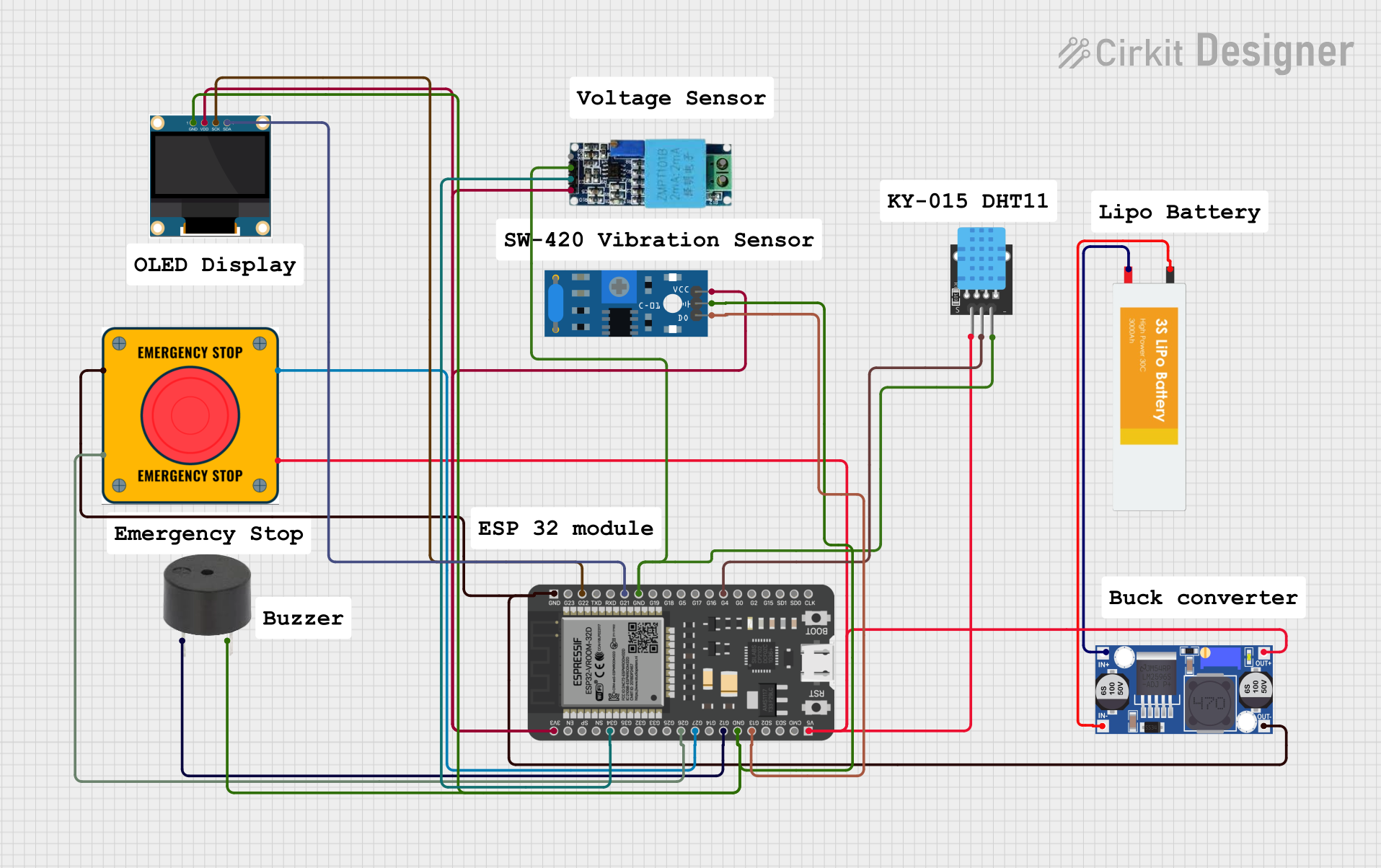 Open Project in Cirkit Designer
 Open Project in Cirkit Designer
Explore Projects Built with E-stop EAO-84-Series 84-5340.0020
Open Project in Cirkit DesignerOpen Project in Cirkit DesignerOpen Project in Cirkit DesignerOpen Project in Cirkit DesignerCommon Applications and Use Cases
- Emergency stop systems in industrial machinery
- Safety control panels in manufacturing plants
- Automation systems requiring immediate shutdown functionality
- Transportation systems and heavy equipment
- Medical devices and laboratory equipment
Technical Specifications
Key Technical Details
| Parameter | Value |
|---|---|
| Manufacturer | EAO |
| Part Number | 84-5340.0020 |
| Type | Emergency Stop Pushbutton Switch |
| Operating Voltage | 24V DC |
| Operating Current | 50mA to 5A (depending on load type) |
| Contact Configuration | 1 Normally Open (NO) + 1 Normally Closed (NC) |
| Actuator Type | Pushbutton with twist-to-release mechanism |
| Mounting Hole Diameter | 22.3 mm |
| Mechanical Life | > 50,000 operations |
| Electrical Life | > 10,000 operations at rated load |
| Operating Temperature | -25°C to +70°C |
| Protection Rating | IP65 (front side) |
| Standards Compliance | EN ISO 13850, IEC 60947-5-1 |
Pin Configuration and Descriptions
The EAO 84-5340.0020 features a simple terminal layout for connecting to the circuit. Below is the pin configuration:
| Pin Number | Description | Type |
|---|---|---|
| 1 | Normally Open (NO) Contact Terminal | Output Signal |
| 2 | Normally Closed (NC) Contact Terminal | Output Signal |
| 3 | Common Terminal | Input Signal |
Usage Instructions
How to Use the Component in a Circuit
Mounting the Switch:
- Drill a 22.3 mm diameter hole in the panel where the switch will be installed.
- Insert the switch into the hole and secure it using the provided mounting hardware.
Wiring the Terminals:
- Connect the Common Terminal (Pin 3) to the input signal or power source.
- Use the Normally Open (NO) Terminal (Pin 1) for circuits that need to activate when the button is pressed.
- Use the Normally Closed (NC) Terminal (Pin 2) for circuits that need to deactivate when the button is pressed.
Testing the Circuit:
- After wiring, test the circuit to ensure the E-stop switch operates as expected.
- Press the button to simulate an emergency stop and verify the circuit disconnects or activates the safety mechanism.
Resetting the Switch:
- To reset the switch after activation, twist the actuator clockwise until it pops back to its original position.
Important Considerations and Best Practices
- Ensure the switch is securely mounted to prevent accidental dislodging during operation.
- Use appropriately rated wires and connectors to handle the current and voltage requirements.
- Regularly inspect the switch for wear and tear, especially in high-use environments.
- Avoid exposing the switch to extreme conditions beyond its rated temperature and protection limits.
- For safety-critical applications, test the switch periodically to ensure proper functionality.
Example: Connecting to an Arduino UNO
The EAO 84-5340.0020 can be used with an Arduino UNO to detect emergency stop events. Below is an example circuit and code:
Circuit Description
- Connect the Common Terminal (Pin 3) to the Arduino's 5V pin.
- Connect the Normally Closed (NC) Terminal (Pin 2) to a digital input pin (e.g., D2) on the Arduino.
- Use a pull-down resistor (10kΩ) between the digital input pin and ground to ensure a stable signal.
Arduino Code
// Define the pin connected to the E-stop switch
const int estopPin = 2;

void setup() {
  pinMode(estopPin, INPUT_PULLUP); // Configure the pin as input with pull-up resistor
  Serial.begin(9600); // Initialize serial communication for debugging
}

void loop() {
  // Read the state of the E-stop switch
  int estopState = digitalRead(estopPin);

  if (estopState == HIGH) {
    // Normally Closed (NC) is open, indicating the button is pressed
    Serial.println("Emergency Stop Activated!");
    // Add code here to handle the emergency stop event
  } else {
    // Button is not pressed, system is running normally
    Serial.println("System Running Normally");
  }

  delay(500); // Add a small delay to avoid spamming the serial monitor
}
Troubleshooting and FAQs
Common Issues and Solutions
The switch does not activate the circuit:
- Verify the wiring connections, ensuring the correct terminals are used.
- Check for loose or damaged wires and replace them if necessary.
- Ensure the power supply is functioning and delivering the correct voltage.
The switch does not reset after activation:
- Ensure the actuator is twisted fully clockwise to reset the switch.
- Inspect the actuator mechanism for dirt or debris that may be obstructing movement.
Intermittent operation or unreliable performance:
- Check for proper mounting to ensure the switch is not moving during operation.
- Inspect the terminals for corrosion or oxidation and clean them if needed.
The Arduino does not detect the switch state:
- Verify the pull-down resistor is correctly connected to stabilize the input signal.
- Ensure the Arduino pin configuration matches the wiring setup.
FAQs
Q: Can this switch be used in outdoor environments?
A: Yes, the front side of the switch is rated IP65, making it resistant to dust and water. However, ensure proper sealing and protection for the rear terminals.
Q: What is the difference between the NO and NC terminals?
A: The Normally Open (NO) terminal is open by default and closes when the button is pressed. The Normally Closed (NC) terminal is closed by default and opens when the button is pressed.
Q: How often should the switch be tested?
A: For safety-critical applications, it is recommended to test the switch at least once a month to ensure proper functionality.
Q: Can this switch handle AC loads?
A: Yes, the switch can handle AC loads within its rated current and voltage limits. Always refer to the datasheet for specific details.
This concludes the documentation for the EAO 84-5340.0020 E-stop switch.