
How to Use FPC 10P: Examples, Pinouts, and Specs
 Design with FPC 10P in Cirkit Designer
Introduction
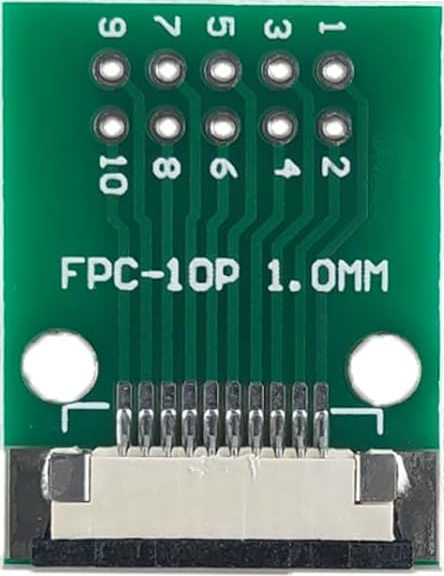
The FPC 10P (Manufacturer Part ID: FPC-10P) is a Flat Printed Circuit (FPC) connector manufactured by MTCELL. This connector features 10 pins and is designed to connect flexible printed circuits to a PCB or other components. Its compact design and flexibility make it ideal for applications where space is limited and a reliable connection is required.
Explore Projects Built with FPC 10P
 Open Project in Cirkit Designer
 Open Project in Cirkit Designer
 Open Project in Cirkit Designer
 Open Project in Cirkit Designer
Explore Projects Built with FPC 10P
Open Project in Cirkit DesignerOpen Project in Cirkit DesignerOpen Project in Cirkit DesignerOpen Project in Cirkit DesignerCommon Applications and Use Cases
- Mobile devices and wearables
- LCD and OLED display connections
- Compact consumer electronics
- Robotics and automation systems
- Prototyping and development boards
Technical Specifications
Key Technical Details
| Parameter | Specification |
|---|---|
| Manufacturer | MTCELL |
| Part ID | FPC-10P |
| Number of Pins | 10 |
| Connector Type | Flat Printed Circuit (FPC) |
| Mounting Type | Surface Mount (SMT) |
| Pitch (Pin Spacing) | 1.0 mm |
| Operating Voltage | 50V DC |
| Current Rating | 0.5A per pin |
| Operating Temperature | -25°C to +85°C |
| Contact Material | Phosphor Bronze with Gold Plating |
| Insulation Resistance | ≥ 100 MΩ |
| Durability | 20 mating cycles |
Pin Configuration and Descriptions
The FPC 10P connector has 10 pins arranged in a single row with a 1.0 mm pitch. Below is the pin configuration:
| Pin Number | Description |
|---|---|
| 1 | Signal/Power Line 1 |
| 2 | Signal/Power Line 2 |
| 3 | Signal/Power Line 3 |
| 4 | Signal/Power Line 4 |
| 5 | Signal/Power Line 5 |
| 6 | Signal/Power Line 6 |
| 7 | Signal/Power Line 7 |
| 8 | Signal/Power Line 8 |
| 9 | Signal/Power Line 9 |
| 10 | Signal/Power Line 10 |
Note: The specific signal or power assignment for each pin depends on the application and circuit design.
Usage Instructions
How to Use the FPC 10P in a Circuit
- PCB Design: Ensure the PCB has a compatible footprint for the FPC 10P connector. The pin pitch should match the 1.0 mm spacing.
- Soldering: Use surface-mount soldering techniques to attach the connector to the PCB. Reflow soldering is recommended for precision.
- FPC Insertion:
- Open the connector's locking mechanism (if applicable).
- Insert the flexible printed circuit (FPC) into the connector, ensuring proper alignment.
- Close the locking mechanism to secure the FPC in place.
- Testing: Verify the connection using a multimeter or continuity tester to ensure all pins are properly connected.
Important Considerations and Best Practices
- Alignment: Ensure the FPC is aligned correctly with the connector to avoid damage to the pins.
- Soldering Temperature: Follow the manufacturer's recommended soldering temperature profile to prevent overheating.
- Durability: Avoid excessive mating and unmating cycles, as the connector is rated for 20 cycles.
- Cleaning: Keep the connector free from dust and debris to maintain reliable connections.
Example: Connecting FPC 10P to an Arduino UNO
The FPC 10P can be used to connect an external module (e.g., an LCD display) to an Arduino UNO. Below is an example code snippet for interfacing an LCD module via the FPC 10P connector:
#include <LiquidCrystal.h>

// Initialize the LCD with the pins connected via the FPC 10P connector
// RS, EN, D4, D5, D6, D7 are connected to Arduino pins 7, 8, 9, 10, 11, 12
LiquidCrystal lcd(7, 8, 9, 10, 11, 12);

void setup() {
  // Set up the LCD's number of columns and rows
  lcd.begin(16, 2);

  // Print a message to the LCD
  lcd.print("Hello, FPC 10P!");
}

void loop() {
  // Move the cursor to the second row and print a message
  lcd.setCursor(0, 1);
  lcd.print("MTCELL Connector");
}
Note: Ensure the FPC 10P connector is properly soldered to the PCB and connected to the Arduino UNO pins as specified in the code.
Troubleshooting and FAQs
Common Issues and Solutions
Loose Connection:
- Issue: The FPC is not securely connected to the FPC 10P connector.
- Solution: Check the locking mechanism and ensure the FPC is fully inserted and locked.
Signal Interference:
- Issue: Noise or interference in the signal lines.
- Solution: Use shorter FPC cables and ensure proper grounding in the circuit.
Damaged Pins:
- Issue: Pins are bent or damaged during insertion.
- Solution: Handle the connector and FPC with care. Replace the connector if pins are irreparably damaged.
Soldering Issues:
- Issue: Poor solder joints causing intermittent connections.
- Solution: Inspect solder joints under a microscope and reflow solder if necessary.
FAQs
Q1: Can the FPC 10P handle high-current applications?
A1: No, the FPC 10P is rated for 0.5A per pin. For high-current applications, consider using a connector with a higher current rating.
Q2: Is the FPC 10P compatible with 0.5 mm pitch FPCs?
A2: No, the FPC 10P is designed for 1.0 mm pitch FPCs. Ensure the FPC matches the connector's pitch.
Q3: Can I use the FPC 10P in outdoor environments?
A3: The FPC 10P is not specifically designed for outdoor use. If used outdoors, ensure it is protected from moisture and extreme temperatures.
Q4: How do I clean the FPC 10P connector?
A4: Use a soft brush or compressed air to remove dust. Avoid using liquids or abrasive materials.
By following this documentation, users can effectively integrate the MTCELL FPC 10P connector into their projects and troubleshoot common issues with ease.