
How to Use 1 gang socket: Examples, Pinouts, and Specs
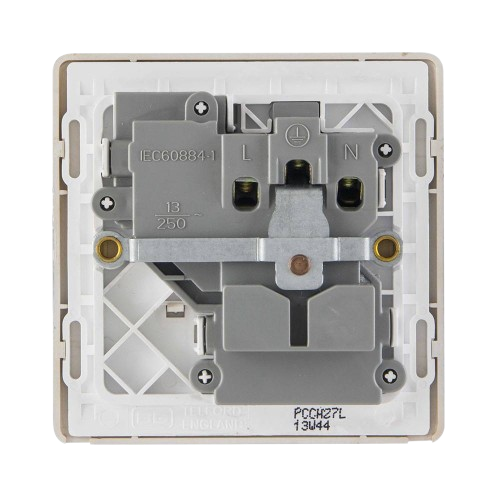
 Design with 1 gang socket in Cirkit Designer
Introduction
- The 1 gang socket is a single outlet socket designed to connect one electrical device to the power supply. It is commonly used in residential, commercial, and industrial settings to provide a reliable and safe connection to mains electricity.
- Typical applications include powering household appliances, office equipment, and other electrical devices. It is a fundamental component in electrical installations and is often mounted on walls or integrated into extension cords.
Explore Projects Built with 1 gang socket
 Open Project in Cirkit Designer
 Open Project in Cirkit Designer
 Open Project in Cirkit Designer
 Open Project in Cirkit Designer
Explore Projects Built with 1 gang socket
Open Project in Cirkit DesignerOpen Project in Cirkit DesignerOpen Project in Cirkit DesignerOpen Project in Cirkit DesignerTechnical Specifications
- Voltage Rating: 220-250V AC (varies by region)
- Current Rating: 10A or 13A (depending on the model)
- Frequency: 50Hz or 60Hz
- Material: Flame-retardant plastic housing with brass or copper internal contacts
- Mounting Type: Surface-mounted or flush-mounted
- Dimensions: Standard sizes vary by region (e.g., 86mm x 86mm for UK models)
- Safety Features: May include shutters for child safety, grounding pin, and surge protection (optional)
Pin Configuration and Descriptions
The 1 gang socket typically has three terminals for wiring:
| Terminal Name | Description | Wire Connection Type |
|---|---|---|
| Live (L) | Connects to the live/hot wire | Brown (or Red) |
| Neutral (N) | Connects to the neutral wire | Blue (or Black) |
| Earth (E) | Connects to the ground/earth wire | Green/Yellow |
Note: Wire color codes may vary by country. Always follow local electrical standards.
Usage Instructions
Installation:
- Ensure the power supply is turned off before installation.
- Mount the socket securely on the wall or desired surface using screws.
- Connect the wires to the appropriate terminals (Live, Neutral, Earth) as per the pin configuration table above.
- Tighten the terminal screws to ensure a secure connection.
- Replace the socket cover and secure it with screws.
Important Considerations:
- Always use wires of appropriate gauge to handle the rated current.
- Ensure proper grounding to prevent electrical hazards.
- Avoid overloading the socket by connecting devices that exceed the rated current.
- Use a voltage tester to confirm the absence of power before handling the socket.
Best Practices:
- Periodically inspect the socket for signs of wear, damage, or overheating.
- Use sockets with built-in surge protection in areas prone to voltage spikes.
- For outdoor installations, use weatherproof sockets to protect against moisture.
Arduino UNO Integration: While the 1 gang socket is not directly compatible with low-voltage microcontrollers like the Arduino UNO, it can be controlled indirectly using a relay module. Below is an example of how to control a device connected to a 1 gang socket using an Arduino and a relay:
/*
  Example: Controlling a 1 Gang Socket with Arduino and Relay
  This code toggles a relay to control a device connected to the socket.
  WARNING: Ensure proper isolation between high-voltage and low-voltage circuits.
*/

const int relayPin = 7; // Pin connected to the relay module

void setup() {
  pinMode(relayPin, OUTPUT); // Set relay pin as output
  digitalWrite(relayPin, LOW); // Ensure relay is off initially
}

void loop() {
  digitalWrite(relayPin, HIGH); // Turn on the relay (socket powered)
  delay(5000); // Keep the socket powered for 5 seconds
  digitalWrite(relayPin, LOW); // Turn off the relay (socket off)
  delay(5000); // Wait for 5 seconds before repeating
}
Warning: High-voltage wiring should only be handled by qualified personnel. Always use a relay module with proper isolation to control mains power.
Troubleshooting and FAQs
Common Issues
Socket not providing power:
- Cause: Loose wiring or damaged internal components.
- Solution: Turn off the power supply, inspect the wiring, and ensure all connections are secure. Replace the socket if necessary.
Overheating socket:
- Cause: Overloading or poor contact between the plug and socket.
- Solution: Reduce the load on the socket and ensure the plug fits snugly. Replace the socket if overheating persists.
Device not turning on when controlled via Arduino:
- Cause: Incorrect relay wiring or insufficient power to the relay module.
- Solution: Verify the relay connections and ensure the Arduino provides sufficient current to activate the relay.
FAQs
Can I use a 1 gang socket outdoors?
- Yes, but only if it is a weatherproof model designed for outdoor use.
What is the difference between a 1 gang and 2 gang socket?
- A 1 gang socket has a single outlet, while a 2 gang socket has two outlets.
Can I install a 1 gang socket myself?
- Yes, if you have basic electrical knowledge and follow safety guidelines. Otherwise, hire a licensed electrician.
Is surge protection included in all 1 gang sockets?
- No, surge protection is an optional feature. Check the product specifications before purchasing.